Runway is the strongest prompt to video model at a normal price, though its own pricing page says a $15 plan buys 52 seconds of Gen-4.5 a month. Synthesia is the pick when your video is a script and a presenter. Adobe Firefly is the cheapest paid entry at $9.99 a month.
Every roundup on this topic prices the plan. Almost none price the video. That gap matters, because the plan is a monthly number and the video is the thing you actually needed, and the two sit further apart than any pricing page admits.
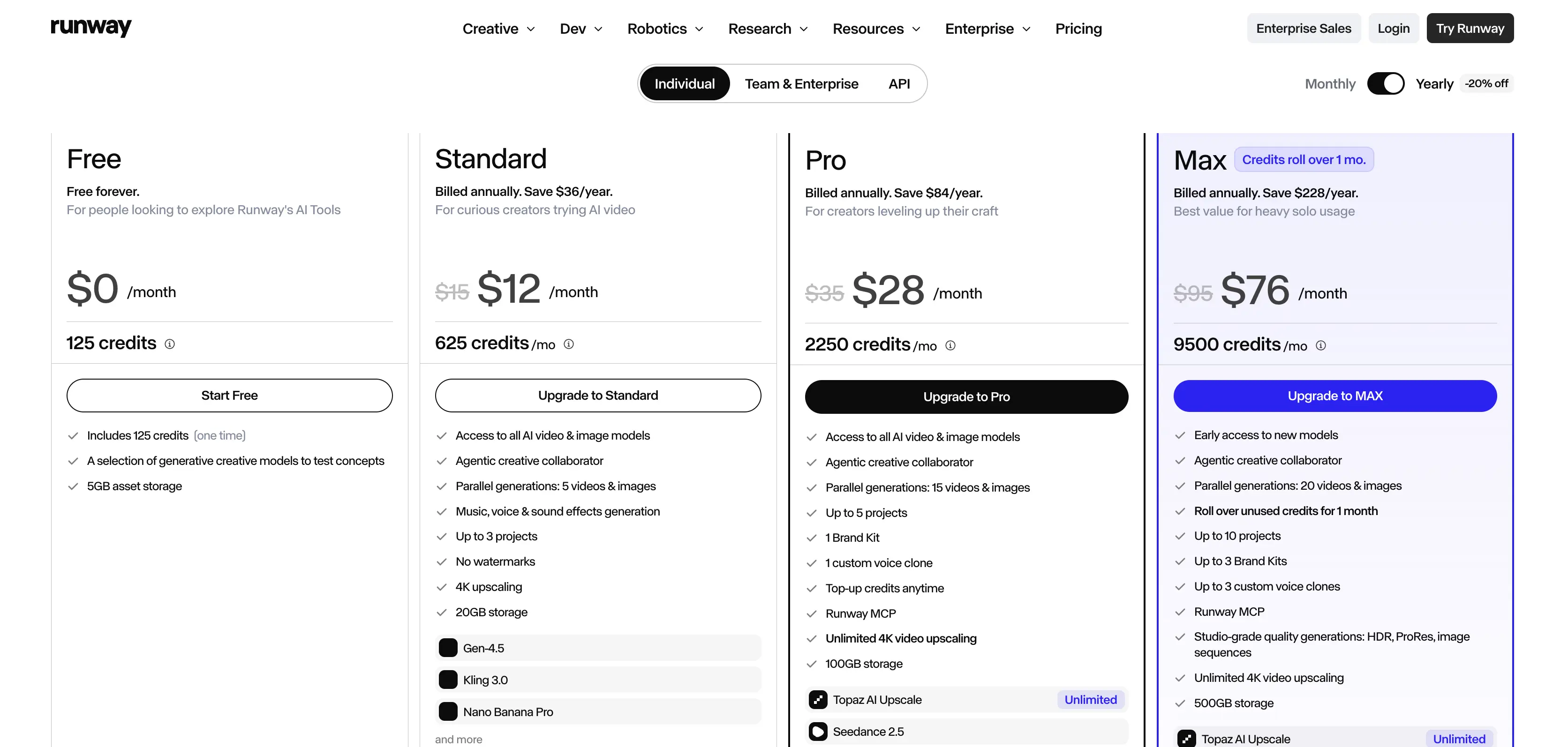
Here is the number that started this. Runway's Standard plan costs $15 a month, and its pricing page states that 625 monthly credits equal 52 seconds of Gen-4.5. A finished minute is longer than that. One minute of output, with nothing thrown away, does not fit inside a full month of the plan most people sign up for.
So the sticker price misleads. I read all 12 pricing pages below on 10 September 2026 and priced the same job against each one: a single finished 60 second video, retries included. Several figures still circulating for these tools are a year out of date.
What one finished minute actually costs
Start with the per second maths. It survives a change of plan.
Runway Standard is $15 a month month to month, or $12 billed yearly, for 625 credits. Those credits buy 52 seconds of Gen-4.5. That works out at about $0.29 for every second the model generates, so 60 seconds of footage is around $17 in credits before you throw anything away.
Nobody keeps every clip. If you keep one generation in three, which is generous for a model asked to hold a character steady across shots, one finished minute costs roughly $52. That is three and a half months of the plan it came from.
Pro changes that. Runway Pro is $35 a month for 2,250 credits, about 187 seconds of Gen-4.5, or $0.19 a second. Buying the bigger plan cuts the per second cost by roughly a third. The cheap plan is the expensive one.
Google lands somewhere similar by a different route. Google AI Pro is $19.99 a month with 1,000 Google Flow credits, but the plan description offers only a limited trial of Veo 3.1 Lite.
Veo 3.1 proper sits on Google AI Ultra, which starts at $99.99 a month with 10,000 Flow credits. Roundups writing "Veo, from $19.99" are describing a trial of the smaller model.
The 12 best AI video generators, grouped by what you are making
Two products share one phrase. One of them writes moving footage from a prompt, inventing every frame.
The other one does something else entirely: it puts a synthetic presenter in front of a script you wrote, and never invents a scene at all. Most lists mix them.
That is how people end up paying for avatars when what they wanted was a cinematic shot.
Prompt to clip models
Google Flow (Veo 3.1)
From $19.99 a month on Google AI Pro · Free tier: daily generations in Gemini The most convincing motion and physics here.
Read the plan line closely, because full Veo 3.1 is a $99.99 Ultra feature and the $19.99 tier carries a limited trial of the Lite model.
If you want Google's Veo 3.1 without a Google AI plan, Nereo's Flow AI video generator runs it online on a credit basis, with native audio and 16:9 or 9:16 output up to 4K.
Runway
From $15 a month, $12 yearly · Free tier: 125 one time credits The control surface is the reason to pay.
Shot direction, motion brushes and generative editing all sit in one place, which is why people who need a specific result rather than a lucky one keep coming back to it, credit meter and all.
Pika
From $8 a month billed yearly · Free tier: 80 credits a month, 480p, image to video only, watermarked Cheap and fast. Also narrow.
The free plan caps you at 480p, accepts an image as the starting frame but not a written prompt, stamps a watermark on the output, and holds commercial rights back until the first paid tier.
Luma Dream Machine
From $30 a month, $25 yearly · 10,000 credits Strong camera movement, clean interface. It is not cheap.
The entry price is double Runway's, so it earns a place only if that motion quality is the thing you are buying.
Adobe Firefly
From $9.99 a month · Free tier: free daily generations across image, video and audio the cheapest paid entry on this list.
It sits inside Creative Cloud, which matters more than raw model quality if your edit already lives in Premiere and you would rather not move footage between two subscriptions to finish one job.
LTX Studio
From $15 a month, $12 yearly · Free tier: 800 one time credits, personal use only Storyboard first, shot by shot, which suits anyone building a sequence rather than a single clip. Check the licence first. It bars paid work.
Avatar and script to video
Synthesia
From $29 a month, $18 yearly · Free tier: 1,200 credits, about 10 minutes a month The default for training and internal video, with 125 or more avatars on the entry plan. Then the add on arrives.
A Studio Express-1 avatar costs $1,000 a year on top of the subscription, and that figure is the one the cheap headline price hides from anyone who wants a presenter who looks like their own staff.
HeyGen
From $29 a month · Free tier: 3 videos a month, 1 minute each, watermarked Faster and looser than Synthesia, and better at short marketing pieces. Length is capped.
A single video cannot run past 30 minutes on either the $29 Creator plan or the $49 Pro plan, and only the $149 Business plan lifts that ceiling to 60 minutes.
Colossyan
From $59 a month · Free tier: 20 minutes a month on NEO, 30 seconds on NEO2 Built for workplace learning, with SCORM export and interactive branching.
Extra editors run $30 each. A team of three costs $119 a month before anyone makes a video.
Editing and repurposing
invideo AI
From $17 a month · 750 credits Type a topic, get a finished social video with stock footage, voiceover and captions. Credits expire.
Nothing you fail to spend inside the month carries into the next one, which quietly raises what the plan costs you across a year of uneven output.
Descript
From $16 a month on the Hobbyist plan · Free tier: 60 minutes a month, 720p, watermarked export Editing video by editing a transcript still feels like a trick the first time you do it.
Delete a sentence in the text and the footage, the audio and the gap all disappear with it, which is why nothing else here handles talking head footage you filmed yourself as well.
OpusClip
From $15 a month · Free tier: 60 credits a month, watermarked Turns a long recording into short vertical clips. Free has a catch.
On the free plan those clips stop being exportable after three days, so free is a trial with a timer.
Best AI video generators Compared
Tool | Starts at | What the free plan actually gives you | Best for |
|---|---|---|---|
Google Flow | $19.99/mo | Daily generations in Gemini | Realistic motion |
Runway | $15/mo | 125 one time credits | Shot level control |
Pika | $8/mo yearly | 80 credits, 480p, watermarked | Cheap experiments |
Luma Dream Machine | $30/mo | Trial only | Camera movement |
Adobe Firefly | $9.99/mo | Free daily generations | Creative Cloud users |
LTX Studio | $15/mo | 800 credits, personal use only | Storyboarded sequences |
Synthesia | $29/mo | 1,200 credits, about 10 min | Training video |
HeyGen | $29/mo | 3 videos, 1 min each | Short marketing video |
Colossyan | $59/mo | 20 min on NEO | Workplace learning |
invideo AI | $17/mo | Trial credits | Social video from a topic |
Descript | $16/mo | 60 min, 720p, watermarked | Talking head editing |
OpusClip | $15/mo | 60 credits, expire in 3 days | Clipping long recordings |
How many clips it takes to reach a finished minute
Prompt to clip models do not make videos. They make shots, usually five to ten seconds long, and the work of turning those shots into something a person will sit through is still yours to do afterwards.
A 60 second piece is therefore seven or eight separate generations that have to cut together, each needing the same character, the same light and the same room.
Every extra shot is another chance for the face to change. Count the shots. That matters more than the price.
Avatar tools work the other way round. Synthesia's free tier gives about 10 minutes of finished video a month, and HeyGen caps a single video at 30 minutes on its $29 Creator plan.
A ten minute training module is one job there. On a clip model it is sixty generations or more.
This decides most purchases. Ask how long the finished thing is. Under 15 seconds, use a clip model. Over a minute with a person talking, use an avatar tool, or film it and edit in Descript.
What replaced Sora, and what happens to your files
Sora is gone. The second half of that shutdown lands this month.
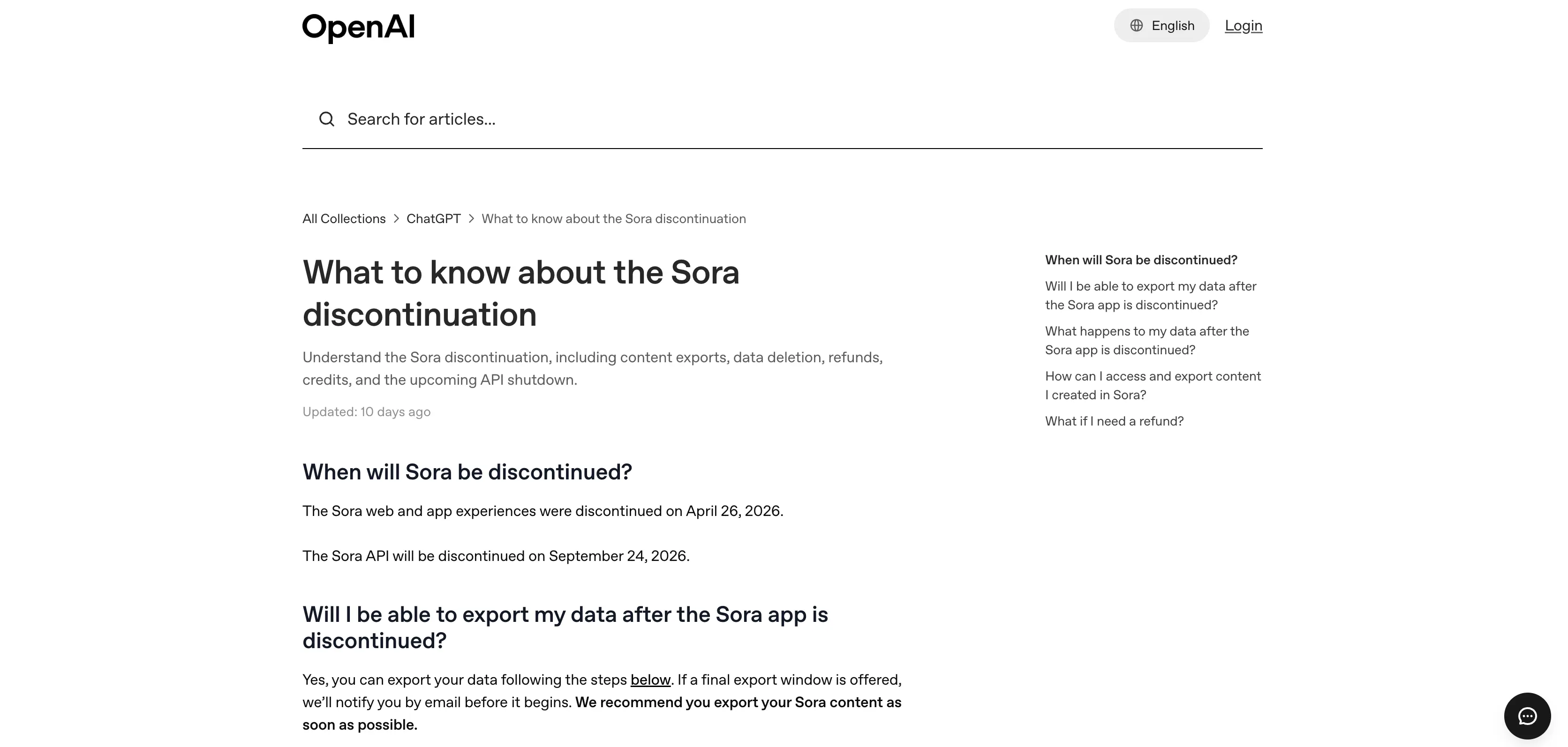
OpenAI's own discontinuation notice states that the Sora web and app experiences were discontinued on 26 April 2026, and that the Sora API will be discontinued on 24 September 2026. That is two weeks away.
Roundups still listing Sora at $20 or $200 are selling something nobody can buy.
Two details go missing everywhere else. Your files come first. Anything you made is exportable at sora.chatgpt.com/sunset, and OpenAI says that after the export window it will permanently delete any data associated with your use of Sora. Purchased ChatGPT and Sora credits are not lost either, since OpenAI says they can still be spent on Codex once the video product itself has closed for good.
OpenAI's deprecations page lists no recommended replacement model. There is no migration path, so the honest answer is that Veo 3.1 and Runway Gen-4.5 absorbed most of that work.
What happens to your credits when a render fails
This is the complaint that dominates the reviews of these tools, turns up on vendor forums, and almost never reaches a roundup like this one. It should.
Runway's Trustpilot page carries a 1.1 out of 5 score across 325 reviews, with reviews still landing on 7 September 2026. The theme is not quality. It is paying for generations that failed, errored or came back unusable, then finding the credits gone anyway.
Adobe's own community forum carries the same pattern on Firefly, in a thread that has drawn 73 replies since December 2025, with several posters reporting losses above 1,000 credits. Adobe's community manager answered that credits are taken the moment you press generate and should come back within about a minute when the job fails. The refund is automatic in theory, and the length of the thread is what happens in practice.
Check three things before you pay: whether failed generations are refunded, whether unused credits roll over into the following month, and whether cancelling a render that has hung for an hour gives you anything back at all.
Invideo states outright that unused credits do not roll over. HeyGen rolls monthly credits forward one cycle. Most pages say nothing at all on the subject, and silence in a billing document has never once meant a refund was waiting for you.
Which plans let you sell the video
Free does not mean yours.
LTX Studio's pricing page attaches this line to its free plan: "For personal projects only. Cannot be used for business, marketing, or paid work." Commercial licensing there begins at the Standard tier, which is $35 a month, not the $15 Lite plan sitting directly above it. Pika does the same, listing commercial use as a paid tier feature.
The pattern holds across the category. Free tiers teach you the tool, and the right to put the output in front of a customer arrives with the first invoice, sometimes the second.
Answer the client work question at the point you start the trial, rather than at the point a finished video is sitting in a shared folder waiting to go out. Not after it ships.
Which AI video generators to pick
You want one realistic shot and you have $20.
Google Flow on AI Pro, accepting that you are using Veo 3.1 Lite. Upgrade only if Lite fails on faces or physics.
You are making training or onboarding video.
Synthesia at $29 a month. Colossyan at $59 instead if the video has to land inside a learning management system, because SCORM export and interactive branching are the two things Synthesia's entry plan will not do for you.
You are making short marketing video for social.
HeyGen for a presenter, invideo AI for stock and captions, Pika at $8 when the brief is loose.
You already film yourself and want it cleaner.
Descript. Nothing else here edits video by editing text.
You are a beginner and want the lowest risk.
Adobe Firefly at $9.99, with free daily generations to test on first.
You need clips from a long recording.
OpusClip, on a paid plan. The free tier stops exporting after three days.
FAQs for AI video generators
Is Veo AI free?
Partly. Veo runs inside Gemini with free daily generations, and paid Google AI plans start at $4.99 a month with 200 Flow credits attached to them.
Full Veo 3.1 needs Google AI Ultra at $99.99 a month, while the $19.99 AI Pro plan carries only a limited trial of Veo 3.1 Lite.
Can ChatGPT generate videos for free?
No longer. The Sora app was discontinued on 26 April 2026 and the Sora API follows on 24 September 2026, and OpenAI's deprecations page names no replacement.
What is the best free AI video generator?
Adobe Firefly, because its free daily generations reset instead of running out once. Runway and LTX Studio both hand you a one time credit grant that ends permanently when spent.
Which AI can create the most realistic video?
Veo 3.1 through Google Flow, on the Ultra plan. Runway Gen-4.5 sits close behind, and costs far less to reach.
Do professionals use more than one tool?
Usually two. A clip model for footage, then an editor such as Descript or invideo for assembly, captions and voice. No single tool here does both sides well.
My picks for AI video generators
For most people the answer is Adobe Firefly at $9.99 to learn on, then Runway Pro at $35 once the per second cost starts to bite. The $15 plan looks like the careful choice and costs about $0.29 a second, while the $35 plan costs about $0.19, so the cautious purchase is the one that runs out first.
If your video is a script with a person reading it, none of the above applies. Buy Synthesia at $29 a month and skip the clip models. That side of the market gets more room in our roundups of Synthesia alternatives and HeyGen alternatives.
Pricing verified on 10 September 2026 from each tool's own pricing page.