
Surfshark is the best VPN for California for most people. It has servers in Los Angeles, San Francisco, and San Jose, and one plan covers unlimited devices.
NordVPN, ExpressVPN and Private Internet Access (PIA) also run California servers. Each one wins on a single point, and the table below shows which.
Prices, device limits and server cities were checked on 27 November 2026 on each VPN's own pages.
A California VPN helps when a site treats you as out of state. A bank may ask for extra checks, or a local service may show you a different region.
A California IP address fixes the network side of that problem.
If you live in California, a VPN does a different job. It hides your IP address from the sites you visit and keeps your browsing private on public networks.
The 4 best VPNs for California
This table shows each VPN's California cities, device limit, and yearly price after the first term.
VPN | California cities | Devices at once | Yearly price after the first term | Money back |
|---|---|---|---|---|
Surfshark | Los Angeles, San Francisco, San Jose | Unlimited | $79 on Starter | 30 days |
NordVPN | Los Angeles, San Francisco | Up to 10 | $139.08 on Basic | 30 days |
ExpressVPN | Los Angeles, San Francisco, Santa Monica | 10 on Basic | $99.95 on Basic | 30 days for new users |
PIA | Los Angeles, Silicon Valley | Unlimited | $47.88 on the 1 year plan | 30 days for new users |
Surfshark is the only VPN of the four with three California cities and no device limit.
California map showing which VPNs have servers in Los Angeles, Santa Monica, San Francisco, San Jose, and Silicon Valley
1. Surfshark: best California VPN for most people
Best for: three California cities and unlimited devices on one plan.
Surfshark lists servers in Los Angeles, San Francisco, and San Jose. Its California page says, "To keep latency low, Surfshark runs 100+ servers in California alone."
To connect, open the app and type California into the search bar. The app lists the three cities, and you tap one to get a California IP address.
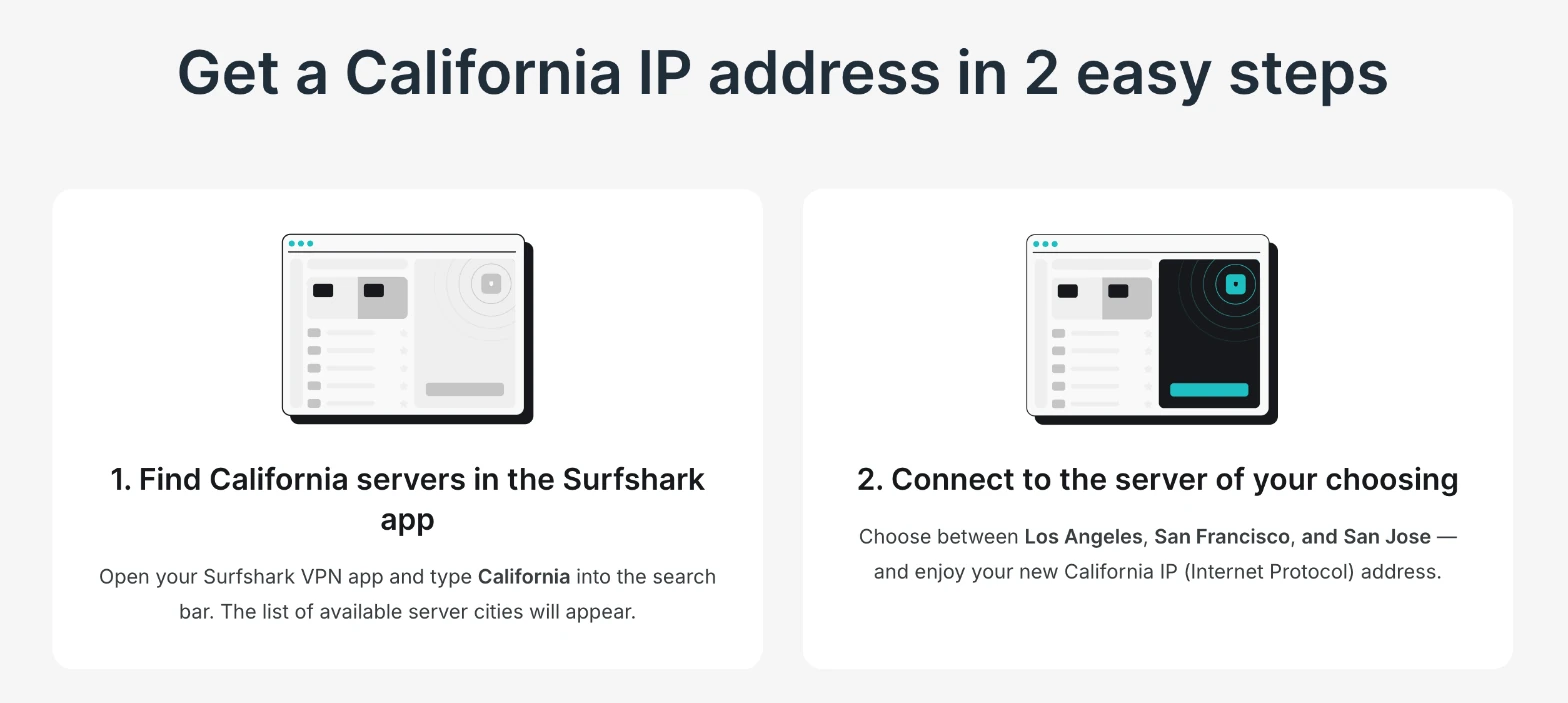
Surfshark California page with 2 steps to get a California IP address, naming Los Angeles, San Francisco and San Jose Surfshark's California server page, 27 November 2026.
Every Surfshark plan covers unlimited devices at once. One account can protect every phone and laptop in your home.
Each plan on Surfshark's pricing page shows a 30-day money-back guarantee.
What Surfshark costs
All three Surfshark plans include the same VPN. One adds Antivirus, Alert and Search, and One+ adds Incogni on top.
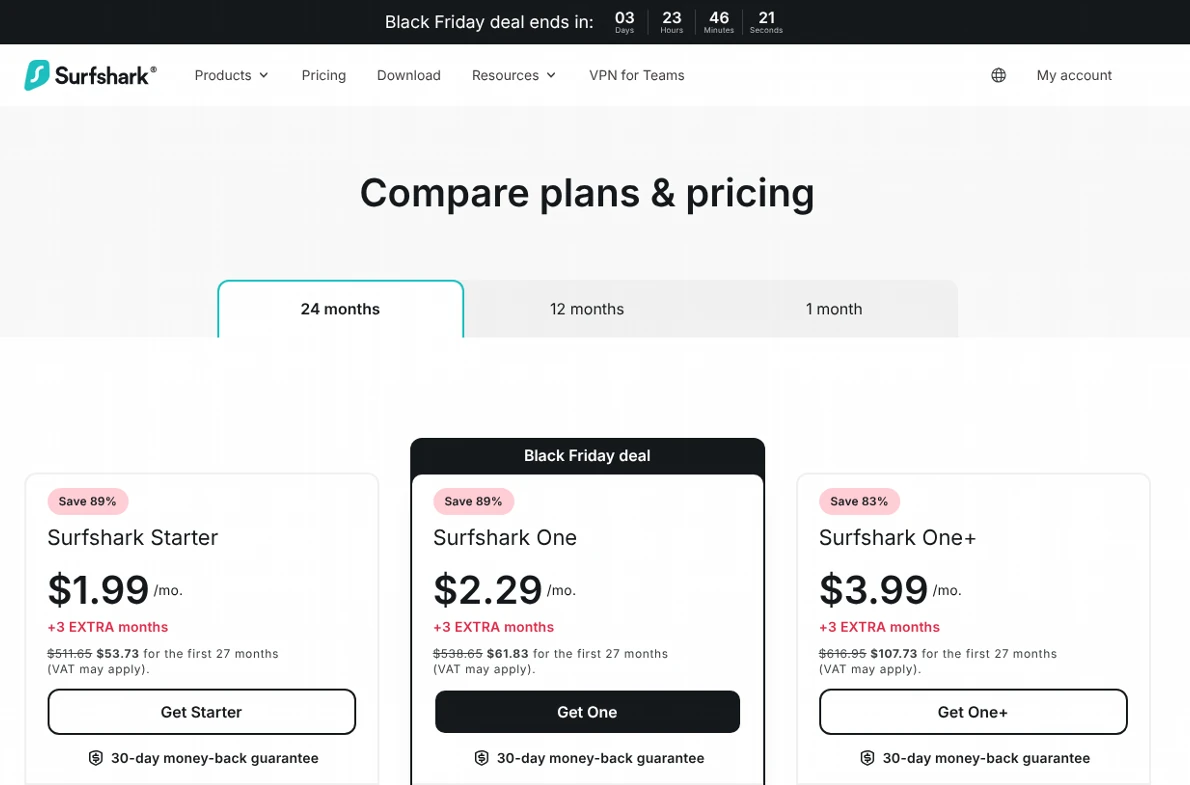
Surfshark Starter costs $1.99 for each month on the 24-month plan. That was the Black Friday deal on 27 November 2026, paid as $53.73 for the first 27 months.
Surfshark pricing page showing Starter at $1.99 a month and $53.73 for the first 27 months on the 24 month plan; Surfshark's pricing page, 24 month plans, 27 November 2026.
After the first term, Starter renews at $79 for each year, before tax. Spread over 12 months, that works out to $6.58 per month.
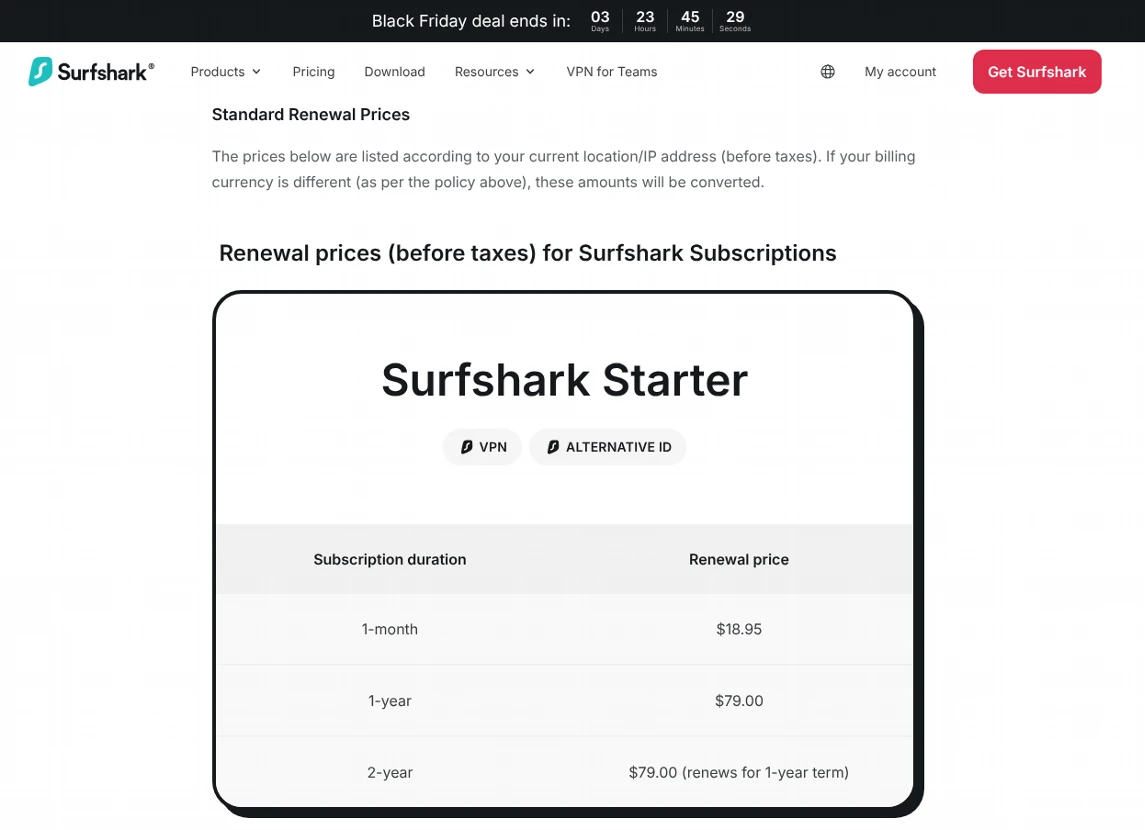
Surfshark renewal price table showing Starter renews at $18.95 a month or $79 a year, before taxes. Surfshark's renewal price table, 27 November 2026.
Surfshark's renewal page says its prices follow your location. The prices in this article are the ones it showed to US visitors on 27 November 2026.
The 1-month plan costs $18.95 for each month. For 12 months, that is $227.40.
Paying month by month for a year costs $148.40 more than the $79 yearly renewal. To run your own numbers, enter both prices in the Annual vs Monthly Calculator.
The two bigger plans follow the same pattern:
One costs $61.83 for the first 27 months, then $99 for each year.
One+ costs $107.73 for the first 27 months, then $139 for each year.
Surfshark's terms page says every renewal is charged at the standard price. Surfshark emails you 30 days before a renewal, except on 1-month plans.
Watch out for: the jump at renewal. On Starter, the monthly cost goes from $1.99 to $6.58 once the first 27 months end.
2. NordVPN: best for a fixed Los Angeles IP address
Best for: keeping the same Los Angeles IP address every time.
NordVPN lists two California cities, Los Angeles and San Francisco. Its US server list, dated 12 May 2026, shows dedicated IP servers in Los Angeles but not in San Francisco.
Pick Los Angeles if your bank or work tool expects the same IP address each time you log in.
One NordVPN plan covers up to 10 devices at once.
NordVPN Basic costs $2.99 for each month on the 2-year plan. On 27 November 2026, that was paid as $80.73 for the first 27 months.
After that, Basic renews at $139.08 for each year. That is $60.08 more each year than Surfshark Starter at $79.
Every NordVPN plan shows a 30-day money-back guarantee.
3. ExpressVPN: best for Los Angeles plus a Santa Monica backup
Best for: two Los Angeles area locations to switch between.
ExpressVPN's California page names Los Angeles and San Francisco, plus a location in Santa Monica. If your Los Angeles location is busy or blocked, Santa Monica gives you a second Southern California option.
The Basic plan covers 10 devices at once. Advanced covers 12, and Pro covers 14.
ExpressVPN Basic renews at $99.95 for each year on both its 1-year and 2-year offers. That is $20.95 more each year than Surfshark Starter.
On the 1 month plan, Basic renews at $12.99 for each month.
New users get a 30 day money back guarantee.
4. Private Internet Access: lowest price after the first term
Best for: the lowest yearly renewal of the four.
PIA's Los Angeles page tells you to choose California, US from the server list. Its San Francisco page points Bay Area users to the US Silicon Valley server.
PIA covers unlimited devices, like Surfshark. It also sells a Silicon Valley dedicated IP option.
PIA's 1 year plan costs $47.88, and it renews at $47.88 for each year. That is $31.12 less each year than Surfshark Starter.
The 1 month plan costs $11.95 for each month.
New subscribers get a 30 day money back guarantee. PIA names two California locations, against three for Surfshark.
How to get a California IP address with Surfshark
Four steps to get a California IP address with Surfshark, from installing the app to checking your IP
Pick a Surfshark plan and install the app on your device.
Open the app and type California into the search bar.
Tap Los Angeles, San Francisco, or San Jose to connect.
Open any IP lookup page and check that it shows a California city.
Pick the city nearest the service you need, or nearest you if you live in California. Surfshark's California page says the distance to a server affects speed.
Why a site may still see you outside California
Four things that can show your real location with a VPN on: browser location, phone GPS, cookies and account country
A California IP address changes what your connection shows. Your device and your account can still give your real location away.
Location access. If you once let a site use your location, your browser can keep sharing it. Block location for that site in your browser settings.
Phone location. Many phone apps read GPS as well as your IP address. Turn off location access for the app while you use it.
Cookies. A site can remember an earlier visit from your real location. Clear its cookies, then reload the page with the VPN on.
Account details. Your billing address or account region can outweigh your IP address. Check the country set in your account.
The wrong server can cause the same problem. On Mozilla's support forum, a Firefox user trying to check a Patreon price abroad still saw local currency.
The answer was that Firefox's browser VPN had picked a nearby server, so choose the exact city yourself.
Some sites block known VPN addresses. If one does, connect to another California city and try again.
What a VPN won't fix for Californians
A VPN hides your IP address from the sites you visit. It does not delete the data that data brokers already hold about you.
California has a free tool for that. CalPrivacy runs DROP, which lets residents send one deletion request to registered data brokers. It opened on 1 January 2026.
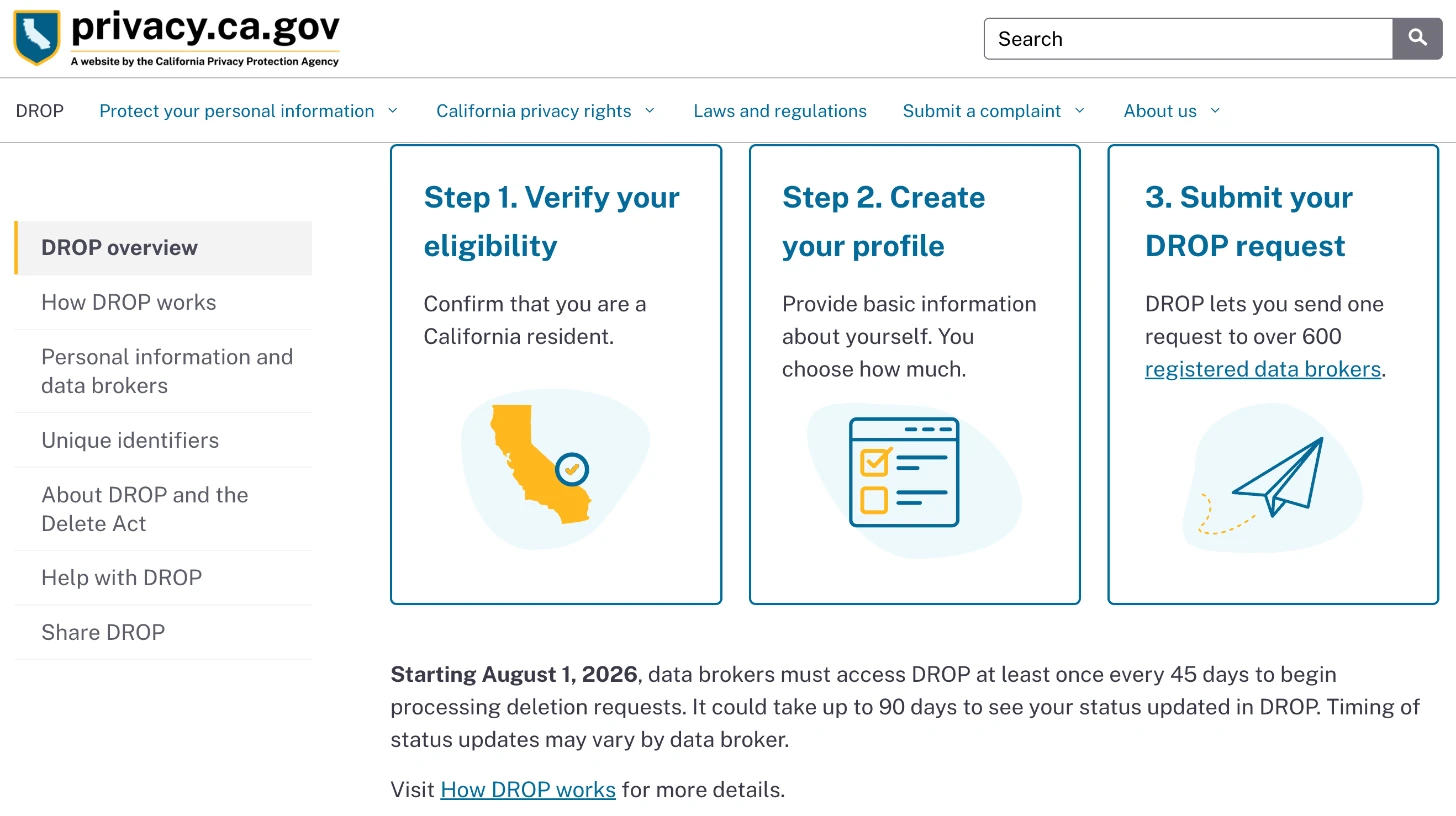
CalPrivacy DROP page showing 3 steps to send one request to over 600 registered data brokers. CalPrivacy's DROP page, 27 November 2026.
CalPrivacy says one DROP request reaches over 600 registered data brokers. Since 1 August 2026, brokers must check DROP at least every 45 days and process those requests.
A request takes less than 10 minutes, CalPrivacy says, but status updates can take up to 90 days to show. Use DROP alongside a VPN, since each one covers a different gap.
Best VPN for California FAQ
Is it legal to use a VPN in California?
Yes. Using a VPN is legal in California and across the United States. Each site's own terms still apply while you are connected.
Which California city should I connect to?
Pick Los Angeles for Southern California, and San Francisco or San Jose for the Bay Area. If a site blocks one city, try the next one.
Is there a free VPN with California servers?
Free plans are a weak fit for this. The plans in our free VPN guide either pick the server for you or cap your data.
Can a free web proxy give me a California IP address?
Only for single pages, and often not from California. Our CroxyProxy alternatives guide notes that CroxyProxy routes most of its servers through Europe.
Does the price go up after the first term?
Yes, for Surfshark and NordVPN. Surfshark Starter goes from $53.73 for 27 months to $79 per year.
NordVPN Basic goes from $80.73 for 27 months to $139.08 per year.
PIA's 1-year plan renews at the same $47.88 for each year.
Can I get a refund if a site still blocks me?
All four show a 30 day money back guarantee. ExpressVPN and PIA limit theirs to new users, so test your California sites in the first month.
Which VPN for California to pick
Three California cities and no device limit: Surfshark.
The same Los Angeles IP address every time: NordVPN.
Los Angeles plus a Santa Monica backup: ExpressVPN.
The lowest yearly price after the first term: PIA.
Start with the city you need, then test your bank and the sites you use in the first 30 days. If one still blocks you, switch cities before you ask for a refund.