
The second time a client asked why our intake form still had a Google logo stamped across the bottom, I stopped explaining that Google Forms is free and started pricing out other options. I rebuilt the same eight field intake form in 10 other tools over one week, timing how long each setup took and noting exactly where the free tier gave out.
Tally is the best free pick because its free plan drops the submission cap entirely, the same thing Google Forms already does, but adds custom branding and conditional logic Google never will. Fillout is the best balance for small teams because every plan, including the free one, covers unlimited seats. Jotform is the pick once you actually need to collect a payment on the form itself, something Google Forms still cannot do natively.
Google Forms is free, and that is exactly the problem this article solves. Nobody switches away from a free tool because of cost. They switch because the form cannot accept card payments, cannot lose the Google branding, or cannot show a different question based on the last answer. The 10 tools below cover those gaps, plus a few Google Forms never tried to fill.
Where Google Forms actually falls short
Google Forms is a survey and form tool bundled free with every Google account and included at no added cost inside Google Workspace. It has no response cap, no forced upgrade, and it drops every answer straight into a linked Google Sheet. For a quick RSVP, an internal poll, or basic survey tools generally, nothing else needs to beat it on price, because nothing can.
The cracks show up the moment a form has to look like your brand or make money. You cannot remove the Google branding, you cannot change button colors or fonts beyond a header image, and conditional logic only branches at the section level, not the individual question. Native payment collection does not exist at all. Pasting a Stripe or PayPal link into the confirmation message is the closest workaround, and it still is not a real checkout.
Real users say the same thing. One Capterra reviewer, an operations coordinator at an education management company, wrote that "design options for headers, colors, and overall branding are fairly limited," a complaint that repeats across the tool's 11,491 verified reviews even at a strong 4.7 out of 5 average. Another reviewer, a fullstack developer at a sporting goods company, compared Google Forms design flexibility unfavorably against Typeform and Jotform by name in the same review, the two tools that keep coming up as the default upgrade path once branding matters.
The benefits of switching go beyond closing those three gaps, too. Several alternatives add advantages Google Forms will likely never build on its own, among them calculated fields, two way database syncing, and full data ownership through self hosting.
Free Google Forms alternatives Worth Trying
Tally
Tally is a form builder that works like a plain document. You type to add a question instead of dragging blocks around a canvas. The free plan includes unlimited forms and unlimited submissions inside a fair use policy, plus payment collection, file uploads, electronic signatures, and full conditional logic, features most competitors save for a paid tier.
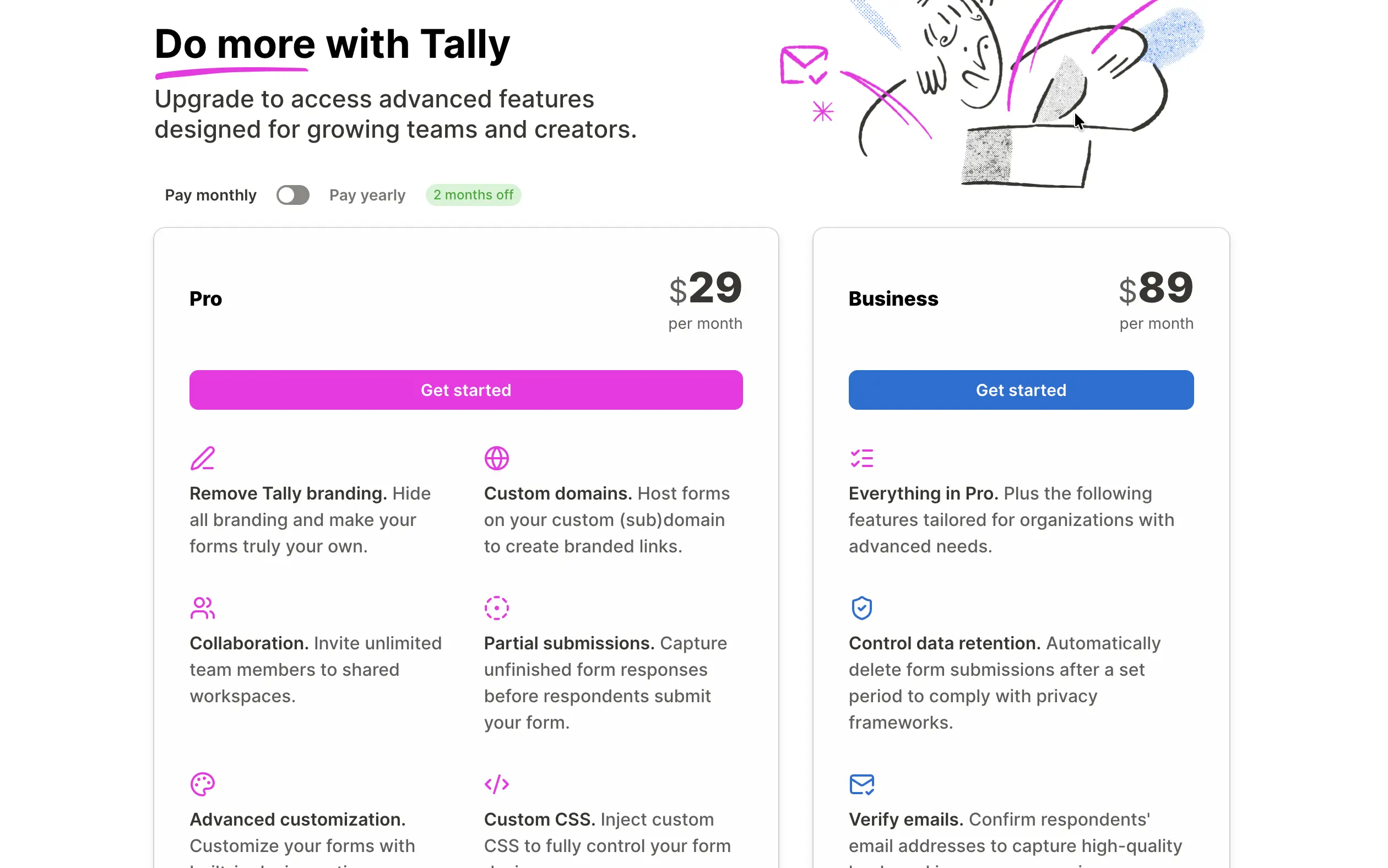
Tally's own pricing page lists Pro at $24 a month when billed annually, or $29 a month billed monthly, and Business at $74 a month annually or $89 a month monthly, adding custom domains, branding removal, and team workspaces. For anyone leaving Google Forms purely to fix the branding and logic gaps, Tally solves both without asking for a credit card first.
Formbricks
Formbricks is an open source survey and form platform that can be self hosted for free, which removes the response cap question entirely since the data and the server both stay on your own infrastructure. The hosted cloud version matches a familiar shape too: a free tier at 1,000 responses a month, then paid plans from around $49 a month for teams that would rather not manage a server.
Formbricks is based in Germany, so GDPR handling is built into how the product stores data by default, a detail that matters more once a form starts asking for anything personal. It is the pick when data ownership, not just cost, is the actual reason for leaving Google.
Paid Google Forms Alternatives Worth the Switch
Jotform
Jotform answers the payment question Google Forms cannot. Its free Starter plan caps out at 5 forms and 100 submissions a month, with Jotform branding attached. Jotform's pricing page shows Bronze starting at $34 a month billed annually, or $39 billed monthly, raising the ceiling to 25 forms and 1,000 submissions while removing the branding. Gold, at $129 a month, adds HIPAA compliant forms and a 100,000 monthly submission ceiling, unusually generous next to competitors that gate HIPAA behind a custom enterprise contract.
The 10,000 plus template library and 40 plus built in payment gateways mean a form can collect a card payment the moment it goes live. Anyone whose search starts with "I need to take payments" ends up here; our Jotform alternatives roundup covers the reverse question, for people finding Jotform's own limits too tight.
Typeform
Typeform answers the branding question with a different form format: one question fills the screen at a time instead of a long scrolling list, the opposite of Google's plain vertical layout. Typeform's free plan was cut from 100 responses a month to just 10 in February 2026, while Google Forms has never had a response limit at all. Basic starts around $25 a month for 100 responses; real volume pushes most teams into Plus or Business, both priced above Jotform's equivalent tier.
What buys the price difference is design that actually looks on brand, plus a completion rate that reliably beats a plain scrolling form in side by side tests. Full coverage of that comparison lives in our Typeform alternatives guide, written for people finding Typeform's own response cap too tight now.
Google Forms alternatives with Real Conditional Logic
Cognito Forms
Cognito Forms builds its entire product around calculation and branching that Google Forms only does at the section level. Pricing quotes, order totals, and multi condition approval steps live natively in the form instead of needing a spreadsheet afterward. The free plan allows unlimited forms with 100 entries a month. Pro, at $19 a month, covers two users; Team, at $39 a month, adds three more seats; Enterprise reaches $129 a month for 20 users. Where Google Forms only branches at the section level, Cognito Forms can hide or reveal a single field based on a previous answer.
Fillout
Fillout turns every submission into a structured record instead of a spreadsheet row, and syncs it two ways into Airtable or Notion. The free plan covers 1,000 responses a month with unlimited seats and unlimited forms, adding the branding, conditional logic, and payment collection Google never built.
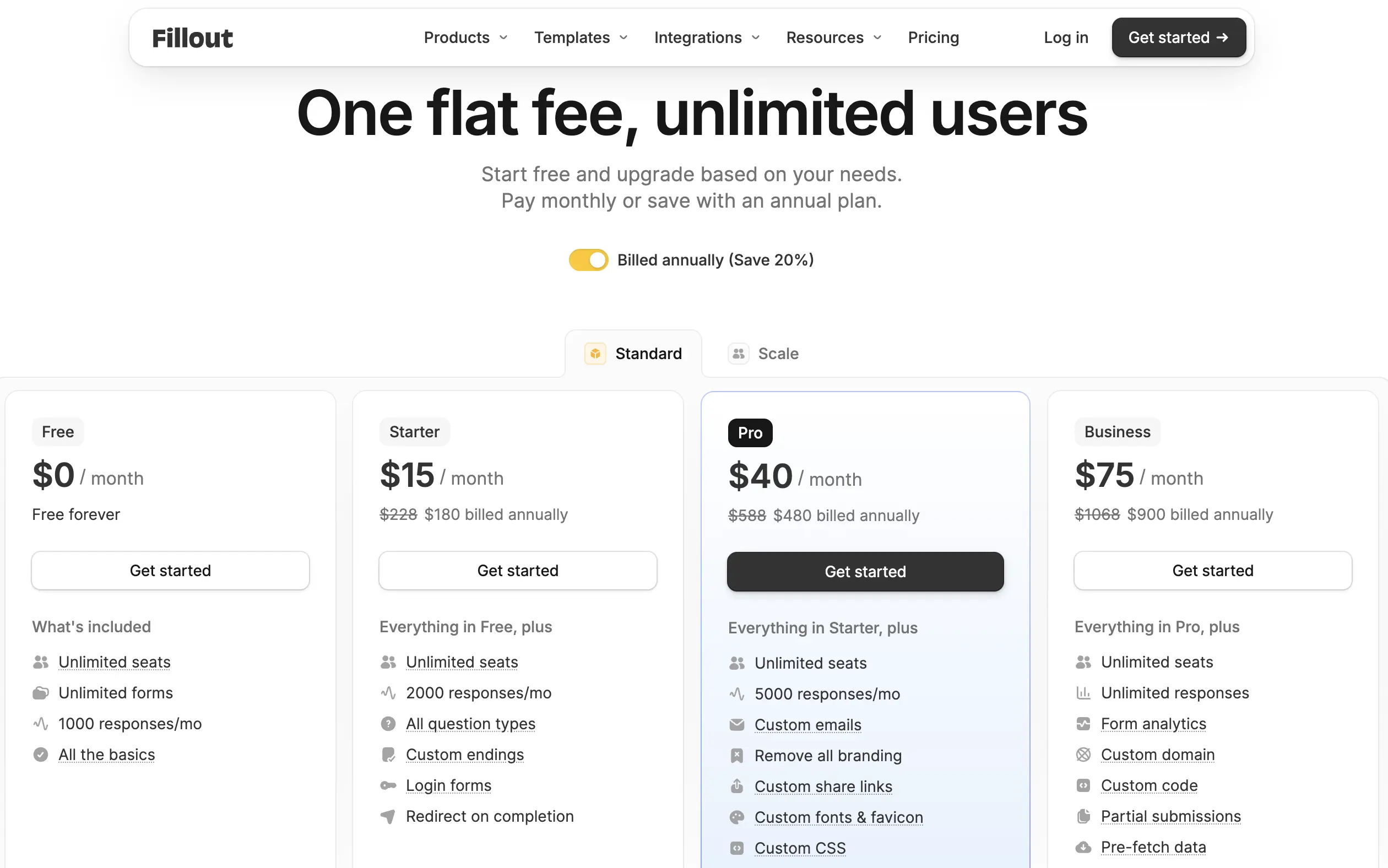
Fillout's own pricing page lists Starter at $19 a month billed monthly, or $15 a month if paid annually, doubling the response ceiling to 2,000. Pro runs $40 a month for 5,000 responses and removes all branding; Business reaches $89 a month billed monthly, or $75 annually, for unlimited responses. That monthly versus annual gap is easy to miss since most roundups quote only one number.
Google Forms Alternatives with analytics that go deeper
SurveyMonkey
SurveyMonkey is a research platform first and a form builder second, with skip logic, question randomization, and benchmarking data built for statistical work. The free plan caps each survey at 10 questions and 25 viewable responses, tighter than Google Forms' unlimited free tier.
Advantage, the individual plan, runs $99 a month billed monthly, or roughly $39 to $46 a month paid annually, for 15,000 annual responses, another case where the price depends entirely on which billing cycle a page shows first. For cross tabulation or significance testing, SurveyMonkey's analytics go further than anything Google Sheets can chart on its own.
Built for a specific ecosystem
Microsoft Forms
Microsoft Forms is the closest thing to a direct Google Forms parallel, just built for Microsoft 365 instead of Google Workspace. The free personal account caps out at 200 responses a month across 400 forms, a hard ceiling Google Forms does not have on its free tier.
Microsoft 365 Personal, at $9.99 a month, raises that to 1,000 responses; Business and Education plans push the ceiling to 5,000,000 responses, effectively unlimited for a school district already paying for Office. If your organization runs on Outlook and Teams instead of Gmail and Docs, Microsoft Forms removes the only real reason Google Forms would have been the default.
Zoho Forms
Zoho Forms sits inside the wider Zoho One suite, connecting natively to Zoho CRM, Zoho Desk, and Zoho Campaigns. The free plan supports one user with 3 forms and 500 submissions a month, tighter than Google Forms but paired with CRM routing Google never offered. Paid plans start at $12 a month billed monthly, or $10 annually, and Standard reaches $25 to $30 a month for up to 10 users. For a business already paying for other Zoho apps, Forms is close to a free add on.
Paperform
Paperform builds forms that read like a styled document, with rich text, embedded video, and product listings living inside the same editor, a natural fit for order forms and bookings that a plain Google Forms layout was never designed to hold. There is no free plan, only a 14 day trial, and Essentials starts around $24 a month. Multiple custom domains are available even on lower tiers, a detail agencies running several client sites tend to notice fast.
Google Forms Alternatives Comparison
Tool | Free tier ceiling | Where it beats Google Forms | Starting paid price |
|---|---|---|---|
Tally | Unlimited | Branding, payments, logic | $24/mo annual |
Jotform | 100 submissions/mo | Payments, templates | $34/mo annual |
Typeform | 10 responses/mo | Brand design, completion rate | $25/mo |
Fillout | 1,000 responses/mo | Database sync, unlimited seats | $15/mo annual |
Cognito Forms | 100 entries/mo | Calculated fields, approvals | $19/mo |
SurveyMonkey | 25 responses/survey | Statistical analytics | $39 to $46/mo annual |
Microsoft Forms | 200 responses/mo | Microsoft 365 integration | $9.99/mo |
Zoho Forms | 500 submissions/mo | CRM integration | $10/mo annual |
Paperform | No free plan | Sales page design | $24/mo |
Formbricks | 1,000 responses/mo, free self hosted | Data ownership | $49/mo |
How to pick your Google Forms replacement
If you are a solo user or a small team on no budget, start with Tally. It matches Google Forms on price and adds the branding and logic Google withholds.
If you need to collect a payment on the form itself, Jotform's template library and 40 plus payment gateways get there fastest; Typeform works too once brand feel matters as much as the payment.
If your team already runs on Microsoft 365 instead of Google Workspace, Microsoft Forms is the direct parallel, including the free personal account's 200 response monthly ceiling.
If you're buying for a school or education team, Jotform's 50 percent education discount on Bronze through Gold undercuts most paid tiers here, and Microsoft Forms already scales free to 5,000,000 responses a month inside a school's existing Microsoft 365 Education license.
If you are running structured UX research instead of a simple survey, Cognito Forms' calculation engine or SurveyMonkey's statistical tooling both outperform what Google Sheets can chart from a Forms export.
If data ownership matters more than convenience, Formbricks is the only tool on this list that can be fully self hosted for free, keeping every response on your own server.
FAQ: Google Forms alternatives
What are alternatives to Google Forms?
Tally, Jotform, Typeform, Fillout, Microsoft Forms, Cognito Forms, Zoho Forms, SurveyMonkey, Formbricks, and Paperform all trade Google's zero cost for branding, payments, or logic Google does not offer.
What are the best Google Forms alternatives?
Tally is the strongest free pick since it matches Google's unlimited submissions while adding branding and logic. Jotform wins for payment collection, and Fillout wins for teams that want unlimited seats without a per user fee.
Which Google Forms alternative works best for schools and education teams?
Microsoft Forms fits schools already running Microsoft 365, since its Education plans raise the response ceiling to 5,000,000 a month. Jotform also offers a 50 percent education discount for schools that need HIPAA compliant forms.
Is there a Google Forms alternative with better analytics?
SurveyMonkey goes furthest on analytics, with cross tabulation and statistical significance testing that neither Google Forms nor most competitors attempt.
Which Google Forms alternative is completely free with no submission cap?
Tally matches Google Forms on the no cap point while adding branding, payments, and full conditional logic on top.
Is there an open source Google Forms alternative?
Formbricks is the only tool on this list that is open source, and it can be self hosted for free, keeping form data off any third party server.
Bottom line
Google Forms is still the right call for an internal poll or a quick RSVP where nobody cares about branding. The moment a form needs to look like your company, take a payment, or ask a smarter follow up question based on a previous answer, one of the 10 tools above closes that gap for less than the time it takes to keep working around it.
Start with Tally if budget is the only constraint, and move down this list only as far as the next missing feature actually requires.