
TL;DR
Pay for Liven only if you will finish one short lesson a day, because the weekly plan renews every week whether you open the app or not.
Liven's AI companion, Livie, and its coaching add-on bill separately from your main plan. Liven's help center calls them separate subscriptions with their own billing cycles.
Open the receipt first. It shows whether Liven, Apple, or Google Play billed you. That decides where you cancel.
New here: a charge-by-charge worksheet, plus a refund policy page that covers Google Play in one paragraph and excludes it in another, so the page cannot tell you who gets a refund.
Prices, plan names and policy terms were checked on 13 November 2026 against the US App Store listing, the Google Play listing, Liven's help center and Liven's money back policy page.
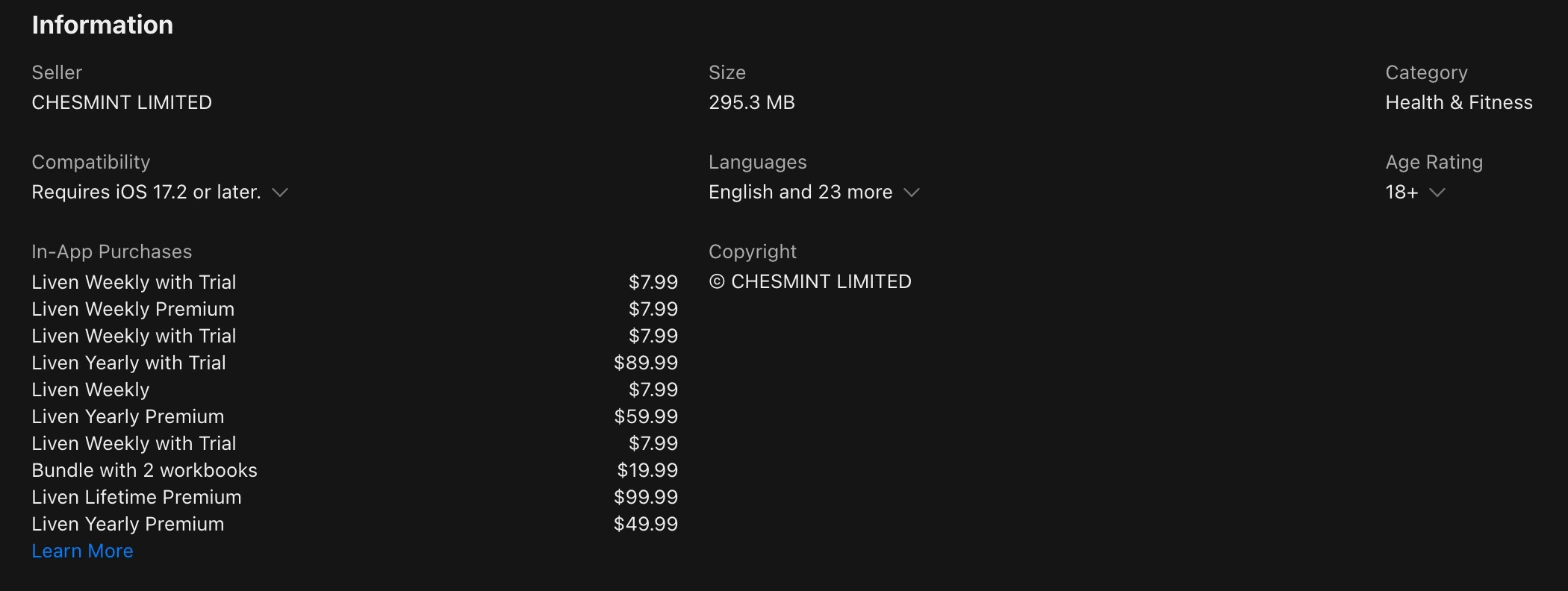
Liven's App Store listing shows weekly plans at $7.99, yearly plans at $49.99, $59.99, and $89.99, and a lifetime plan at $99.99.
A weekly plan left on for 52 weeks is 52 charges and $415.48.
Liven is a wellness app. It has short lessons, a journal, breathing exercises, and an AI companion called Livie. The US App Store lists Chesmint Limited as the developer.
This article covers Apple App ID 6450840109. Liven reviews on Google Play lean toward money problems: two of the three shown first on 13 November 2026 are about charges or cancelling.
Is Liven worth paying for?
Liven is worth paying for if you will finish one short lesson a day and want a journal and an AI companion in the same app. It is a weak buy if you only want mood logging.
It is also weak if you skip the receipt check. Both listings say the app is no substitute for professional medical care.
Liven replied on Trustpilot that its courses run one lesson a day. The review it answered is dated 11 November 2026. The pace matters.
Liven's own cost article puts the weekly plan at about $1.14 a day. Divide $7.99 by 7 days, and you get the same $1.14.
What does Liven actually do?
The App Store listing promises 10 minutes a day of emotional skills, a journal that maps your patterns, breathing exercises, and calming sounds.
It also describes 5-minute guided paths and role-play for hard conversations, and it frames the whole app as stress and anxiety skills for people under pressure.
The Google Play listing calls Liven a self-discovery companion. It adds a mood tracker with a calendar, a Tasks tool for routines, well-being tests, and soundscapes for deep focus.
Both listings feature Livie. She chats about your thoughts and suggests ideas to try. Both listings say the app is not meant to diagnose, treat, cure, or prevent a health condition.
What do Liven app reviews say?
Liven reviews and complaints split by store. The US App Store shows 4.4 from about 52,000 ratings, Google Play shows 3.8 from about 56,300 reviews, and Trustpilot shows 4.3 from 36,047 reviews. Google Play sits lowest.
One quoted review praises the short lessons and the journal. The others are about update prompts, rating prompts, renewals and cancelling.
Source | Rating | Count |
|---|---|---|
US App Store | 4.4 out of 5 | About 52,000 ratings |
Google Play | 3.8 out of 5 | About 56,300 reviews |
Trustpilot | 4.3 out of 5 | 36,047 reviews, 13% one star |
Liven user reviews on the App Store and Google Play
An App Store reviewer dated 3 October praised the journal and the bite-size lessons, chose the lifetime plan, and said the tablet layout needs work. Another reviewer, dated 14 January 2025, said the app kept asking for a rating after four answers and called the prompts manipulative.
On Google Play, a reviewer dated 3 November 2026 said Liven charged them once, showed no subscription in the Play Store, and then charged again. Liven replied on 4 November. It asked the reviewer to write to trust@theliven.com for cancellation help and a refund if possible.
A second reviewer dated 3 November said an email asking to cancel went unanswered for about a month and that a quarterly payment still went through.
A reviewer dated 6 November said updates arrive every other day and the AI companion feels templated. Each Liven app review above is a single account. It shows no trend.
Liven reviews on Trustpilot
Trustpilot shows 4.3 from 36,047 reviews on 13 November 2026, 13% of them give one star, and the public profile is claimed and shows a paid Trustpilot subscription.
The newest review listed is dated 11 November and carries an Invited label.
That review says the one lesson a day limit looks like a way to stretch paid time past one month. Liven replied that the pace is deliberate and pointed to the Explore tab, a breathing tool, and Livie for more content.
Liven customer reviews like this one are worth reading beside the five-star ones.
Liven app cost in the US
Liven's US App Store listing shows weekly entries at $7.99, yearly entries at $49.99, $59.99, and $89.99, and a lifetime entry at $99.99. Check your offer screen first.
Liven's billing guide says website offers include a weekly intro that continues monthly and a 3-month plan, but it gives no US price for any of them.
Liven app reviews and cost belong together, because a charge you did not expect is the common thread in two of the three Google Play reviews quoted above.
App Store entry | Price | When it charges |
|---|---|---|
Liven Weekly and Liven Weekly Premium | $7.99 | Every week |
Liven Weekly with Trial | $7.99 | After a 3 day trial, then every week |
Liven Yearly Premium | $49.99 | Once a year |
Liven Yearly Premium | $59.99 | Once a year |
Liven Yearly with Trial | $89.99 | After a 7-day trial, then once a year |
Liven Lifetime Premium | $99.99 | One-time payment |
Bundle with 2 workbooks | $19.99 | Separate charge for workbooks |
Weekly is the cheapest entry.
The weekly entry costs $7.99 per week. For 4 weeks, that is $31.96. For 52 weeks, that is $415.48.
The first yearly entry costs $49.99 for each year. For 2 years, that is $99.98.
The second yearly entry costs $59.99 for each year. For 2 years, that is $119.98.
The $89.99 entry is labeled Yearly with Trial. The billing guide says its first charge comes after a 7-day trial.
Liven's cost article, last updated July 2026, shows a monthly card starting from $49.99 for each month. For 12 months at that starting price, that is $599.88. The article's prices are approximate.
The App Store list has no monthly entry, so check which store or website your offer came from before you trust any monthly price printed in a review or a blog post.
To compare a monthly and a yearly offer for the same features, use the annual vs monthly billing calculator.
Liven lifetime plan: $99.99 once
Lifetime costs $99.99 once. The US App Store lists it as Liven Lifetime Premium. The billing guide calls it a one-time payment. That is one cent more than two years of the $49.99 yearly entry.
The help pages do not say whether Livie or coaching comes with the lifetime plan, so read the offer screen for extra lines before you pay.
Why did Liven charge me twice? Read the receipt first
Liven can charge you more than once because the main plan, Livie, coaching, and workbooks are separate purchases. A bank authorization can look like a second charge.
Liven says a pending one drops off within a few days. Check each receipt.
Liven's help center says: "Both Livie and Coaching are separate subscriptions from your main Liven plan." Each has its own billing cycle, usually 31 days, and its own entry under Settings, then Membership.
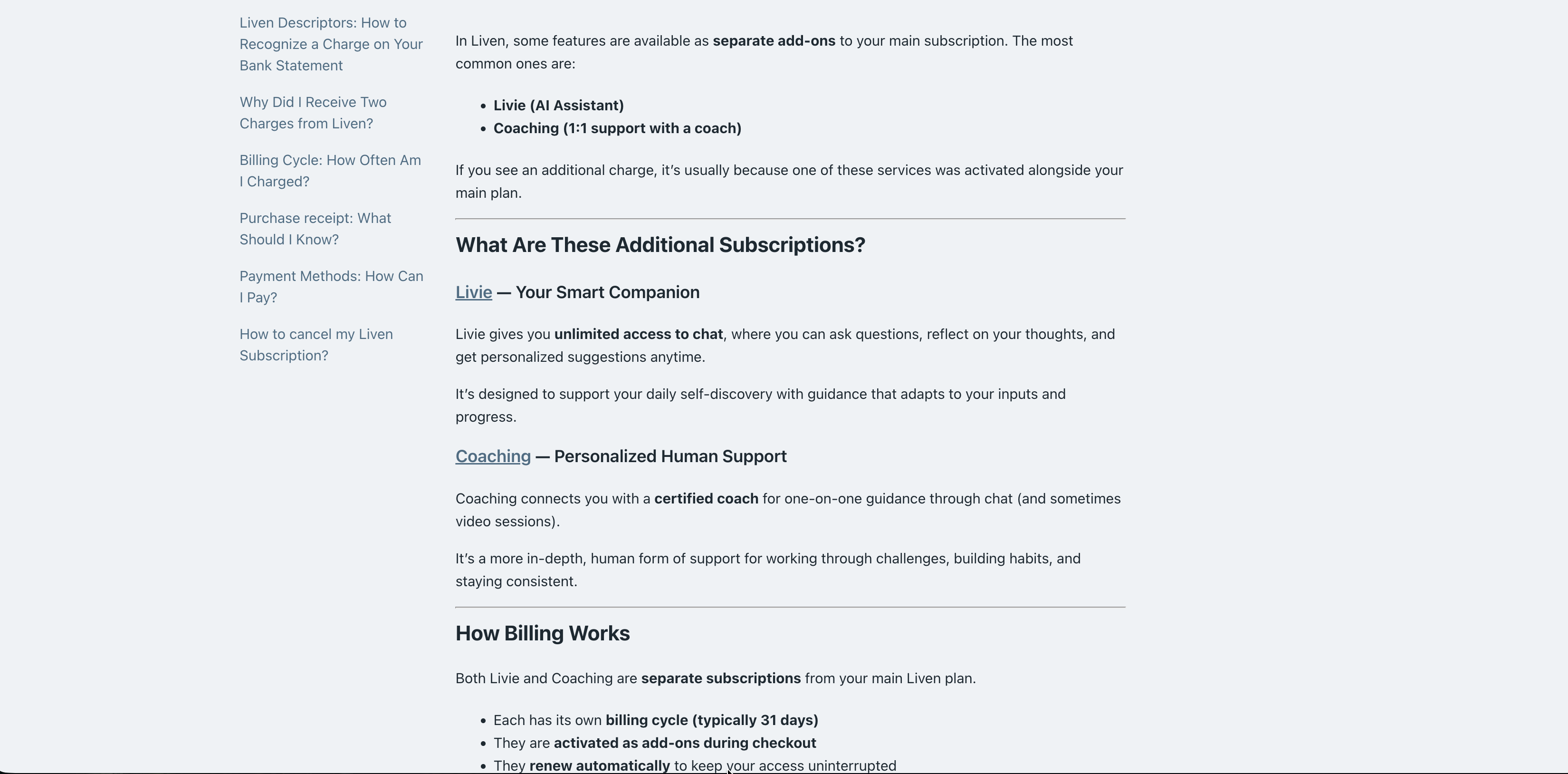
The cycle lengths differ. The billing guide says most Liven subscriptions follow a 30-day cycle, while the add-on article says add-ons usually run 31 days, and that gap grows with every renewal.
Suppose a base plan and an add-on start on the same day. After 12 cycles, the base plan renews on day 360. The add-on renews on day 372. They sit 12 days apart. The help pages do not say both start together, so this is a worked example only.
Liven sends an invoice for the first purchase only. Later charges can arrive with no invoice, so your bank statement, Apple Pay history, Google Pay history, or PayPal is the record, and the welcome email with the purchase confirmation is the one to find.
Fill in one row for each charge you can see.
Charge | Write down from the receipt | Billing interval Liven states | Where to manage it |
|---|---|---|---|
Main plan | Who billed it, amount due today, next charge amount and date | Weekly, monthly, every 3 months, yearly or one time, by offer | Liven app for website buys, Apple Subscriptions, or Google Play Subscriptions |
Livie | Who billed it, amount due today, next charge amount and date | Its own cycle, usually 31 days | Liven app, Settings, then Membership |
Coaching | Who billed it, amount due today, next charge amount and date | Its own cycle, usually 31 days | Liven app, Settings, then Membership |
Workbook | The confirmation email or the bank line | Charged individually, apart from the plan | The confirmation email and your bank statement |
To total every recurring charge you pay across apps, use the subscription cost calculator.
Is Livie included in Liven?
Not by default. Liven's help center lists Livie as an add-on with its own subscription, and Liven's cost article says access comes for an additional fee that the article does not price.
The App Store listing describes Livie's free talk mode and names no fee. Look for a Livie line on the offer screen before you pay.
Coaching is separate too. The help center describes it as chat with a certified coach, sometimes with video sessions.
Livie and coaching are 2 add-ons, and each one is its own subscription, so cancel each one you no longer want.
Liven missing from Apple or Google Play subscriptions
Your Liven purchase may not be an Apple or Google Play subscription at all. Liven says website purchases do not appear in your device's subscription settings.
Cancel those inside the Liven app, or write to support@theliven.com.
The Google Play reviewer from 3 November described this pattern of a charge, no subscription in the Play Store, and then another charge, and the report does not say who billed the first one. It shows the symptom only.
How to cancel Liven and ask for a refund
Cancel where the receipt came from. A website purchase is cancelled in the Liven app, and an Apple or Google Play purchase is cancelled in that store.
Cancelling stops future renewals and keeps access until the current period ends. A charge already paid goes through the refund process instead.
Who sent the receipt? | Where to cancel | Where to ask for a refund |
|---|---|---|
Liven website | In the Liven app, open Profile, then My Subscriptions or Membership. Tap Cancel, scroll down and tap Cancel subscription again, then confirm. | Email support@theliven.com from your purchase email and describe the charge. |
Apple | iPhone Settings, your name, Subscriptions, Liven, then Cancel subscription. | Apple's Report a Problem page. Liven's policy lists Apple App Store purchases as not covered. |
Google Play | Play Store, profile icon, Payments and subscriptions, Subscriptions, Liven, then Cancel subscription. | Google Play's refund process. Liven also pointed Google Play reviewers to trust@theliven.com. |
Liven's cancellation guide says to wait for a confirmation message or email once you cancel.
Keep it. For another subscription app with its own refund rules, read the Yoga-Go reviews.
Does Liven give refunds? The policy page says two things
Liven handles refund requests under its money back policy, last updated 15 June 2026, and the page contradicts itself on whether Google Play purchases are covered.
The opening says the policy covers Liven website purchases and Google Play purchases. Section 1.3 says it does not cover purchases through the Apple App Store, Google Play, or any other third-party platform.
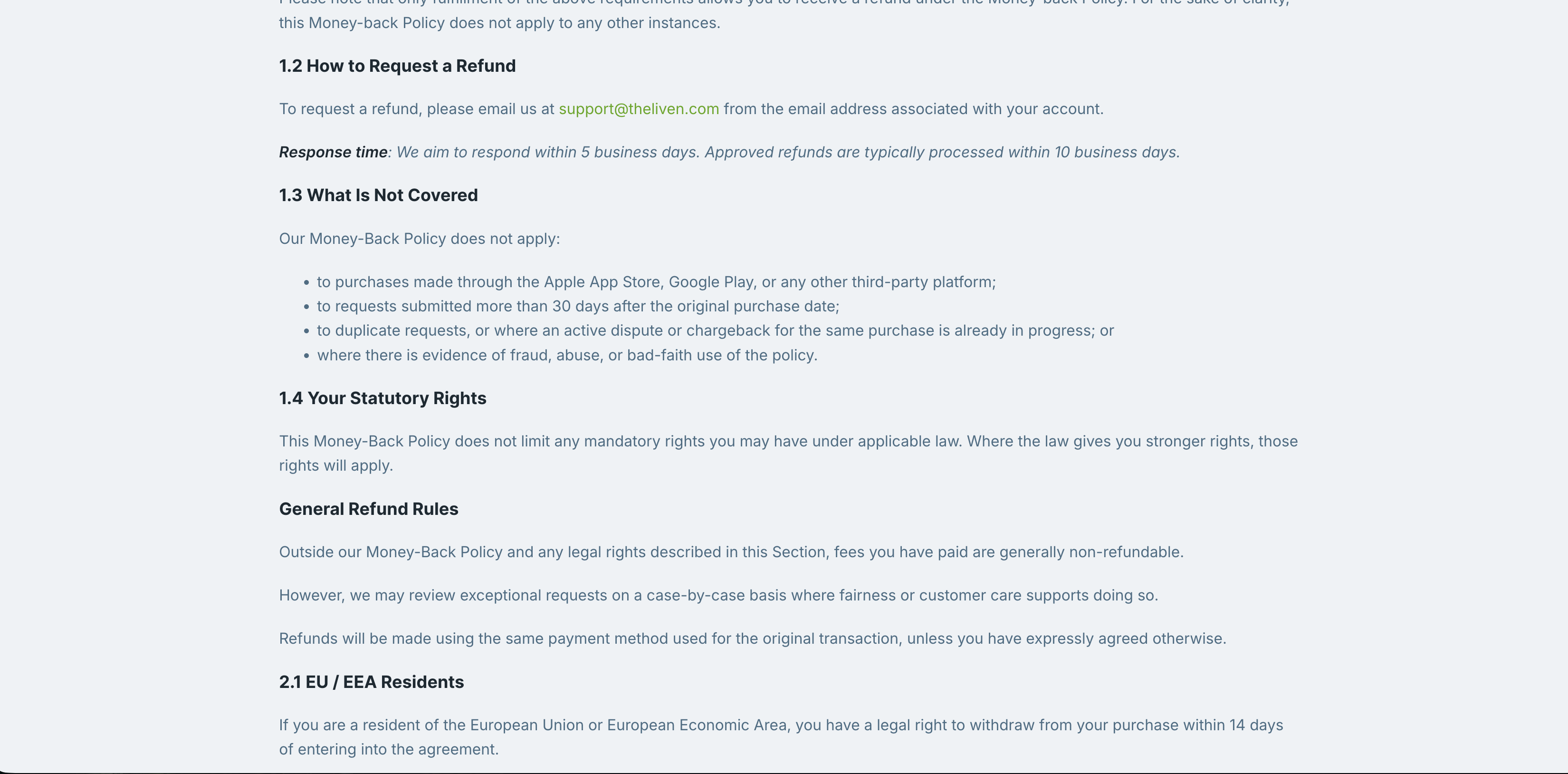
For a website purchase, the page asks you to write within 30 days and before the period ends. It also asks for use on consecutive days.
The streak is 3 days within 7 for weekly or biweekly plans, 5 days within 28 for 4-week plans, and 7 days within 30 for monthly or longer plans.
Proof is a Streak screenshot. Email it to support@theliven.com.
Liven aims to reply within 5 business days and usually pays approved refunds within 10 business days. The start date is unclear. The page does not say whether the 30 days begin on the first day of a trial or on the first charge.
California and Connecticut residents can cancel before midnight of the third business day after purchase and get a refund.
Outside the policy, the page says paid fees are generally not refundable. Exceptions exist. Unusual requests may be reviewed one by one.
If you paid through Google Play, ask through Google Play's refund process and write to Liven as well, since the policy page covers Google Play in one paragraph.
Who should pay for Liven, and who should skip it?
Pay for Liven if you can give it 10 minutes a day and want a journal and an AI companion. Skip it if you want treatment for a health condition, because both listings say the app is not meant to treat one.
Stress and saying no. Both listings aim at this, so start on the 3-day weekly trial or the 7-day yearly trial and cancel it if you stop finishing lessons.
Parents. An App Store reviewer wrote that you do not have to be a struggling parent to find the app necessary, but neither listing names parenting as a feature.
ADHD. The listings mention focus and time management, but neither names ADHD, so treat Liven as a habit and routine app.
Weight loss. Neither store listing mentions weight loss, so nothing on the listings supports buying Liven for that goal.
Cortisol and anxiety. The App Store listing frames Liven as stress and anxiety skills and says it is not meant for treating health conditions, and neither listing mentions cortisol.
Procrastination. The Google Play listing offers a Tasks tool for routines, and the lessons run once a day, so the app fits small daily steps.
A human coach. Coaching is 1 of the 2 paid add-ons and comes with a certified coach, so budget for a second subscription line.
Questions about Liven
Is Liven free?
No. Liven says it is not completely free. Store buyers may get a 3-day trial on the weekly plan or a 7-day trial on the yearly plan, then it renews as a paid plan.
Website buyers get no free trial but may get a discounted first payment.
Is Liven legit?
Liven is a real app. The US App Store lists Chesmint Limited as the developer and shows 4.4 from about 52,000 ratings.
Google Play shows 3.8. Google Play reviews dated 3 November 2026 complain about charges and cancellation. Check the offer screen and the cancellation route before you pay.
How do I contact Liven customer service?
Email support@theliven.com or call +1 (302) 406 3574, the number on Liven's help page about two charges, and note that Liven also pointed Google Play reviewers to trust@theliven.com for cancellation and refund help.
Does the Liven quiz cost money?
Liven does not say. Its help pages never state whether the quiz alone is free. Website buyers get no free trial but may get a discounted first payment. Read the price on the offer screen before you enter card details.
What to do first
Open the receipt and fill in one worksheet row for each charge. Cancel the subscription whose receipt matches, then open Membership to look for Livie or coaching.
If you have not paid yet, read the offer screen for the first amount, the renewal date, and any extra line before you enter card details or confirm a trial.
The help pages and the cost article name no price for Livie or coaching, so the amount on your own receipt is the only figure that counts. A weekly plan at $7.99 adds up to $415.48 over 52 weeks.