Canva closed its Teams plan to new sign-ups. Its pricing page now lists Pro at $144 for the year. Business costs $250 for each person for the year.
Three Canva alternatives fit most people. Adobe Express costs $9.99 a month, and VistaCreate costs $10 USD a month. Affinity is free with a free Canva account.
The 12 tools below are grouped by who they suit. Each price comes from the tool's own pricing page.
Short answer
Adobe Express: $9.99 a month on Premium, with a free plan that includes 5GB of storage.
VistaCreate: $10 USD a month on Pro, with up to 10 team seats and 100 AI image generations a month.
Affinity: free design software for macOS and Windows, with a free Canva account to sign in.
Pricing and features verified 15 October 2026 from each tool's official pricing page. All prices are in US dollars.
Why people look for Canva alternatives
Canva Free costs $0. It includes 5GB of storage and 1 Brand Kit limited to 3 colors. It also allows up to 20 Standard or Premium AI uses.
Canva lists Pro at $144 for the year for one person. Business costs $250 for each person for the year. AI Pass is an add-on that costs extra on top of either paid plan.
Those numbers point to three reasons for leaving. Some people want a lower yearly bill. Some people hit the limits of the free plan. Others want AI that does not stop after 20 uses.
Trustpilot shows Canva at 4.0 stars from 7,775 reviews on 15 October 2026. Half of those reviews give five stars, and 30% give one star.
Canva Teams is closed: what small teams can use instead
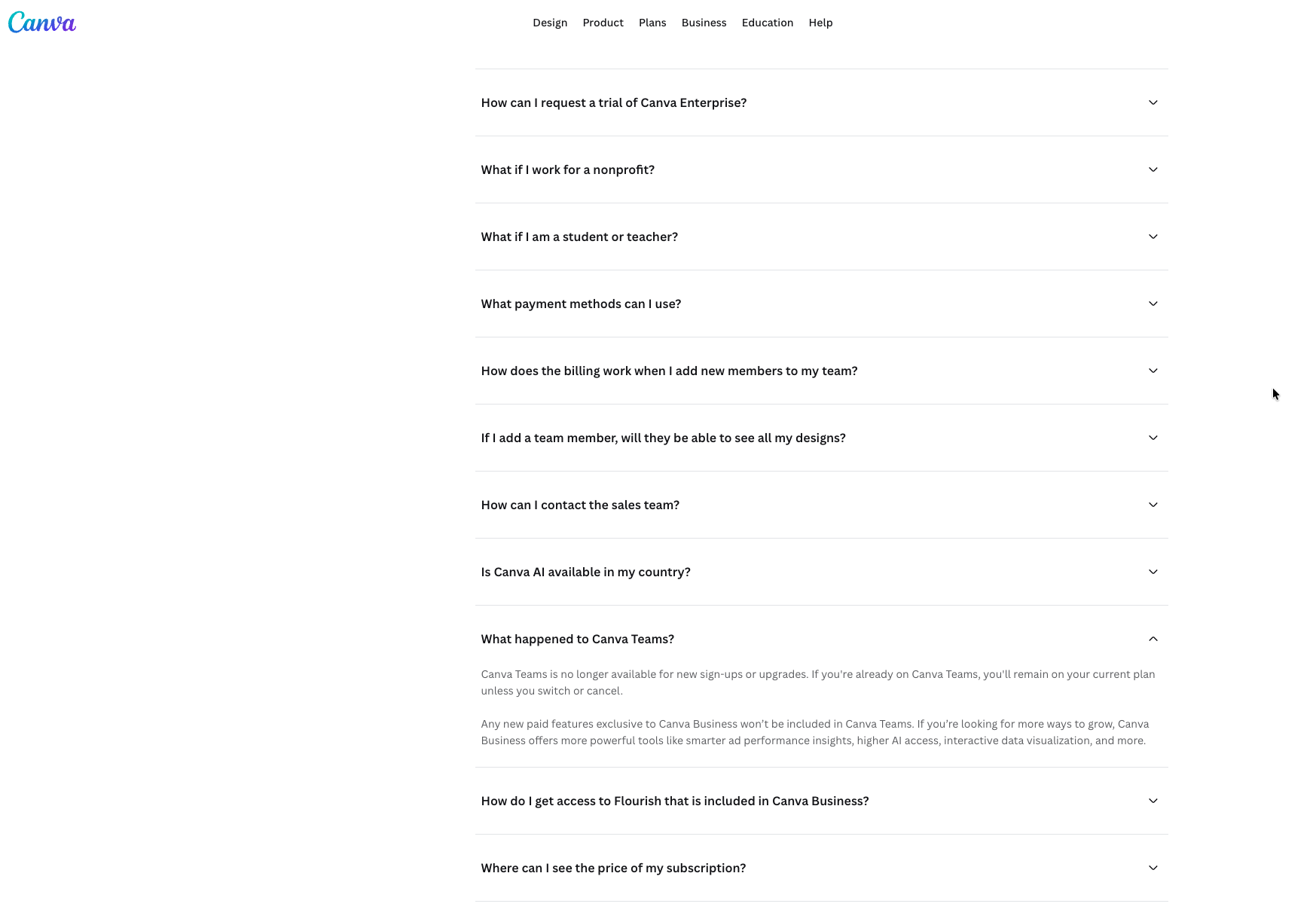
Canva says the Teams plan is no longer available for new sign-ups or upgrades. People already on Teams keep their current pricing and features.
If they cancel, the Canva Help Center says they cannot resubscribe. Canva points them to Pro for one person or Business for a team.
Take a team of 5 people for 12 months.
Canva Business costs $250 for each person for the year. For 5 people, that is $1,250.
Snappa Team costs $20 a month when you pay for the whole year. It covers 5 users. Over 12 months, that is $240.
Piktochart Pro costs $10 per member each month when you pay for the whole year. For 5 members over 12 months, that is $600.
Penpot Professional costs $0, and it allows up to 8 team members plus unlimited viewers.
Canva Business costs $1,010 more than Snappa Team over the same 12 months.
Best Canva alternatives by user type
If you searched for alternatives to Canva, sites like Canva or apps like Canva, start with the group that matches your work.
Affinity has its own section further down.
Canva alternatives for social posts and small businesses
If scheduling posts matters as much as designing them, the guide to the best social media management tools covers that side.
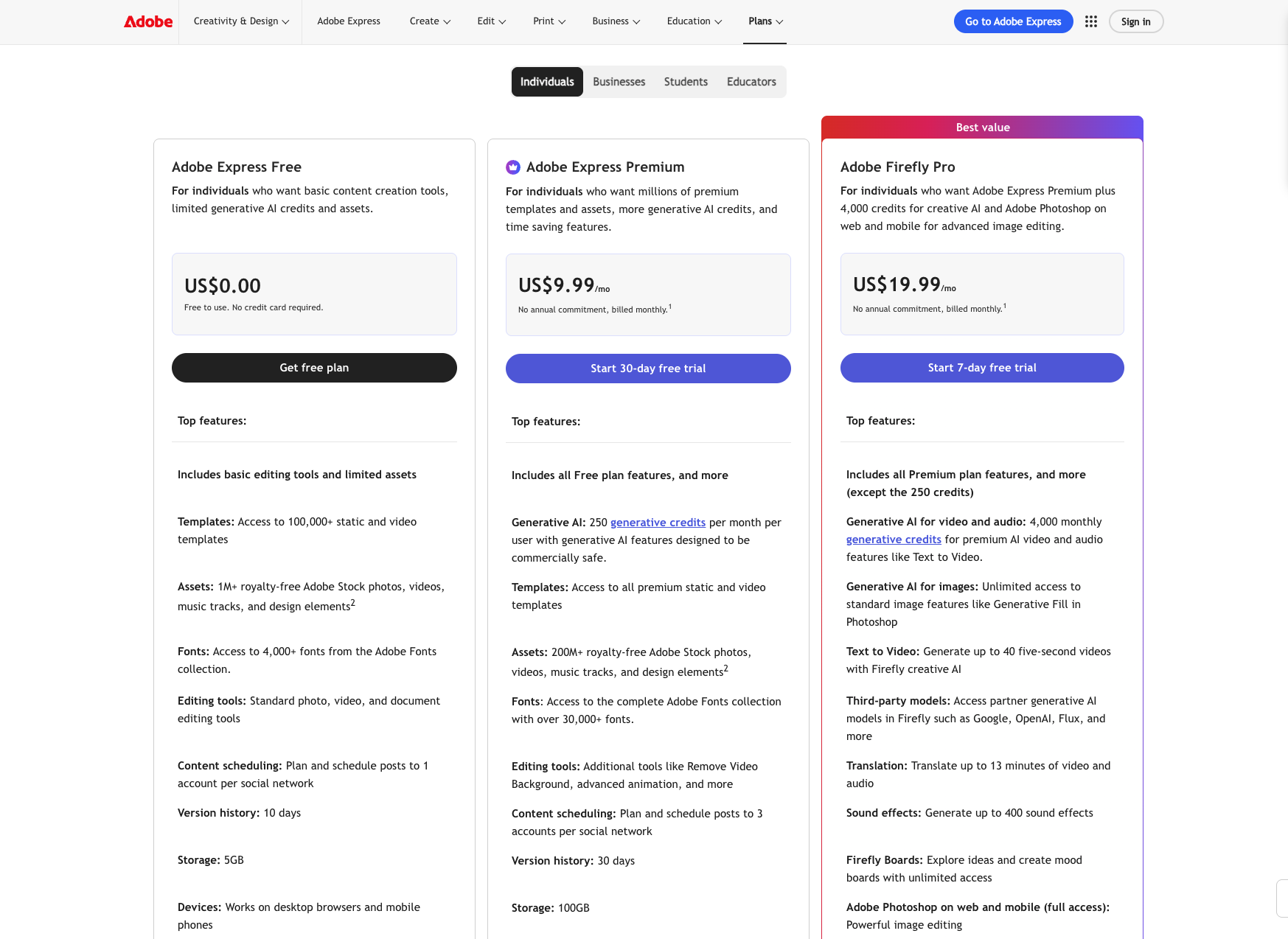
Adobe Express is Adobe's online design app. Premium costs $9.99 a month with no yearly commitment. Over 12 months, that is $119.88.
The free plan includes 5GB of storage. It also allows 2 free lifetime uses of 5-second AI video and 5 free lifetime uses of document-to-presentation.
Premium adds 250 generative credits a month. Video can run up to 2 hours on Premium, against 30 minutes on Free.
For longer or fully generated clips, see the best AI video generator guide. Adobe lists Premium storage twice: 100GB on the plan card and 10GB in the comparison table.
VistaCreate has a free Starter plan and a Pro plan at $10 USD a month.
Pro includes unlimited storage, up to 10 team seats, and 100 AI image generations a month.
It also has a 14-day free trial. The help page names no yearly price, so 12 months of Pro costs $120.
The same page lists no storage or download limits for Starter.
Snappa Free allows 3 downloads a month. Pro costs $15 a month, or $10 a month when you pay for the whole year.
Pro is for 1 user and has unlimited downloads. Over 12 months, Pro costs $120 when paid yearly and $180 when paid monthly.
Kittl Pro costs $12 for each editor, each month, when you pay for the whole year.
Over 12 months, that is $144, the same as Canva Pro.
The Free plan is for personal use only and has no vector exports. Pro and Expert include a commercial license for up to 500,000 copies.
Pixlr Plus costs $2.49 a month, or $1.99 a month when you pay for the whole year.
Plus includes 80 AI credits each month. Premium costs $9.99 a month, or $7.99 a month for the whole year, with 1,000 credits each month.
The pricing page describes no free plan. Plus for the whole year costs $23.88, the lowest paid plan in this list.
Canva alternatives for presentations and reports
Visme has a free Basic plan with 500MB of storage, 10 AI credits, and downloads as JPG, PNG, and PDF.
Starter costs $147 for the year, which the page shows as $12.25 each month. That is $3 more than Canva Pro.
Starter includes 1GB of storage and 200 AI credits. Pro costs $297 for the year, or $24.75 each month, with 10GB and 500 AI credits.
Piktochart Free includes 1GB of storage, 60 AI credits, and 2 PNG downloads in total.
Pro costs $15 for each member each month. It costs $10 per member each month when you pay for the whole year.
For 1 member over 12 months, that is $120. Pro adds 500 AI credits, 100GB, and unlimited PNG downloads.
Gamma Free starts you with 400 credits, and Gamma's help page says free credits do not refresh.
Free creates up to 10 slides per prompt. Plus costs $9 for each seat each month, or $108 for each seat for the year.
Plus includes 1,000 credits each month, up to 100 slides per prompt, and no Gamma branding.
Pro costs $18 for each seat each month, or $216 for the year.
Canva alternatives for designers and teams
Figma Starter is free and includes unlimited drafts and 150 AI credits a day, up to 500 a month.
Professional costs $16 a month for a Full seat when you pay for the year.
It costs $20 a month when you pay monthly. Over 12 months, a Full seat costs $192 on yearly billing and $240 on monthly billing. Figma's page lists prices in USD.
Canva alternatives with no login or open source
Polotno Studio is a free online editor that needs no signup.
Polotno describes opening the editor, designing, exporting, and closing the tab.
Studio covers social posts, posters, simple video, PDF export, templates, and background removal.
Penpot is open-source graphic design software. Professional costs $0 for each user each month, with up to 8 team members and unlimited viewers.
Unlimited costs $7 for each editor each month, capped at $175 a month.
The pricing page also lists a self-host option.
Free Canva alternatives: what runs out first
Here is what each free plan allows, from each pricing page.
Canva Free: 5GB of storage, 1 Brand Kit with 3 colors, up to 20 Standard or Premium AI uses.
Adobe Express Free: 5GB of storage, 2 free lifetime AI video uses, 5 free lifetime document-to-presentation uses.
Piktochart Free: 1GB of storage, 60 AI credits, 2 PNG downloads in total.
Snappa Free: 3 downloads a month.
Visme Basic: 500MB of storage, 10 AI credits.
Gamma Free: 400 credits that do not refresh, 10 slides per prompt.
Figma Starter: unlimited drafts, 150 AI credits a day, up to 500 a month.
Kittl Free: personal use only, no vector exports.
VistaCreate Starter: free, with no storage or download limits listed.
Penpot Professional: $0 for up to 8 team members.
Polotno Studio: free, with no signup.
Affinity: free, with no restrictions stated.
Pixlr: the pricing page describes no free plan.
Piktochart's 2 downloads in total is the tightest download limit on this list.
Snappa's 3 downloads a month comes next. Adobe Express allows only 2 free lifetime AI video uses.
Canva alternatives with AI: what each plan allows
Canva Free allows up to 20 Standard or Premium AI uses. Pro allows up to 200 Premium or 20 Ultra uses. Business allows up to 400 Premium or 40 Ultra uses.
The pricing page text lists no price for AI Pass.
Each tool counts AI its own way, so compare numbers within one row.
Tool | Free plan | Paid plans |
|---|---|---|
Canva | Up to 20 Standard or Premium AI uses | Pro: up to 200 Premium or 20 Ultra uses. Business: up to 400 Premium or 40 Ultra uses |
Adobe Express | 2 lifetime AI videos, 5 lifetime presentations | Premium: 250 generative credits a month |
Visme | 10 credits | Starter: 200 credits. Pro: 500 credits |
Piktochart | 60 credits | Pro: 500 credits. Business: 1,000 credits |
VistaCreate | None listed | Pro: 100 AI image generations a month |
Pixlr | No free plan listed | Plus: 80 credits a month. Premium: 1,000 credits a month |
Gamma | 400 credits, no refresh | Plus: 1,000 credits a month. Pro: 4,000 credits a month |
Figma | 150 credits a day, up to 500 a month | Professional Full seat: 3,000 credits a month |
Affinity is free, but it needs a Canva account
Affinity is graphic design software for macOS and Windows.
Affinity says every tool in the Pixel, Vector, and Layout studios is free, with no restrictions or payment needed.
Affinity says it is now brought to you by Canva. To download it, you sign in with a Canva account or create one for free.
Affinity's FAQ asks whether you can use AI tools without a Canva Pro or other premium plan.
The answer is "No, these are only available to those with Canva premium accounts." On a free account, the AI tools stay locked.
If you want to leave Canva completely, Affinity does not fit. If you only want to stop paying for Canva, it does.
Canva Pro alternatives: what one person pays for a year
Canva Pro costs $144 for the year. This table shows what 1 person pays over 12 months on the plan named.
Tool | Free plan | Plan priced | 12 months, 1 person | Plan adds |
|---|---|---|---|---|
Canva | Yes | Pro, pay for the year | $144 | 100GB of storage |
Adobe Express | Yes | Premium, pay monthly | $119.88 | 250 generative credits a month |
VistaCreate | Yes | Pro, pay monthly | $120 | Up to 10 team seats |
Snappa | 3 downloads a month | Pro, pay for the year | $120 | Unlimited downloads |
Kittl | Personal use only | Pro, pay for the year | $144 | Commercial license |
Pixlr | None listed | Plus, pay for the year | $23.88 | 80 AI credits a month |
Visme | Yes | Starter, pay for the year | $147 | 200 AI credits |
Piktochart | Yes | Pro, pay for the year | $120 | Unlimited PNG downloads |
Gamma | Yes | Plus, pay for the year | $108 | 1,000 credits a month |
Figma | Yes | Professional Full seat, pay for the year | $192 | 3,000 AI credits a month |
Penpot | Yes | Professional | $0 | Up to 8 team members |
Polotno Studio | Yes | Free | $0 | No signup |
Affinity | Yes | Free | $0 | Needs a Canva account |
Kittl Pro costs the same as Canva Pro over 12 months, at $144. Visme Starter costs $3 more. Pixlr Plus costs $120.12 less.
Snappa Pro and Piktochart Pro both cost $60 more over 12 months when you pay monthly. That is $180 against $120.
The annual vs monthly calculator runs the same check on any plan above.
Which Canva alternative fits you
Start with the reason you are leaving, then follow the line that matches.
If you want the lowest-priced plan, Pixlr Plus costs $23.88 for the whole year.
If you are a freelancer or creator who sells designs, Kittl Pro includes a commercial license. Adobe Express Premium costs $119.88 over 12 months.
If you run a small team of 5, Snappa Team costs $240 for the year. Penpot allows up to 8 team members for $0.
If you make presentations, Gamma Plus creates up to 100 slides per prompt. Visme Basic is free with 500MB of storage.
If you want no AI, use Affinity on a free account, where the AI tools stay locked.
If you want no login, use Polotno Studio.
If you want open source, use Penpot, which also lists a self-host option.
If you work with developers, use Figma, where a Full seat costs $192 for the year.
If you post to social media often, Snappa Pro costs $120 when you pay for the whole year. VistaCreate Pro costs $120 over 12 months.
If you edit video, Adobe Express Premium allows videos up to 2 hours long.
FAQs
What replaces Canva?
Adobe Express, VistaCreate and Snappa replace Canva for social posts and marketing graphics. Visme, Piktochart and Gamma replace it for presentations and reports. Affinity, Figma and Penpot replace it for design work.
Is there a free version of Canva?
Yes. Canva Free costs $0 and includes 5GB of storage and 1 Brand Kit limited to 3 colors. It allows up to 20 Standard or Premium AI uses. Affinity is also free, but it needs a free Canva account.
Is there a Canva alternative without AI?
Affinity keeps its AI tools locked on a free account. Penpot's pricing page lists no AI limits. Polotno's page mentions optional AI features without saying which ones Studio has.
What is the best Canva Pro alternative?
Adobe Express Premium costs $9.99 a month, and VistaCreate Pro costs $10 USD a month. Canva Pro costs $144 a year. Kittl Pro costs the same $144 for the year. Pick Adobe Express for video and VistaCreate for team seats.
Is there a Canva alternative for teams?
Snappa Team covers 5 users for $240 over 12 months when you pay for the whole year. Penpot Professional is free for up to 8 team members. Canva Business costs $250 for each person for the year, and Canva Teams is closed to new sign ups.
Is there a free Canva alternative with no login?
Polotno Studio is free and needs no signup. Its page describes opening the editor, designing, exporting and closing the tab. Affinity is free too, but it needs a Canva account.
Which one to pick
Pick by the reason you left.
For price, start with Pixlr Plus, Snappa Pro or Adobe Express Premium.
For a free plan that does not run out, start with Affinity, Penpot or Polotno Studio.
For AI, find your tool in the AI table and match its number to how often you use it.
To run your own numbers, use the switch and save calculator.