
FreeTaxUSA offers free federal filing. Filing your 2025 taxes for one US state costs $15.99, with extra charges if you choose paid support or other optional services.
Paying those fees from your refund raises that total to $40.98. Your decision depends on which forms you need and how much help you want.
The IRS lists TaxHawk and FreeTaxUSA among its 2026 Free File partners. That supports its legitimacy.
It does not mean every tax situation fits the software.
The short answer
Choose FreeTaxUSA if you can prepare your own supported return and want predictable fees.
Choose Deluxe if you need live software help and included amendments. Choose Pro if you want personal tax advice and phone support.
Look elsewhere if your required forms are excluded or you want someone to prepare everything.
One detail matters for investors: importing a combined brokerage statement does not capture every section.
FreeTaxUSA's consolidated 1099 help page says digital asset income and original issue discount income still need manual entry.
These are labelled 1099-DA and 1099-OID.
Is FreeTaxUSA safe to use?
FreeTaxUSA publishes account protections and participates in the IRS Free File program. Those are useful trust signals when deciding whether to enter sensitive information.
Its security page says it encrypts stored information and information being sent. It also lists passkeys and an extra login check through a code or authenticator app.
The company says it sends alerts after changes to account or deposit details.
Use those protections before entering tax documents. Choose a unique password or passkey, and protect the email account linked to your return.
Security also depends on reaching the correct website. Enter the address yourself when signing in. Treat unexpected requests for account codes with care.
A legitimate provider can still be unsuitable for a particular return.
Account security, supported forms, and the quality of help are separate questions. Check each before choosing.
What do FreeTaxUSA reviews complain about?
The FreeTaxUSA Trustpilot profile showed 2.6 out of 5 from 197 reviews on 2 November 2026. Positive comments praise the price and straightforward filing.
Negative comments describe payment problems, support frustrations, and situations the software could not handle.
These comments help identify what to check. They do not establish how often problems happen across all customers.
Trustpilot also says the company has no recent history of inviting reviews. Its warning says the reviews may not be representative.
Read complaints for details that match your return. A problem with a particular state form matters more if you need that form.
A complaint about support matters more if you expect personal tax advice.
Avoid treating every refund complaint as proof of a software error. Establish what happened, who handled the payment, and what the company replied.
What does FreeTaxUSA actually cost?
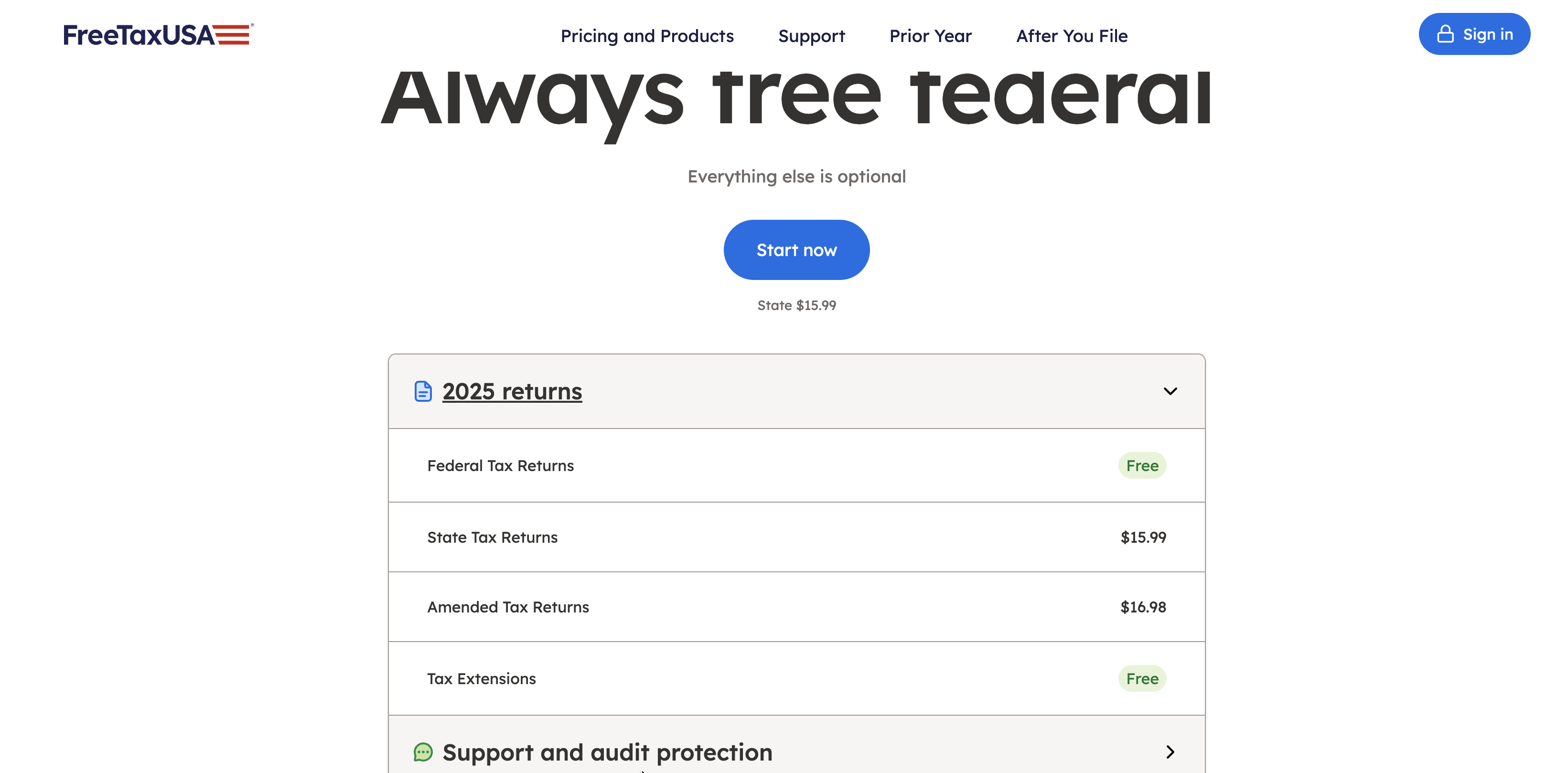
The official pricing page describes the model as “Everything else is optional.” Federal filing is free.
State returns and selected services cost extra.
These totals use the displayed prices for supported 2025 returns.
What you select | Calculation | Total |
|---|---|---|
Federal only | No paid extras | $0 |
Federal and one state | $0 + $15.99 | $15.99 |
Federal and two states | $15.99 + $15.99 | $31.98 |
One state with Deluxe | $15.99 + $7.99 | $23.98 |
One state with Pro | $15.99 + $64.99 | $80.98 |
One state, fees paid from refund | $15.99 + $24.99 | $40.98 |
The table excludes Audit Defense and other optional purchases. Card payment means paying the software fee with a card, not paying your tax bill.
Pricing and features verified on 2 November 2026 from FreeTaxUSA's official pricing and product pages.
These figures cover tax year 2025. Prices for tax year 2026 are not confirmed here.
Paying from your refund adds a separate fee
FreeTaxUSA's refund payment explanation distinguishes direct deposit from paying its charges through your refund.
You can receive your refund by direct deposit without buying the refund payment service.
If you choose that service, a banking partner receives the refund through a temporary account. It deducts the order charges and the extra service fee. The remaining money then goes to your bank account.
Check the order summary before agreeing. Compare the amount you owe upfront with the amount that would leave your refund.
The eligibility rules also require a large enough refund, electronic filing, and direct deposit. Other conditions include age and address requirements.
This option does not allow you to split the refund between multiple accounts.
If your broader goal is reducing household bills, our Rocket Money review covers a separate budgeting service. Keep that choice separate from how you pay tax filing charges.
Deluxe versus Pro: what help are you buying?
FreeTaxUSA Deluxe costs $7.99. The Deluxe comparison page lists priority support, live chat, and unlimited amended returns. An amended return corrects a return you already filed.
Deluxe suits someone who understands their tax situation but wants help using the software.
Personal tax advice belongs to Pro Support. The Pro page lists a $64.99 price, scheduled calls, screen sharing, and ProCheck.
ProCheck is a final review where a tax professional helps with questions about your completed return.
Pro still requires you to prepare the return and enter your information.
Choose a different service if you want someone to handle preparation for you.
Need | Support choice to consider |
|---|---|
Help articles and account messages | Free support |
Live chat and priority software help | Deluxe |
Personal tax advice and scheduled calls | Pro |
Someone to prepare the whole return | A different service |
Write down the question you need answered before paying. Finding a screen and deciding how to report income require different kinds of help.
Which tax documents can you import?
FreeTaxUSA supports document uploads that fill in information for you. A supported PDF upload does not mean a direct connection to your employer or brokerage.
The official import guide lists these formats.
Document | Accepted format in the guide |
|---|---|
W2, the employer wage statement | PDF or photo |
1099-R, retirement distributions | PDF or photo |
1099 MISC, miscellaneous income | PDF or photo |
1099-NEC, contractor income | PDF or photo |
1099 INT, interest | |
1099 DIV, dividends | |
1099-B, investment sales | |
Consolidated 1099, combined brokerage statement |
The guide also supports importing last year's return from several other providers.
Save the original documents before starting. After an upload, compare the entered information with those originals.
FreeTaxUSA itself recommends reviewing imported details for accuracy.
A brokerage upload can leave sections unfinished
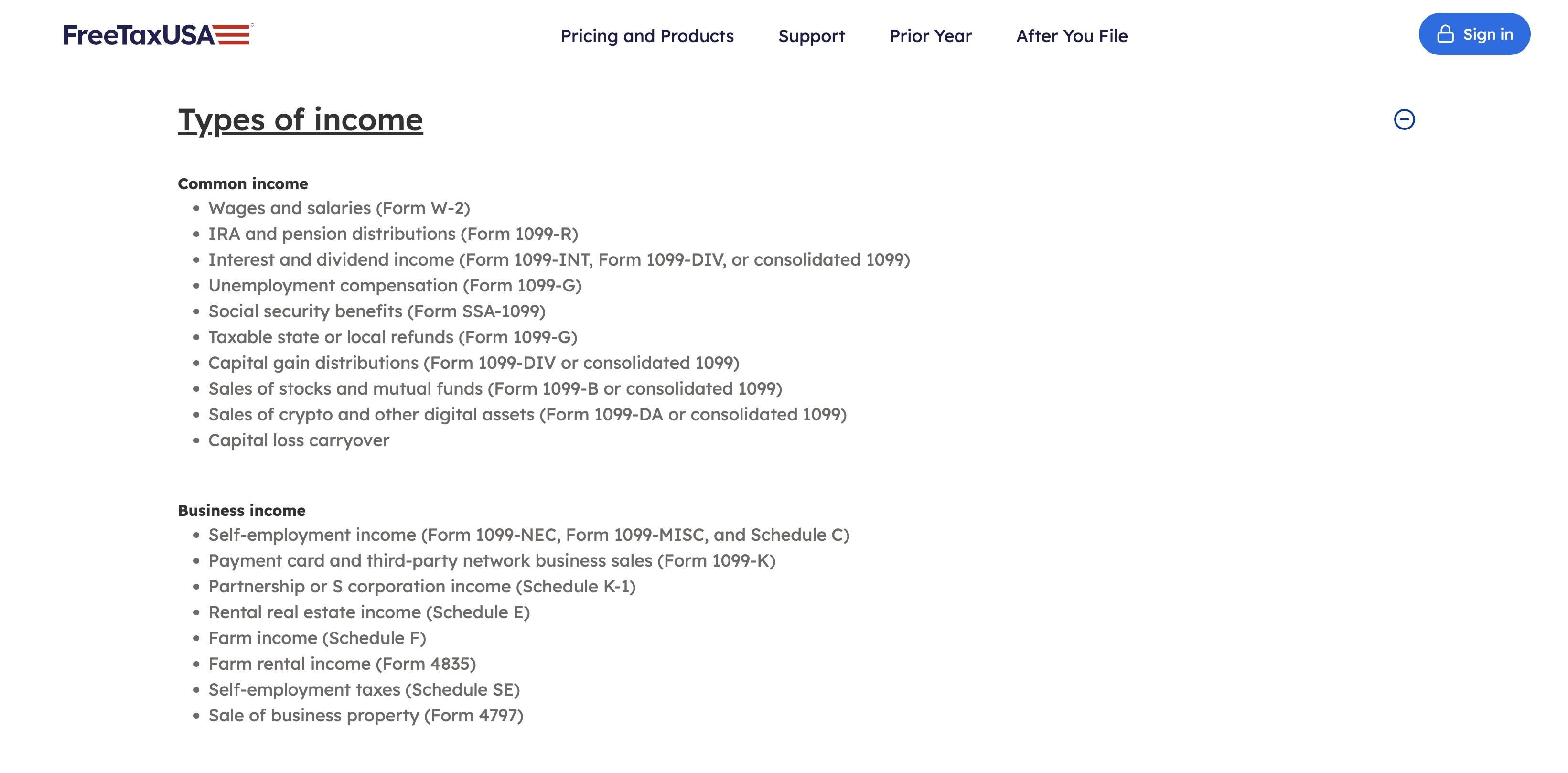
The consolidated statement instructions say the software looks for interest, dividends, stock sales, and miscellaneous income. Sections containing only zero amounts are skipped.
The same instructions say to enter 1099-DA and 1099-OID income manually. The first relates to digital assets such as crypto. The second concerns original issue discount, a type of interest income.
Compare each section of your brokerage statement with the completed return.
An accepted upload is not evidence that every section was entered.
Can FreeTaxUSA handle your business or unusual return?
FreeTaxUSA supports personal returns with several kinds of business income. Preparing a separate company return is a different task.
An official support explanation confirms support for business income reported on Schedule C within a personal return. It also distinguishes entering information from a Schedule K-1 from preparing the entity return itself.
FreeTaxUSA does not prepare Forms 1120, 1120-S, 1065, or 1041. These cover certain corporation, partnership, estate, and trust returns.
The supported forms page also lists exclusions. Examples include nonresident alien returns and customers living outside the United States when filing.
Certain foreign income and partnership situations are excluded too.
Check the exact form and any stated restriction before entering everything.
A broad description such as “business owner” does not establish that your return is supported.
Audit Defense is a separate purchase
FreeTaxUSA's Audit Defense page lists a $19.99 charge for help with an audit. An audit is a tax authority's examination of a return.
The page describes coverage lasting three years for the federal return and four for the state return.
Treat that service separately from help preparing a return or making an amendment. Read the coverage terms before choosing it.
Buying a support upgrade does not answer every question about later audit assistance.
Check the free state filing route first
The IRS Free File announcement explains that each partner sets its own eligibility rules. Some offers include state filing.
Its general income limit does not establish eligibility for every provider. Review the specific offer and its availability for the filing season you need.
If you qualify, enter through the IRS offer before starting. Avoid assuming that every route to the same brand includes the same price.
Compare the work before you switch
Put your current tax documents beside last year's return before choosing a product. List anything that changed, such as a new business, investment sales, or another state.
Use that list to check form coverage and the support you need.
If you compare two services, enter the same documents for the same tax year. Review any difference in the result before deciding which return is correct.
A lower filing fee does not resolve an unexplained difference in income or deductions.
Keep notes of questions you could not answer. Ask about those questions before buying support, so you know whether the service can help.
Save a copy of the completed return and keep the original documents. Before submitting, check the taxpayer details, bank details, and figures you entered.
Resolve missing sections or duplicate entries before sending the return.
Questions before you switch
Can I import last year's TurboTax return?
Yes. FreeTaxUSA's import guide lists TurboTax among supported providers for a prior return PDF. Check the carried information against your documents before continuing.
Is FreeTaxUSA good for freelancers?
It is worth considering whether your income fits its supported personal return forms. Check business structure and form requirements before choosing based on price.
Does Deluxe include phone support?
Phone support is listed under Pro. Deluxe offers live chat and priority support.
Will FreeTaxUSA give me a bigger refund?
A larger number alone does not establish a correct return. If two products show different results, compare the entries and obtain help with unexplained differences.
Decide before you enter everything
Choose FreeTaxUSA when your forms fit, and you can prepare the return yourself. Pick support based on the help you need, then review the full order before paying.
For more comparisons of prices and service limits, browse SaaSSwitcher's software reviews.
Before switching, confirm your hardest form is supported, and your least familiar tax question has an answer.