
A two person team pays $0. A five person team on one hub lands close to $500 a month once seats and onboarding wash out over a year.
A twenty five person team running Marketing Professional plus Sales Professional is closer to $2,800 a month before contacts, credits, or a bundle discount get counted.
Most of that gap comes from one thing: two prices sit on every tier page, and nothing tells you which is which.
I read every HubSpot pricing page, hub by hub. I cross checked each figure against HubSpot's own knowledge base and dated every source below. I ran no trial. I made no payment. What follows is what the pages actually say, not what a sales call tells you.
Two numbers sit on almost every HubSpot tier. Sales Hub Professional shows $90 and $100. Marketing Hub Professional shows $800 and $890.
Why the sticker price rarely matches your quote
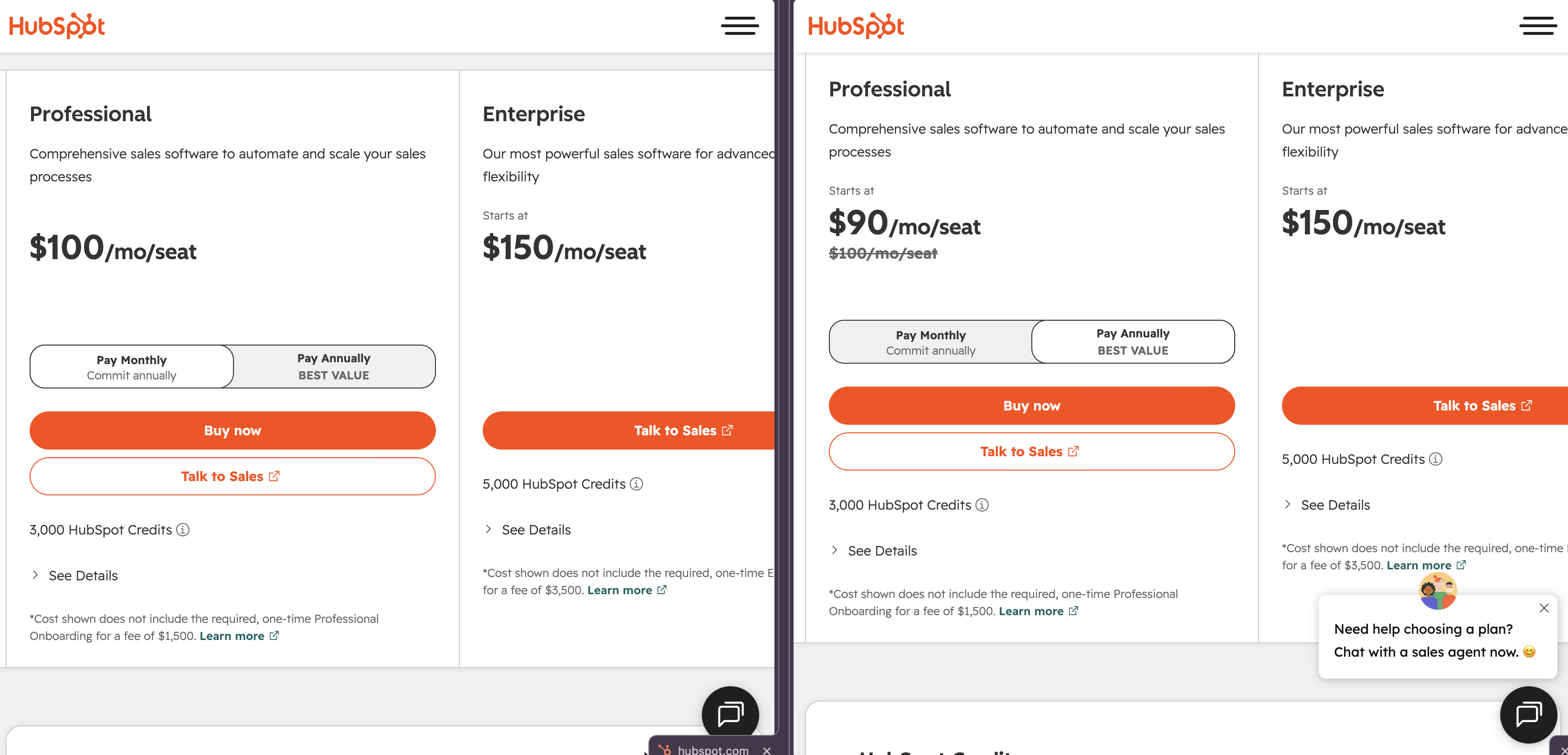
HubSpot prices every paid hub two ways. Commit to a year up front and the number drops. Pay month to month and it climbs.
Sales Hub Professional is $90 per seat a month if you pay annually, $100 if you pay monthly.
Marketing Hub Professional is $800 a month billed annually, or $890 billed month to month. That gap is structural, not a typo, and it repeats across every paid hub.
The confusion is simple. Most pricing pages print one number with no label attached. A reader landing on a page that shows "$800" cannot tell whether that is the discounted annual rate or a flat monthly charge unless the page says so in words.
One reviewer on Trustpilot, under a one star heading, described a plan structure that jumps straight from around twelve dollars a month to eight hundred, with nothing in between.
That complaint sits among HubSpot's 1,165 Trustpilot reviews and a 1.5 out of 5 TrustScore as of this check. The jump feels arbitrary until you realize $800 is the annual Marketing Professional number, not a separate cheap tier.
Want the exact dollar difference for your own seat count and term? Our annual versus monthly calculator runs the math HubSpot's own pages leave to you.
Annual contracts on Professional and Enterprise do not allow a mid term exit at a partial refund either. HubSpot's own cancellation help page states that "mid contract cancellations are not permitted," and that a subscription instead runs to the end of its committed term before billing stops.
Budget for the full term you sign. Not the month you might stop using it.
Hub by hub: what each HubSpot product actually costs
HubSpot sells seven separate hubs plus a bundled Customer Platform. Every hub below shares the same three tier shape: Starter, Professional, Enterprise. Some Enterprise pricing needs a call.
Hub | Starter | Professional | Enterprise | Onboarding fee |
|---|---|---|---|---|
Marketing | $7 to $20 per seat | $800 annual, $890 monthly | $3,600 a month | $3,000 Pro, $7,000 Ent |
Sales | $7 to $20 per seat | $90 annual, $100 monthly per seat | $150 per seat | $1,500 Pro, $3,500 Ent |
Service | $7 to $20 per seat | $90 annual, $100 monthly per seat | $150 per seat | $1,500 Pro, $3,500 Ent |
Content | $7 to $20 per seat | $450 annual, $500 monthly | $1,500 a month | Not published |
Data | $7 to $20 per seat | $720 annual, $800 monthly | $2,000 a month | Not published |
Revenue | Not available | $85 to $95 per seat | $140 per seat | Not published |
Commerce | No monthly fee | Transaction based | Transaction based | Not published |
Marketing Professional includes three core seats, 3,000 HubSpot Credits, and 2,000 marketing contacts.
Extra core seats run $45 a month each. Marketing Enterprise steps that up to five core seats, 5,000 credits, 10,000 contacts, and $75 a month per added seat.
Sales and Service follow the same seat math on their own smaller price tags.
The free plan caps out at two users, 1,000 contacts, and 2,000 marketing email sends a month. It also carries HubSpot branding on every form and email you send from it.
Which HubSpot price are you actually looking at
It is the single fact that would have saved every unhappy Trustpilot reviewer above real frustration, and it applies to every paid hub HubSpot sells, not just the two we already walked through: pay annually and the number drops, pay monthly and it climbs.
Sales and Service Professional move between $90 and $100 a seat. Content Professional moves between $450 and $500. Data Professional moves between $720 and $800. None of that is negotiated. It is one plan, priced two ways, with a gap that runs from roughly ten to eighty dollars a month depending on the hub.
Run the numbers on three seats of Sales Professional. The ten dollar per seat gap between $90 and $100 works out to $30 a month, or $360 a year, just for choosing month to month over annual.
Add a marketing and a service seat on the same terms and the annual commitment pays for itself before the first renewal even arrives.
HubSpot AEO: the newest hub
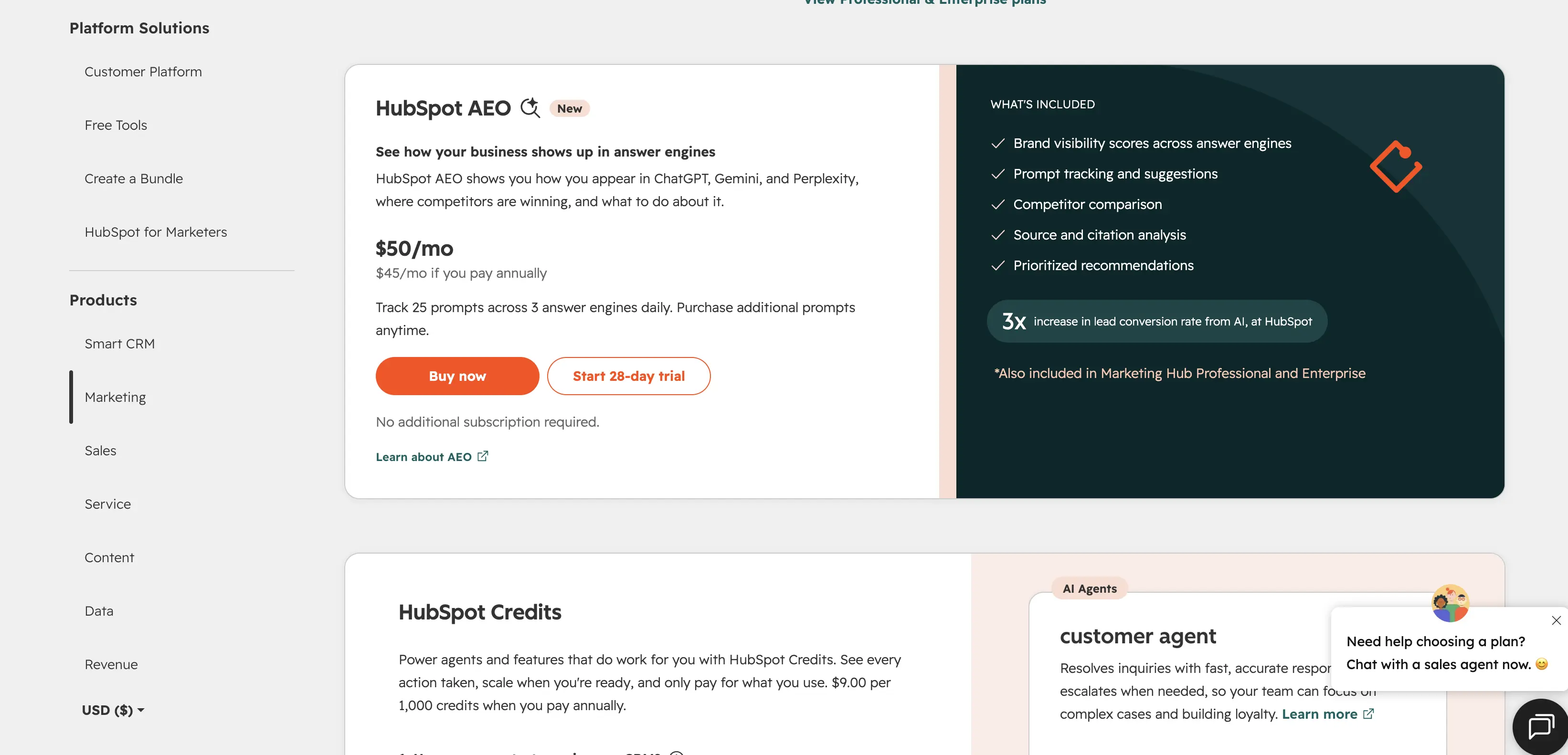
HubSpot AEO tracks how a brand shows up inside ChatGPT, Gemini, and Perplexity answers, and it launched as its own line item in 2026, priced separately from every hub above it. The price is $50 a month, or $45 paid annually, with 25 prompts included and more available to buy.
A free trial needs no card. AEO stands alone. It does not require another HubSpot subscription to buy on its own, though it gains expanded tracking when paired with Marketing Hub Professional or Enterprise.
Check the bundled allowance first. If your team already pays for Marketing Hub Professional, confirm it covers your prompt volume before adding the standalone line.
Revenue Hub is a paid product hiding behind old habits
If the last time you priced HubSpot was before 2026, you knew six hubs: Marketing, Sales, Service, CMS, Operations, and nothing else. That lineup is gone.
HubSpot folded CMS into Content Hub, folded Operations into Data Hub, and added two new products, Agent Hub and Revenue Hub.
Revenue Hub bundles CPQ, billing, and payment collection. It runs $85 to $95 a seat a month on Professional and $140 a seat on Enterprise at list price.
New Sales Hub customers currently qualify for a bundled rate of $57 a seat on Professional and $98 on Enterprise. That promotional price can change without notice, so confirm it is still live before budgeting around it.
Revenue Hub Professional caps e signatures at 25 per seat a month, pooled across every seat with a Revenue Hub license rather than issued per person.
Enterprise doubles that pool to 50 per seat. A signature counts against the pool the moment it is turned on for a sent quote, whether or not the recipient ever signs it, and a resent quote spends another one from the same pool.
A five person Enterprise team works with 250 pooled signatures a month, not an individual allowance each.
What HubSpot Credits actually cost since the April 2026 change
HubSpot Credits fund every AI agent HubSpot sells, and the system that prices them changed in April 2026, resetting how much each agent action actually costs an account.
Customer Agent now spends 50 credits per resolved conversation. Data Agent spends 10 credits per run. Prospecting Agent spends 100 credits, roughly a dollar, per qualified lead it surfaces.
Starter plans include 500 credits a month, Professional plans include 3,000, Enterprise plans include 5,000. Extra credits cost $9 per 1,000 paid annually, or a cent each on a pay as you go basis.
Unused credits reset every month and do not carry forward. HubSpot states that directly in its own documentation. A team that burns 1,200 credits in a light month and 4,000 in a busy one cannot bank the slow month against the busy one.
Size your tier for your heaviest month, not your average one.
The one contact rule that changes your bill at midnight
Marketing contacts are the cost driver most people underestimate, because going over is not a warning. It is an automatic upgrade. HubSpot's own support documentation puts it plainly: the contact tier upgrade happens at 12:00 AM in your account's local time zone the moment you cross your limit.
You are billed at the new tier from that point until renewal, even if your contact count drops back down the next day.
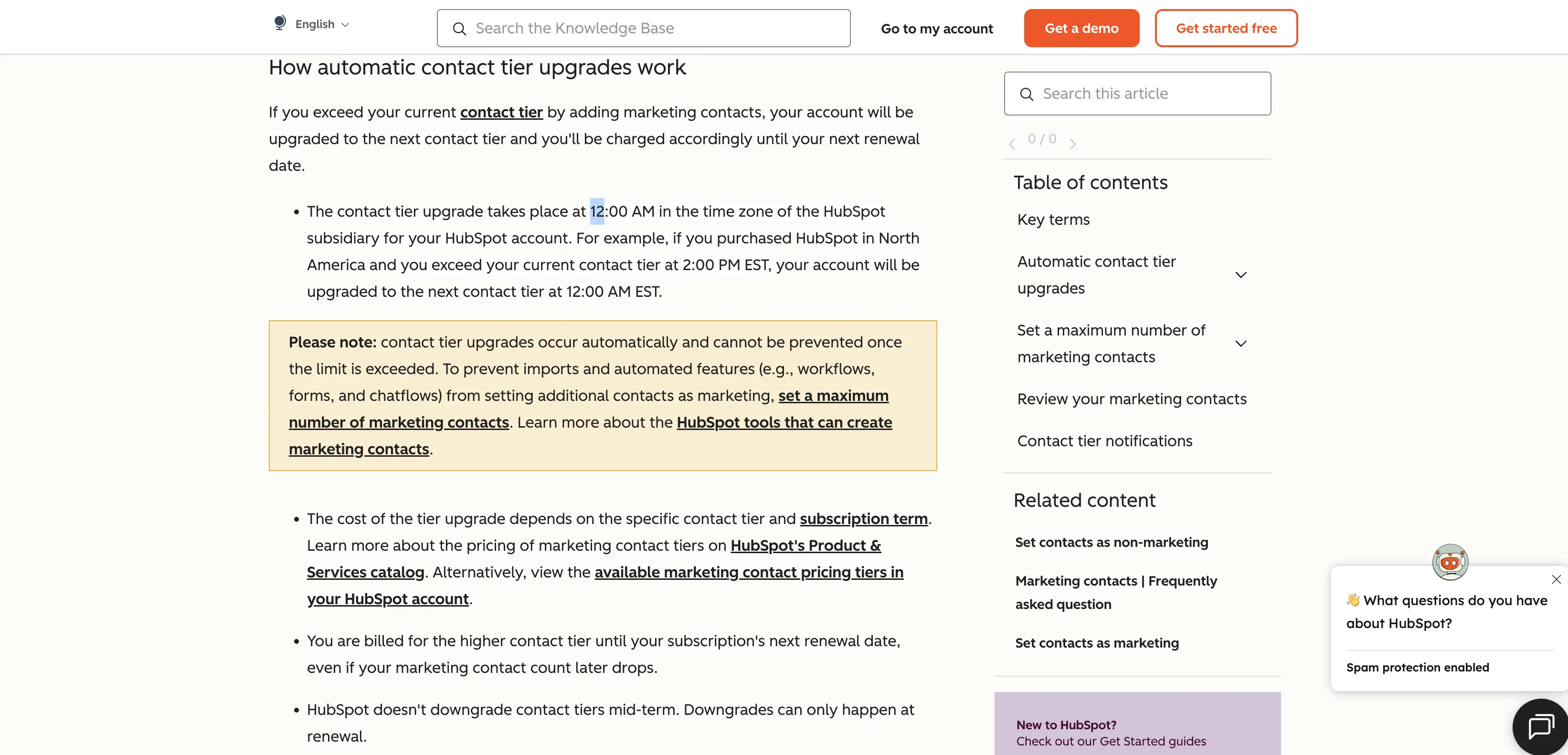
Reversing that upgrade takes real lead time. "HubSpot doesn't downgrade contact tiers mid term," and a downgrade happens only at renewal, after a request filed at least five business days ahead, through your Contract Manager on Professional or Enterprise, or a support ticket on Starter.
One imported list. One webinar signup spike. One CRM cleanup gone the wrong way. Any of those locks the account into a higher tier for the rest of the term.
Who each HubSpot plan actually fits
A solo founder or a two person team testing the CRM waters fits the free plan, as long as HubSpot branding on outbound emails is not a dealbreaker.
A five person team running one hub, usually Sales or Service, sits comfortably on Professional at that hub's per seat rate. Plan around the $1,500 onboarding fee as the real first year cost, not the monthly number alone.
A ten to twenty five person team spanning marketing and sales usually needs two Professional hubs running at once. That is where the per seat and per contact math above compounds fastest, and where the bundled Customer Platform pricing is worth comparing against buying hubs separately.
A twenty five person or larger operation, or any team already holding a Salesforce or Zoho quote, is the group HubSpot's own sales team expects to negotiate with, rather than let buy off the sticker price.
Procurement data on real signed deals shows typical discounts of 30 to 35 percent off list on Professional tiers. Treat the published Enterprise number as a starting point, not a fixed price.
Nonprofits get a separate track. Confirm eligibility and the exact discount directly with HubSpot before budgeting off the public page.
An agency or reseller managing several client portals should ask specifically about Solutions Partner terms. Those are priced and negotiated outside the self serve tiers covered here.
HubSpot pricing questions people actually ask
How much does HubSpot cost per month?
It depends entirely on which hubs, how many seats, and whether you pay annually or monthly, but a single Professional hub with three seats starts near $800 to $900 a month before onboarding.
Is HubSpot free?
Yes. The CRM core is free indefinitely for up to two users, though it carries contact and send limits and HubSpot branding.
Why is HubSpot so expensive?
The list price is only part of it. Onboarding fees, per seat add ons, marketing contact overages, and HubSpot Credits all sit on top of the headline number most people quote.
What is HubSpot's onboarding fee?
A one time charge separate from the subscription: $1,500 on most Professional hubs, $3,000 on Marketing Professional specifically, rising to $3,500 to $7,000 on Enterprise depending on the hub.
Does HubSpot charge per contact or per user?
Both. Seats are billed per user on paid tiers, and marketing contacts are billed in tiers that jump automatically when you exceed them, as covered above.
Does HubSpot require annual contracts?
Not strictly. Monthly billing exists on every hub, but it costs more per seat than the annual rate, and annual plans cannot be cancelled for a partial refund mid term.
Do unused HubSpot Credits roll over?
No. Credits reset every month on your renewal cycle, and any unused balance is gone at reset, per HubSpot's own documentation.
Where to start with HubSpot pricing
Work out your seat count first. Work out your heaviest month for contacts and credits too, before you look at a single tier page. Then run your own numbers, annual against monthly, through a calculator rather than guessing which of the two printed figures applies to you.
That one step accounts for most of the gap between what people expect to pay HubSpot and what actually lands on the invoice.
Looking for the full field of alternatives instead? Our HubSpot alternatives guide breaks down thirteen tools priced without a $3,000 onboarding fee attached. Teams comparing the CRM specifically against other options can also check our best CRM software for small business roundup, and anyone pricing Marketing Hub against a standalone tool should see our email marketing software comparison for how each vendor bills.
Pricing verified September 11, 2026 from HubSpot's official pricing pages and knowledge base articles.