

For most small teams, HubSpot CRM is the safest first stop because the free plan is a real CRM, not a stripped demo. If your reps live on the phone, Close CRM beats Pipedrive on calling out of the box. And if budget is the whole story, Zoho CRM still undercuts Pipedrive at every tier while matching most of its core features.
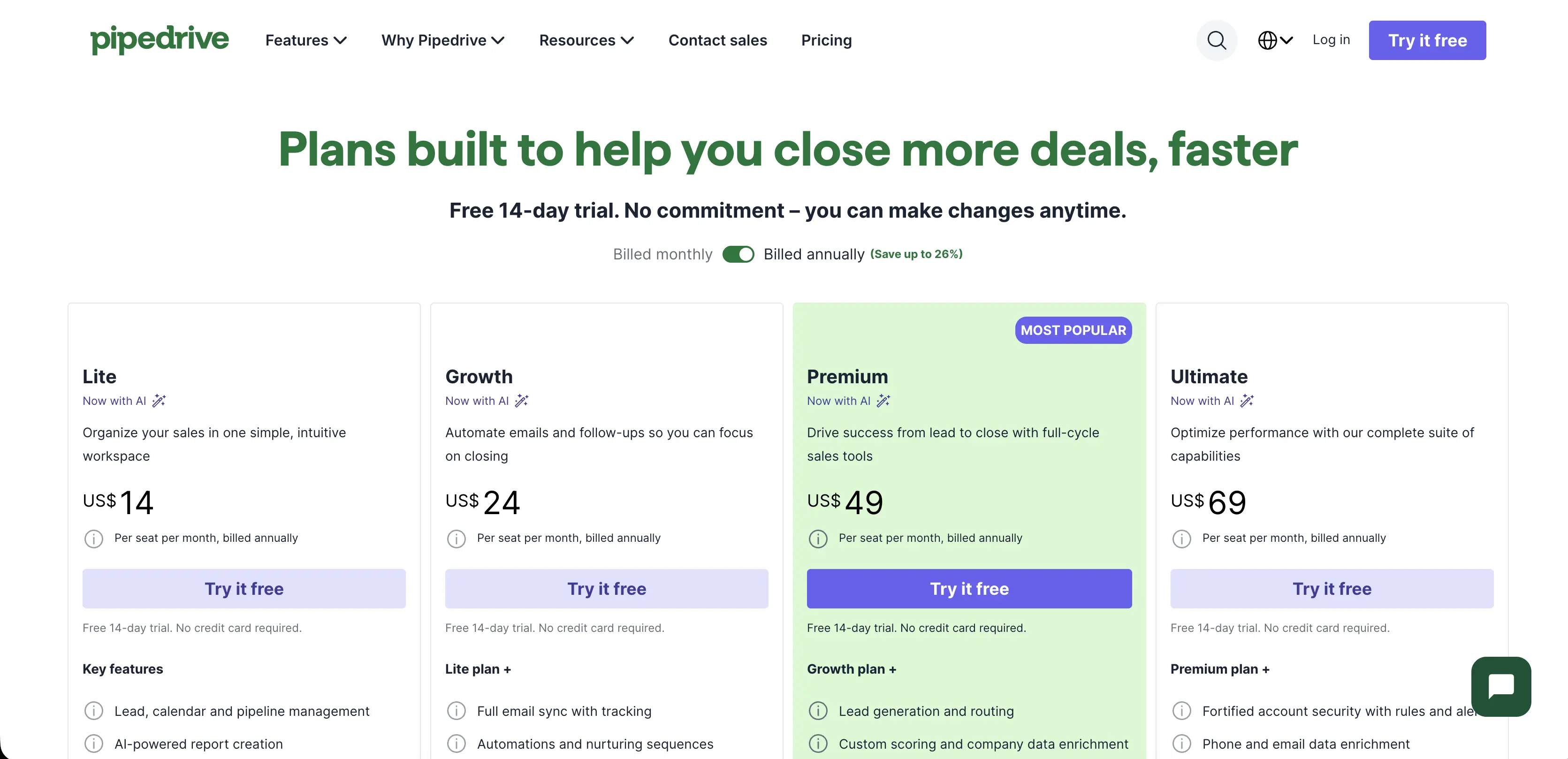
Here's the number that started this list. Pipedrive's Premium plan runs $59 per seat a month. Add the LeadBooster add-on ($32.50) and Web Visitors ($41), two features most competitors bundle in, and the real price climbs to $132.50 per seat. That's a 125% markup over the sticker price, before you've added a single extra user.
Where I'm coming from
I run a one-person operation. No sales team, no ops manager, just me chasing down guest post partners and the odd advertiser for the sites I run. I've cycled through three different CRMs to manage that outreach, and Pipedrive was the middle one. It's the easiest tool on this list to fall in love with in week one and the easiest one to start resenting by month six, once you realize half the features you assumed were included are actually add-ons.
Where Pipedrive still wins
Before the pile-on, credit where it's due. Pipedrive's visual pipeline is still one of the cleanest in the category, and the base Lite plan at $14 a seat is honestly cheap for what it does. Setup takes an afternoon, not a week, and the mobile app doesn't feel like an afterthought the way some competitors' apps do.
The API is popular enough that people build real workflows around it. On a StackShare decision thread, a QA manager at a German software company posted a question about testing Pipedrive's webhooks without polluting production data, a real operational problem that only shows up once a team is deep enough into the tool to automate it. That post picked up six upvotes and more than 9,000 views, which says more about how many teams hit the same wall than any marketing page would.
Where it stops winning is the add-on model. Lead generation, document e-signatures, website visitor tracking, and email campaigns all live outside the base price. Stack the Lite plan with just LeadBooster, and you're at $46.50 a seat, a 232% jump from the $14 sticker. Most of the tools below fold at least two or three of those features into a single price.
Read Also: 10 Best DocuSign Alternatives (cheaper per envelope, no lock-in)
The 18 Best Pipedrive Alternatives Ranked by Overall Strength
HubSpot CRM: the free plan that's actually usable.
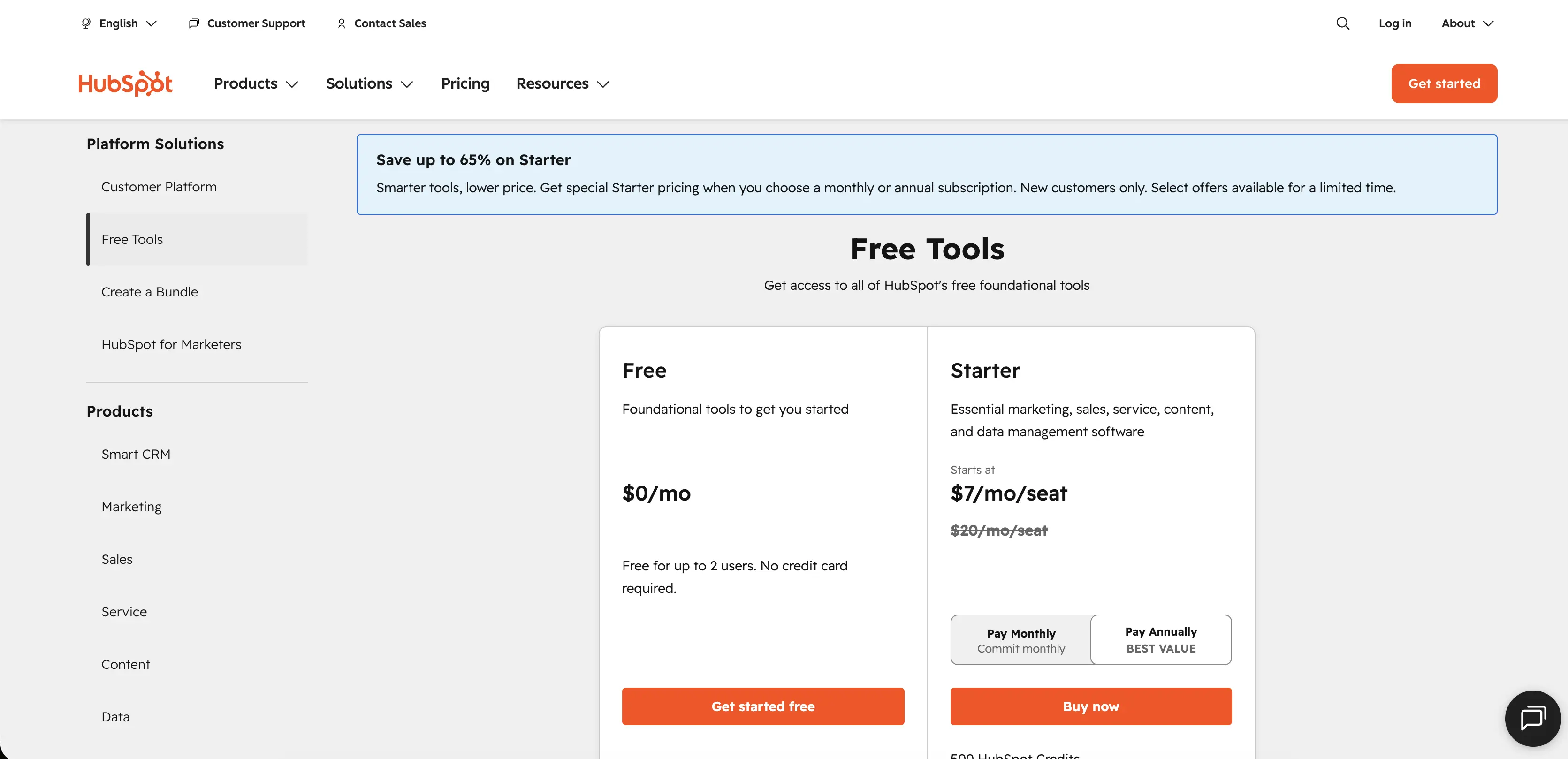
Free for 2 users, or Starter at $20/seat/month, billed annually. HubSpot CRM is a sales and marketing platform built around a shared customer record that every team in the company can see. The free tier includes real pipeline management and email tracking, not a crippled trial. The catch shows up once you need automation or custom reporting: Professional jumps to roughly $90 to $100 a seat, a steep climb from Starter.
Salesforce Sales Cloud: the enterprise standard
Starter Suite from $25/seat/month; Enterprise runs $175/seat/month, billed annually. Salesforce Sales Cloud is the CRM most large sales organizations eventually land on because it can be shaped into almost anything through custom objects and a marketplace of add-on apps. That flexibility comes with a real cost. Teams past 20 seats usually need a dedicated admin just to keep the configuration from sprawling out of control.
Zoho CRM: the value pick
Free for 3 users; Standard $14, Professional $23, Enterprise $40, Ultimate $52/seat/month. Zoho CRM is a sales and pipeline tool that undercuts almost everything on this list while still including workflow automation and custom fields on its lower tiers. The learning curve is steeper than Pipedrive's, and the interface shows its age next to newer tools, but the per-seat math is hard to beat for a bootstrapped team.
Freshsales: the AI-included budget option
Free for 3 users; Growth $9, Pro $39, Enterprise $59/seat/month. Freshsales, part of the Freshworks suite, bundles a lead-scoring AI called Freddy into every paid tier instead of gating it behind Enterprise. Built-in calling and email live in the same workspace. Teams making more than a handful of calls a day should budget for phone credits, since usage isn't unlimited even on Pro.
Close CRM: built for outbound calling
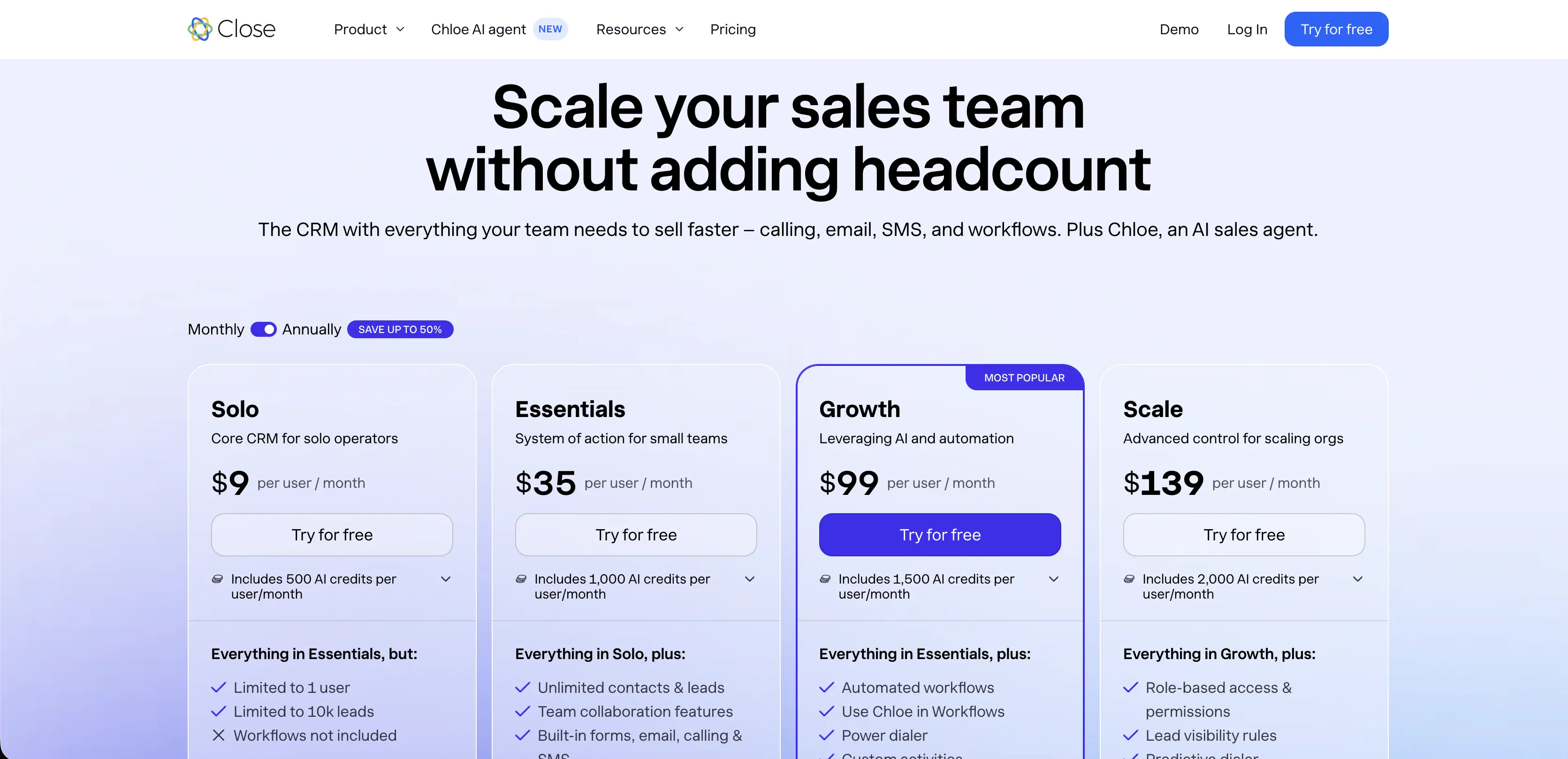
Solo at $9, Essentials $35, Growth $99, Scale $139/seat/month, billed annually. Close is a CRM built specifically for teams that sell by phone and text rather than by email drip. Calling, SMS, email, and a shared inbox are all native, not bolted on through a third-party integration. Close's AI agent, Chloe, is included at every tier. One customer, Flatiron School's Jem Millett, described the impact plainly on Close's pricing page: "Chloe is not just innovation. She is creating the work we need to do." The power dialer that makes Close worth the switch only unlocks at Growth, so budget past the entry tier if calling volume is the reason you're looking.
Salesflare: automated data entry for B2B teams
No free plan; trial only, tiers scale from roughly $29 to $99/seat/month. Salesflare is a CRM that fills itself in from email signatures and public company data, so reps spend less time typing and more time actually selling. It works best for small B2B teams selling to other businesses. Solo founders and B2C teams tend to find the automation aimed at a workflow they don't have.
Monday CRM: for teams that already run on monday.com
Free plan available; Basic from around $12/seat/month, billed annually. Monday CRM is a sales layer built on top of monday.com's broader work management platform, so pipeline boards and project handoffs can live in the same automation engine as everything else. If your company already pays for monday.com elsewhere, this is close to a free upgrade. Standing it up as a first CRM with no other monday.com use is a harder sell.
Copper CRM: the Google Workspace native
Basic $23, Professional $59, Business $99/seat/month, billed annually. Copper is a CRM designed to live inside Gmail and Google Calendar rather than pull reps into a separate app. Contact and deal updates happen from the inbox itself. Real workflow automation and bulk email don't turn on until the $59 Professional tier, so treat the entry price as a taste, not the full tool.
Bitrix24: the free-forever all-in-one
Free plan for unlimited users; paid plans from roughly $61/month flat (not per seat). Bitrix24 bundles CRM, task management, team chat, and a website builder into one platform, and the free tier doesn't cap out at two or three users the way most competitors' free plans do. The interface tries to do everything at once, and new users often need a week or two before the layout stops feeling cluttered.
Nutshell: unlimited contacts, no data cap
Foundation from $13/seat/month; Pro around $42/seat/month, billed annually. Nutshell is a pipeline CRM that skips the contact caps most budget tools use to push upgrades, so a growing database doesn't force an unplanned tier jump. Every plan includes live human support, a detail smaller teams tend to value more than they expect going in. API access waits until the top Enterprise tier, which matters if custom integrations are part of the plan.
NetHunt CRM: Gmail-native with real reporting
Basic from $24/seat/month, up to $84/seat/month on higher tiers. NetHunt CRM runs entirely inside Gmail, similar to Copper, but adds forecasting reports and Looker Studio integration that Copper doesn't offer at comparable tiers. Teams not already anchored to Gmail as their main workspace won't get much benefit from the tight integration that makes NetHunt worth considering.
Keap: sales and marketing automation for small service businesses
Pro starts at $159/month for 2 users and 1,500 contacts; extra seats run $29/month each. Keap combines CRM and email marketing with appointment booking, built for small service businesses like coaches and local shops. The pricing model is flat-fee-plus-seats rather than pure per-user, which can work out cheaper for a 2-person team and more expensive once you're past 5 or 6 people.
Zendesk Sell: for teams already inside Zendesk support
Entry tiers start under $20/agent/month, scaling with plan level. Zendesk Sell is a sales CRM built by the same company behind the Zendesk help desk, so support tickets and sales deals can share the same customer timeline. The value case weakens fast if your support team isn't already on Zendesk, since the cross-tool benefit is the whole point.
Capsule CRM: the lightweight option
Free for 2 users; paid plans start around $18/seat/month. Capsule CRM keeps the feature set deliberately small, just contacts and pipelines, without the automation depth of bigger tools. That restraint is the appeal for a team that just wants a clean pipeline without a month of setup. Teams that outgrow the basics tend to outgrow Capsule fast too.
Streak CRM: pipeline management inside the inbox
Plans run roughly $16 to $67/seat/month; the free tier is gone for new signups. Streak CRM turns Gmail into a spreadsheet-style pipeline, with deals tracked as rows right inside the inbox. It's a familiar interface for anyone who already thinks in spreadsheets. The organization stays locked to pipelines only, so teams that need a separate view for tasks or projects will feel the limit quickly.
Method CRM: built around QuickBooks
Plans generally start in the $25 to $30/seat/month range. Method CRM syncs two ways with QuickBooks, so invoices and payments stay lined up between the CRM and the accounting software without manual re-entry. Businesses not already running QuickBooks lose most of the reason to pick this tool over a more general CRM.
Read Also: 12 Best Chargebee Alternatives in 2026 (no surprise overage fees)
Insightly: CRM plus project management
Professional tier starts around $29/seat/month; marketing and service modules cost extra. Insightly pairs a standard sales pipeline with project management tools for the work that happens after a deal closes, useful for agencies and service businesses that hand off to delivery teams. The base price looks reasonable until marketing automation or a support module gets added, at which point the total climbs well past the advertised entry price.
Vtiger: the budget all-in-one
Free plan for up to 10 users; Growth from $12/seat/month, Professional $30/seat/month, billed annually. Vtiger bundles sales, marketing, help desk, and inventory tools into one suite at a price most single-purpose CRMs can't match. Reviewers consistently note the interface feels less polished than HubSpot or Pipedrive, a fair trade for teams prioritizing budget over shine.
How the 18 Pipedrive Alternatives Stack Up
Tool | Starting price (seat/month) | Free plan | Where it beats Pipedrive | The catch |
|---|---|---|---|---|
HubSpot CRM | Free, then $20 | Yes, usable | Real free tier | Professional jumps to ~$90 to $100 |
Salesforce Sales Cloud | $25 | No | Depth and customization | Needs an admin past ~20 seats |
Zoho CRM | Free, then $14 | Yes, 3 users | Price at every tier | Steeper learning curve |
Freshsales | Free, then $9 | Yes, 3 users | AI included on paid tiers | Calling isn't unlimited |
Close CRM | $9 | No | Native calling and SMS | Power dialer waits until Growth |
Salesflare | ~$29 | No, trial only | Data entry automation | Weak fit for B2C |
Monday CRM | Free, then ~$12 | Yes, limited | Fits into existing monday.com use | Weak as a standalone first CRM |
Copper CRM | $23 | No | Deep Gmail integration | Automation waits until $59 tier |
Bitrix24 | Free | Yes, unlimited users | No user cap on free plan | Cluttered interface |
Nutshell | $13 | No | No contact caps | API access is Enterprise-only |
NetHunt CRM | $24 | No | Reporting beats Copper | Only useful if you live in Gmail |
Keap | $159/mo for 2 users | No | Marketing automation bundled in | Pricier past 5 to 6 seats |
Zendesk Sell | under $20 | No | Ties into Zendesk support | Weak case outside the Zendesk stack |
Capsule CRM | Free, then $18 | Yes, 2 users | Fastest setup on this list | Outgrown quickly |
Streak CRM | $16 | No | Familiar spreadsheet feel | Pipelines only, no task view |
Method CRM | ~$25 | No | Two-way QuickBooks sync | Little value outside QuickBooks shops |
Insightly | $29 | No | Project management included | Add-ons inflate the real price |
Vtiger | Free, then $12 | Yes, 10 users | Best budget all-in-one | Rougher interface polish |
None of these numbers mean much until you run them against your own bill — the switch and save calculator does that.
Which one fits your team
If you want free and are willing to grow into paid: start with HubSpot CRM. The free tier holds up longer than most, and the upgrade path is well documented.
If your team lives on the phone: Close CRM beats everything else here on calling, texting, and a shared inbox that doesn't need a third-party dialer bolted on.
If everything already runs through Gmail: Copper or NetHunt CRM will feel closer to a plugin than a new app to learn, with NetHunt edging ahead on reporting.
If QuickBooks is the center of your business: Method CRM is the only tool on this list built specifically around that sync, and it shows in how little manual re-entry is left once it's set up.
If you're still comparing CRMs beyond Pipedrive's competitors: our best CRM software for small business roundup breaks down the annual versus monthly pricing gap across ten tools, several of which also appear on this list.
Common Questions about Pipedrive Alternatives
Is there a free alternative to Pipedrive?
Yes. HubSpot CRM, Zoho CRM, Freshsales, Bitrix24, Capsule CRM, and Vtiger all offer a genuine free plan, unlike Pipedrive, which only offers a 14-day trial. HubSpot's free tier is the most complete of the group for a first-time buyer.
What's the cheapest Pipedrive alternative with real automation?
Freshsales starts automation and AI lead scoring at $39 a seat on its Pro plan, which lands below Pipedrive's Premium tier at $59 while including features Pipedrive gates behind add-ons. Zoho CRM's Professional tier at $23 is cheaper still, with lighter automation depth.
Which Pipedrive alternative works best for a small business on a tight budget?
Zoho CRM and Vtiger both offer full CRM functionality under $15 a seat, well below Pipedrive's $14 entry tier once a single add-on gets involved. Both trade some interface polish for that price.
What I'd actually install
If I were rebuilding my outreach stack from zero tomorrow, I'd start with HubSpot's free tier and only pay the moment I actually hit a wall, not before. For a team that spends its day on the phone, Close earns the higher price tag. Pipedrive isn't a bad tool. It's a fairly priced tool wearing a price tag that stops being honest the moment you touch an add-on.