Scalefusion fits businesses that run phones, tablets, and computers on different systems. It lets IT manage all of them from one dashboard.
Device plans cost $2 to $6 for each device, each month.
You pay for the whole year, and the minimum is 10 devices.
For login rules and security checks too, the Scalefusion 360 Enterprise Suite costs $12.42 for each device, each month.
Why mixed devices are hard to manage
Managing company devices gets harder once you have more than office laptops. A retailer might use Android tablets at the checkout and Windows PCs in the back office.
Staff may also use their own phones for work.
Each device needs its own apps and limits. IT still has to push updates, answer support requests, and control who can reach company files.
If your team also needs a help desk for those requests, our guide to ServiceNow alternatives compares cheaper options.
Scalefusion brings device management, login control, and device security into one platform.
Its main appeal is how these products work together, especially for IT teams with staff spread across many sites.
What is Scalefusion?
Scalefusion is a unified endpoint management and security platform with three products:
Scalefusion UEM runs the devices themselves.
OneIdP handles user identity and Zero Trust access.
Veltar adds endpoint security and compliance checks.
All three sit in one shared management dashboard. OneIdP and Veltar features show up inside the normal UEM workflows.
The platform covers Android, iOS, iPadOS, macOS, tvOS, Windows, Linux and ChromeOS. The controls on offer change with each operating system and each plan.
It works with company-owned devices, personal devices used for work, shared devices, and devices set up for a single job.
IT admins enroll each device, add it to a group, and apply a profile that sets its apps, settings, and limits.
After that, they can make changes or look into problems remotely. Nobody has to set up each device by hand.
Scalefusion UEM: device management
UEM is the base of the platform. It covers setup, policies, apps, updates, inventory, and remote support across mixed devices.
A business opening several stores can build one tablet setup and send it to every location. The office laptops stay on their own separate policies.
Enrollment and policies
Scalefusion supports Android Zero Touch Enrollment, Apple Automated Device Enrollment and Windows Autopilot, among other methods.
Once a device is enrolled, it gets the password rules, network settings, app limits, and security policies set for its group.
Admins can also send out public apps or the company's own apps, and share business documents.
Kiosk mode for frontline devices
Admins can lock Android and iOS devices to one app or a short list of approved apps. Browser limits are available where the system supports them.
This suits checkout tablets, like the ones sold with wine retail POS software. It also suits front desk tablets and other devices built for one job.
Location tracking and geofencing help IT keep track of eligible company-owned field devices.
Updates and remote fixes
UEM manages operating system updates. It also patches third-party apps on supported platforms.
With Remote Cast & Control, technicians can view a device's screen and take control where the platform allows it.
Remote commands and terminal tools help with other upkeep. DeepDive Analytics, reports, and workflows give a view of every device at once.
Extras on the Enterprise plan
The Enterprise plan adds AirThink AI. It writes scripts from plain English prompts, and IT admins review each script before they send it out.
Enterprise also adds deeper troubleshooting and more integration options.
These extras help teams with lots of repetitive upkeep work. A simple rollout of phones and tablets may not need them.
OneIdP: identity and Zero Trust access
OneIdP solves a different problem. A correct password does not show whether the device asking for access meets company policy.
OneIdP ties each sign-in decision to the user and to device data from Scalefusion UEM.
It handles directory management and connects with identity providers like Microsoft Entra ID, Google Workspace, and Okta.
Single Sign-On gives staff access to their assigned work apps with one login. Provisioning integrations help IT create and remove user accounts as people join or leave.
On Windows and macOS, OneIdP Keycard lets staff log in to the computer with their work identity. Extended Access Policies can put conditions on app access.
They check signals like management status, device compliance, location, and network.
OneIdP also offers Just-in-Time Admin. It gives a user admin rights for a short time, instead of permanent local admin rights.
OneIdP fits best when a company wants its access rules to follow the state of each device. It helps most when staff work from many places.
Veltar: endpoint security and compliance
Veltar adds security controls to devices managed in Scalefusion UEM. It cuts risk on each device. It also gives IT and security teams a way to enforce policies and act on what they find.
Its Secure Web Gateway filters the web on managed devices. It can block sites by category and block harmful domains, even when staff are away from the office network.
Endpoint data loss prevention controls access to USB drives and other plugged-in hardware. App control can block software on supported devices.
Veltar checks compliance against CIS Level 1 and 2 benchmarks on supported Apple devices and CIS Level 1 on Windows.
It also uses Android Enterprise Device Trust signals. IT teams can review the findings, spot settings that have drifted and apply supported fixes.
Its vulnerability management finds affected Windows and macOS devices. It ranks each finding with CVSS, EPSS, and CISA's Known Exploited Vulnerabilities catalog.
When a patch exists, the link to UEM helps teams go straight from finding a problem to fixing it.
For access to internal company resources, Veltar offers a Business VPN built on WireGuard. It runs on a server the company hosts itself.
The mix of security controls depends on the plan and the operating system. Check coverage against the devices you actually run before you buy.
Scalefusion pricing and plans
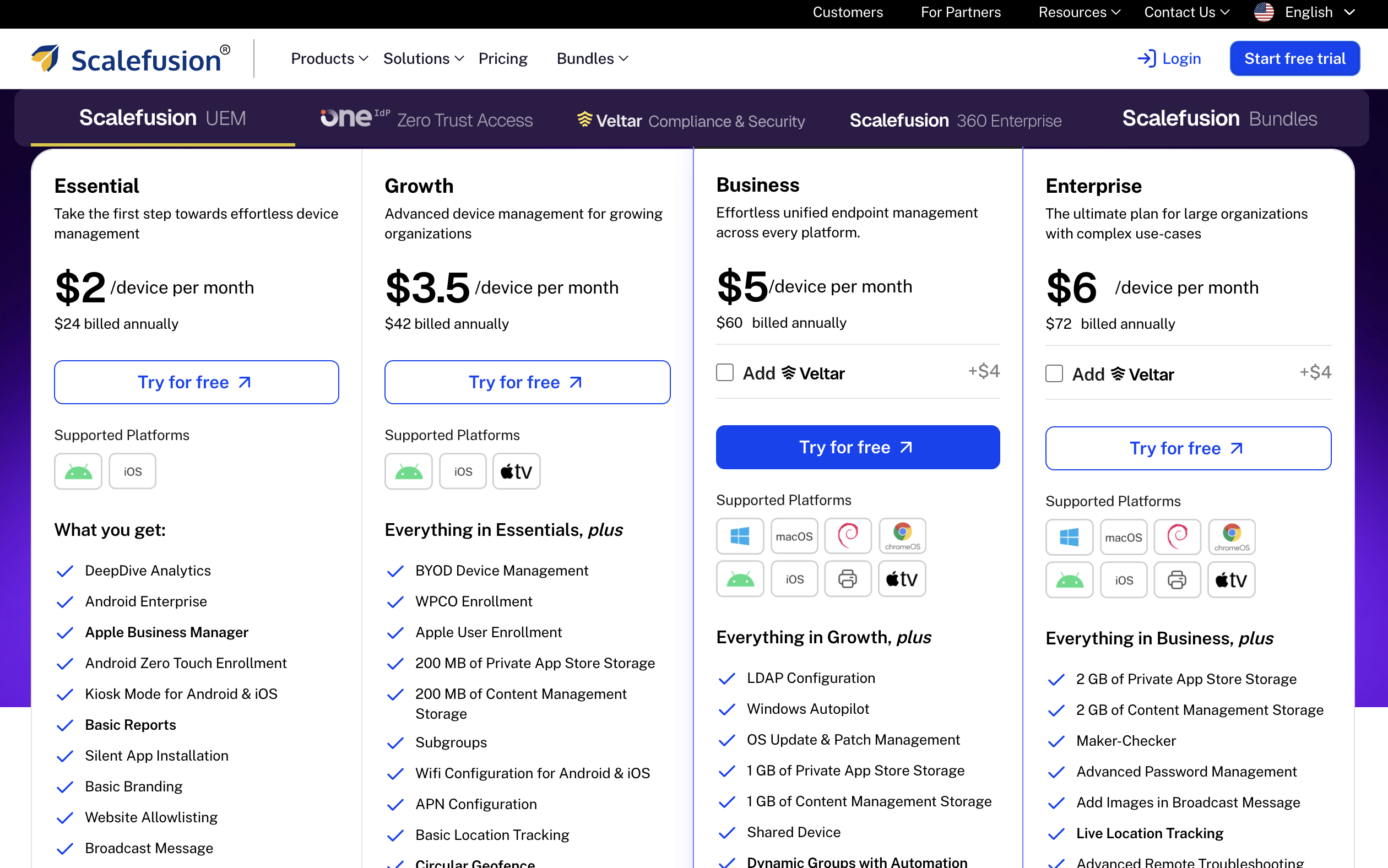
Scalefusion sells UEM, OneIdP, and Veltar as separate plans. OneIdP and Veltar sit on top of Scalefusion UEM and cost extra.
All prices are in US dollars for each device. You pay for the whole year, and you need at least 10 devices in total. These prices are from the Scalefusion pricing page as of 18 November 2026.
This table shows what each plan costs for one device.
Product | Plan | For each device, each month | For each device, for the whole year |
|---|---|---|---|
UEM | Essential | $2 | $24 |
UEM | Growth | $3.50 | $42 |
UEM | Business | $5 | $60 |
UEM | Enterprise | $6 | $72 |
OneIdP | Access Core | $4 | $48 |
OneIdP | Access Pro | $5 | $60 |
Veltar | Security Core | $3 | $36 |
Veltar | Security Pro | $4 | $48 |
Bundle | Scalefusion 360 Enterprise Suite | $12.42 | $149 |
What each plan adds
Essential covers core Android and iOS management. Growth adds support for personal devices used for work, plus more setup options.
Business is the first plan for wider desktop management, patching, and remote admin. Enterprise adds AirThink AI, webhooks, and more admin controls.
OneIdP Access Core covers device login, directory links, and Just-in-Time Admin. Access Pro adds conditional Single Sign-On.
Veltar Security Core focuses on web and network protection. Security Pro adds compliance checks, device access limits, and app control.
What the 360 suite saves
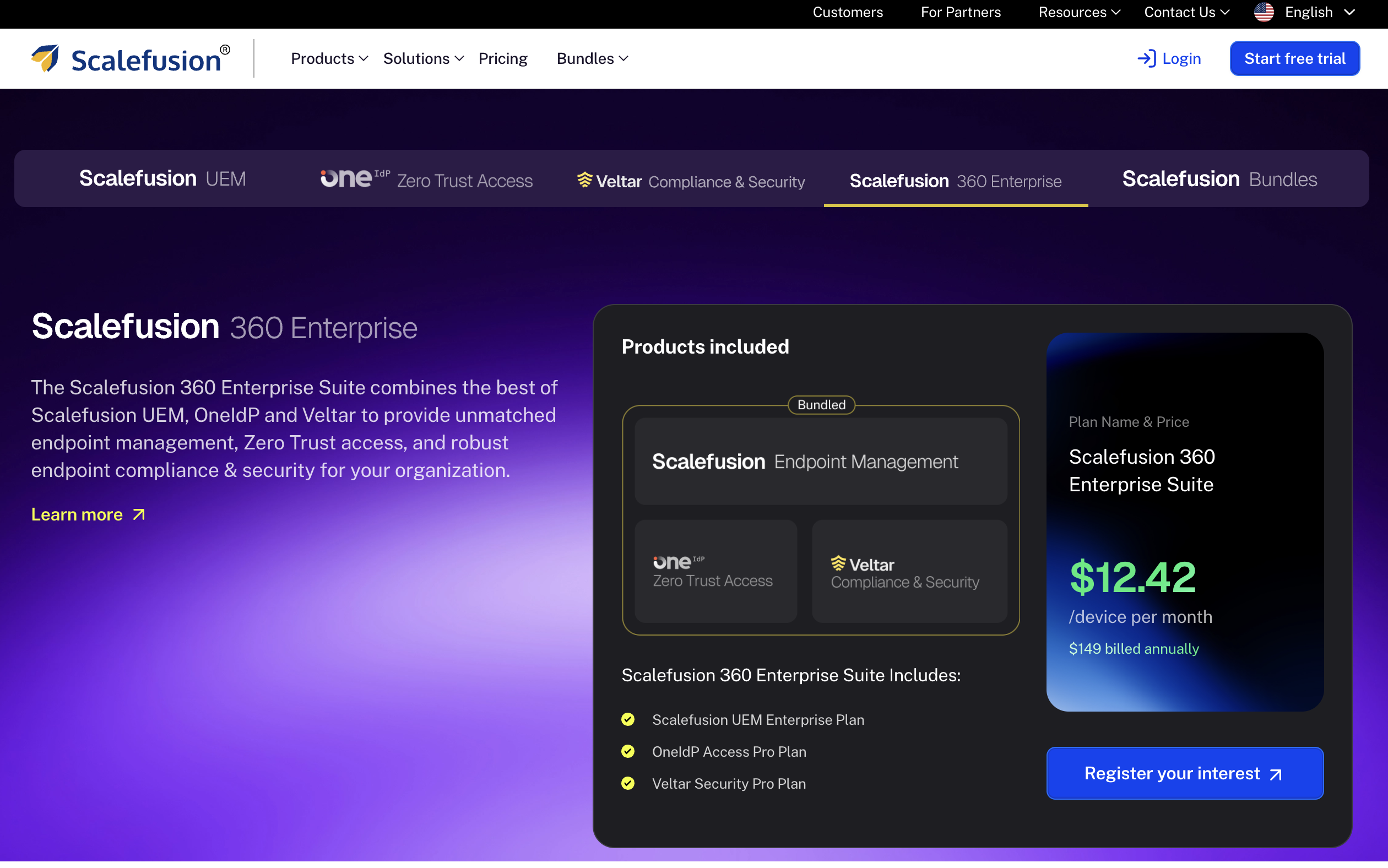
The Scalefusion 360 Enterprise Suite bundles UEM Enterprise, OneIdP Access Pro and Veltar Security Pro.
The suite costs $12.42 for each device, each month.
Bought one at a time, the same three plans cost more:
UEM Enterprise: $6 for each device, each month
OneIdP Access Pro: $5 for each device, each month
Veltar Security Pro: $4 for each device, each month
Added together, that is $15 for each device, each month.
The suite costs $2.58 less for each device, each month.
Now take the 10-device minimum for a whole year. The suite costs $149 for each device for the year. For 10 devices, that is $1,490.
From the table above, the three separate plans add up to $180 for each device for the year. For 10 devices, that is $1,800.
The suite costs $310 less than the separate plans for 10 devices over one year.
A 14-day free trial gives access to every feature. Cloud setup has no setup fee, and professional help with deployment is billed separately.
To see how this fits with the rest of your software bill, add it to our SaaS spend calculator.
Strengths and limits
What works well
Scalefusion's main strength is range. It manages office computers and single-job kiosks, and it ties device data to access and security rules.
Its enrollment, remote support, patching, and reporting tools help most when devices sit across many sites.
Companies can also start with UEM and add OneIdP or Veltar later, as the need grows.
Where it falls short
Many desktop and automation features sit in the higher UEM plans. OneIdP and Veltar each add their own cost.
Features also change by platform. A feature on the list may not work the same way on Android, Windows, and macOS.
Rolling out the full suite takes planning around device groups, access rules and security policies.
The cloud dashboard keeps devices, profiles, apps and reports in one place.
Scalefusion also offers Help Center guides, premium support on every plan, and optional deployment help.
A trial with your real devices and workflows is the best way to judge the dashboard and the support.
Scalefusion FAQ
How much does Scalefusion cost?
Scalefusion UEM costs $2 to $6 per device, each month. You pay for the whole year, and the minimum is 10 devices.
Does Scalefusion have a free trial?
Yes. The trial lasts 14 days and includes every feature.
Can you pay for Scalefusion month by month?
No. Every Scalefusion plan is paid for the whole year.
Which Scalefusion plan manages Windows and Mac computers?
Business is the first plan that manages Windows and macOS. Essential and Growth focus on Android and iOS.
Is Scalefusion worth it?
Scalefusion is worth a close look for companies running mixed operating systems. It suits frontline devices and staff spread across many locations best.
Kiosk mode and remote admin give UEM a clear daily job. OneIdP and Veltar make more sense when IT and security teams also want access decisions and security fixes tied to managed devices.
Start with your devices and the work IT has to do, then pick the plan. A business with a small set of phones and tablets may need only a basic UEM plan.
A company with desktops, remote staff, and stricter access or compliance rules has a stronger case for the higher plans or the 360 suite.