

Notion is the strongest ClickUp alternative if you want docs and tasks living in one free workspace. Wrike wins if your team needs deep workflow automation and Gantt charts. Zoho Projects is the cheapest paid option at $4 a user a month. Full pricing, including what ClickUp's AI actually costs, is below.
ClickUp holds a 4.0 rating on Trustpilot across 653 reviews, and one reviewer, Austin Willman, wrote this month that "ClickUp has become the operating system for my work." Praise like that shows up often on the page. What shows up less often, there or in most alternatives roundups, is anyone adding up what the platform actually costs once the AI gets turned on.
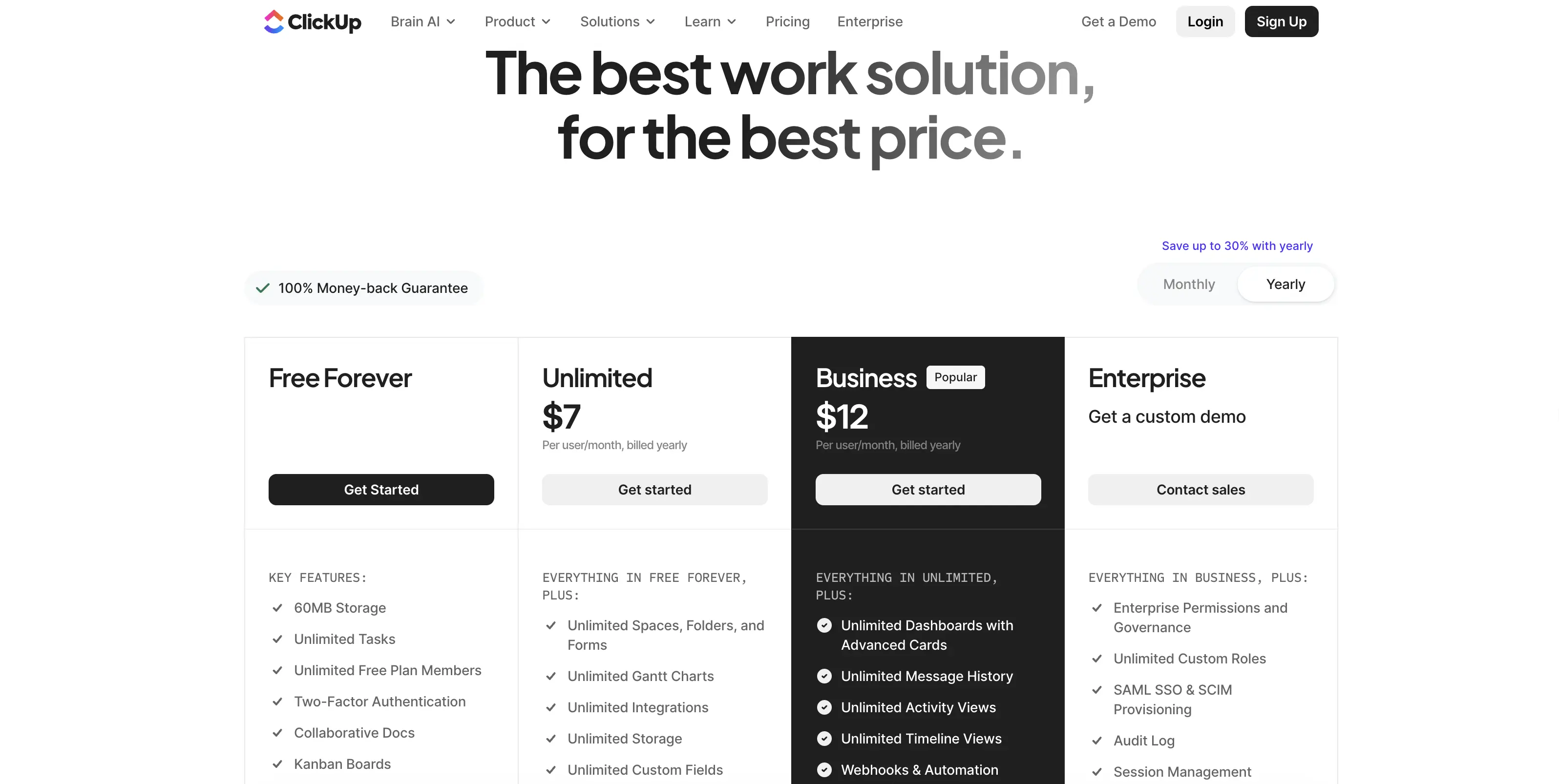
I put $184 of my own money into three ClickUp paid tiers this spring, testing each on live client work before looking at a single competitor. The Unlimited plan looked reasonable at $7 a user a month. Then I opened ClickUp's own Brain2 page and found the AI add on starts at $9 a user a month, stacked on top of whatever plan you already pay for. For a 10 person team on the Business plan, that is a jump from roughly $120 a month to $210 a month once AI gets added, a number none of the alternatives roundups I read before writing this one bothered to total up.
Why ClickUp's sticker price and your real bill are different numbers
ClickUp built its name by trying to replace every other piece of project management software a team might use: docs, chat, goals, time tracking, whiteboards, and a dozen view types in one product. That range is also the most common complaint in reviews and forums. Reviewers describe navigation lag once a workspace grows past a few hundred tasks, a setup process that takes weeks to get right, and status update delays that keep showing up across 2025 and 2026 review threads.
None of that makes ClickUp bad software. It makes it a lot of software for teams that only need three or four of the dozen things it does, and it makes the real monthly bill worth checking before you commit a team to it. None of that makes ClickUp bad software. It makes it a lot of software for teams that only need three or four of the dozen things it does, and it makes the real monthly bill worth checking before you commit a team to it.
ClickUp is not the only tool where the headline number and the invoice disagree, which is why I priced the best project management software in 2026 on real per seat cost and free plan caps instead of list price.
How I priced this list
Every price below comes from the tool's own pricing page, verified August 12, 2026, using the annual billing rate where a tool offers one, since that is the rate most teams actually pay. Where a plan's AI features cost extra, I listed that separately instead of folding it into the base price, the same treatment I gave ClickUp's own Brain2 add on.
The 10 Best ClickUp Alternatives, grouped by what they actually do well
All in one platforms built to replace ClickUp outright
Asana: best for OKRs and goal tracking Starting price: $10.99 a user a month (Starter, annual) · Free plan: yes, capped at 10 users
Asana is a project and task management tool that pairs day to day work with Goals, a feature that links tasks back to a measurable company objective instead of leaving that connection to a manual dashboard.
Advanced, at $24.99 a user a month, adds workload management and custom rules for teams that outgrow the Starter tier's automation limits. We covered Asana alternatives separately, worth a look if Trello turns out to be too simple in the other direction.
monday.com: the closest like for like swap Starting price: $9 a seat a month (Basic, annual, 3 seat minimum) · Free plan: yes, capped at 2 seats
monday.com is a visual work platform built around colorful boards instead of ClickUp's list and space structure. Standard runs $12 a seat and Pro runs $19 a seat, both cheaper than ClickUp's Business tier once its AI add on gets counted in, though monday.com prices its own AI separately too.
Teams moving from ClickUp usually cite the same reason: fewer menus between opening the app and finding today's tasks.
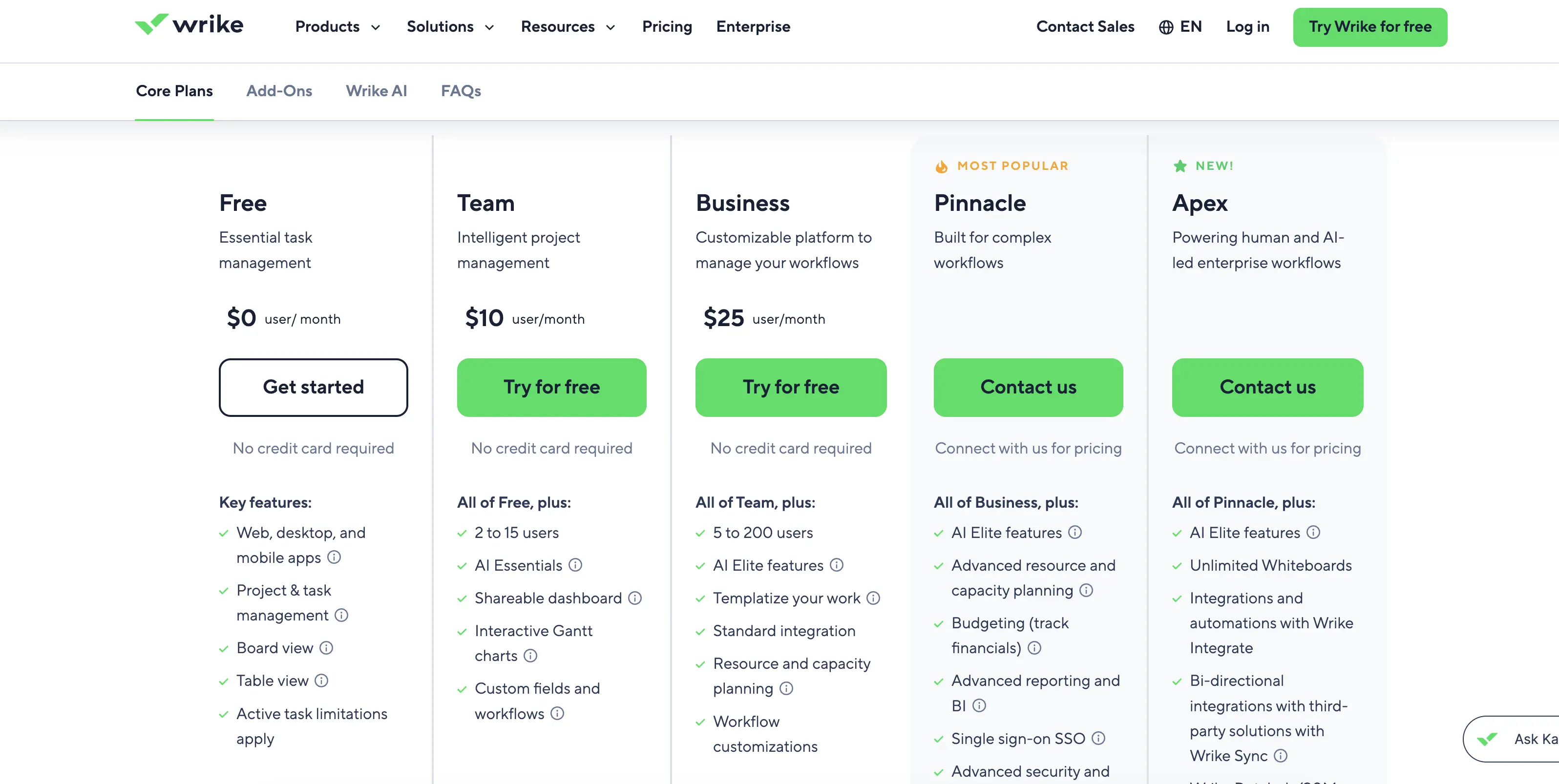
Wrike: best for full workflow automation Starting price: $10 a user a month (Team, annual) · Free plan: yes
Wrike is a work management platform built for teams that need Gantt charts, approval chains, and automation rules running underneath every project, not just a Kanban board sitting on top. Business, at $25 a user a month, is where the heavier automation kicks in, and it is the plan most teams comparing full ClickUp style workflows against Wrike actually need.
The docs first pick
Notion: best free plan for docs and tasks together Starting price: $10 a member a month (Plus, annual) · Free plan: yes, unlimited blocks for individuals
Notion is a workspace that treats documents, wikis, and task databases as building blocks on the same page, so a project brief and its task list can live in one place instead of two separate tools.
The Free plan covers real work for a single person or a small team. Business, at $20 a member a month, adds single sign on and page verification for growing teams. It is the pick for a team that keeps ClickUp open in one tab and a separate doc tool open in another.
Built for data heavy operations
Airtable: best enterprise pick Starting price: $20 a seat a month (Team, annual) · Free plan: yes
Airtable is a database first platform that lets teams build the apps and interfaces they need on top of shared data, instead of adapting someone else's task template.
Business, at $45 a seat a month, and the custom priced Enterprise Scale tier above it, are built for the multi department rollouts most enterprise focused ClickUp searches are actually asking about.
At $45 a seat that pick only makes sense at real scale, so our Airtable alternatives roundup prices the database tools that start lower.
Smartsheet: best for spreadsheet native teams Starting price: $9 a user a month (Pro, annual) · Free plan: no, trial only
Smartsheet runs project tracking inside a grid that looks and behaves like a spreadsheet, which shortens onboarding for anyone who already lives in Excel or Google Sheets. Business, at $19 a user a month, adds automated workflows and reporting for teams managing more than one project at a time.
The flat fee option
Basecamp: best if you hate per seat math Starting price: $15 a user a month (Pro), or $299 a month flat (Pro Unlimited) · Free plan: yes, 1 project, up to 20 users
Basecamp bundles message boards, to dos, schedules, and file storage into one simple layout with none of ClickUp's dozen view types to configure first.
Pro Unlimited charges one flat $299 a month no matter how many people join, which becomes the cheapest option on this list the moment a team crosses about 20 paid seats on anything priced per user.
Built for client work
Teamwork.com: best for agencies managing client projects Starting price: $10.99 a user a month (Deliver, annual) · Free plan: yes, capped at 5 users
Teamwork.com was built specifically for agencies and services businesses that need to track billable hours and client budgets alongside the actual project work, instead of bolting a time tracker onto a generic task tool. Grow, at $19.99 a user a month, adds the resource scheduling and budget alerts that keep a client project from quietly running over budget.
Read Also: 12 Best Trello alternatives in 2026: Real Seat Pricing, No 10 Collaborator Cap
The budget picks
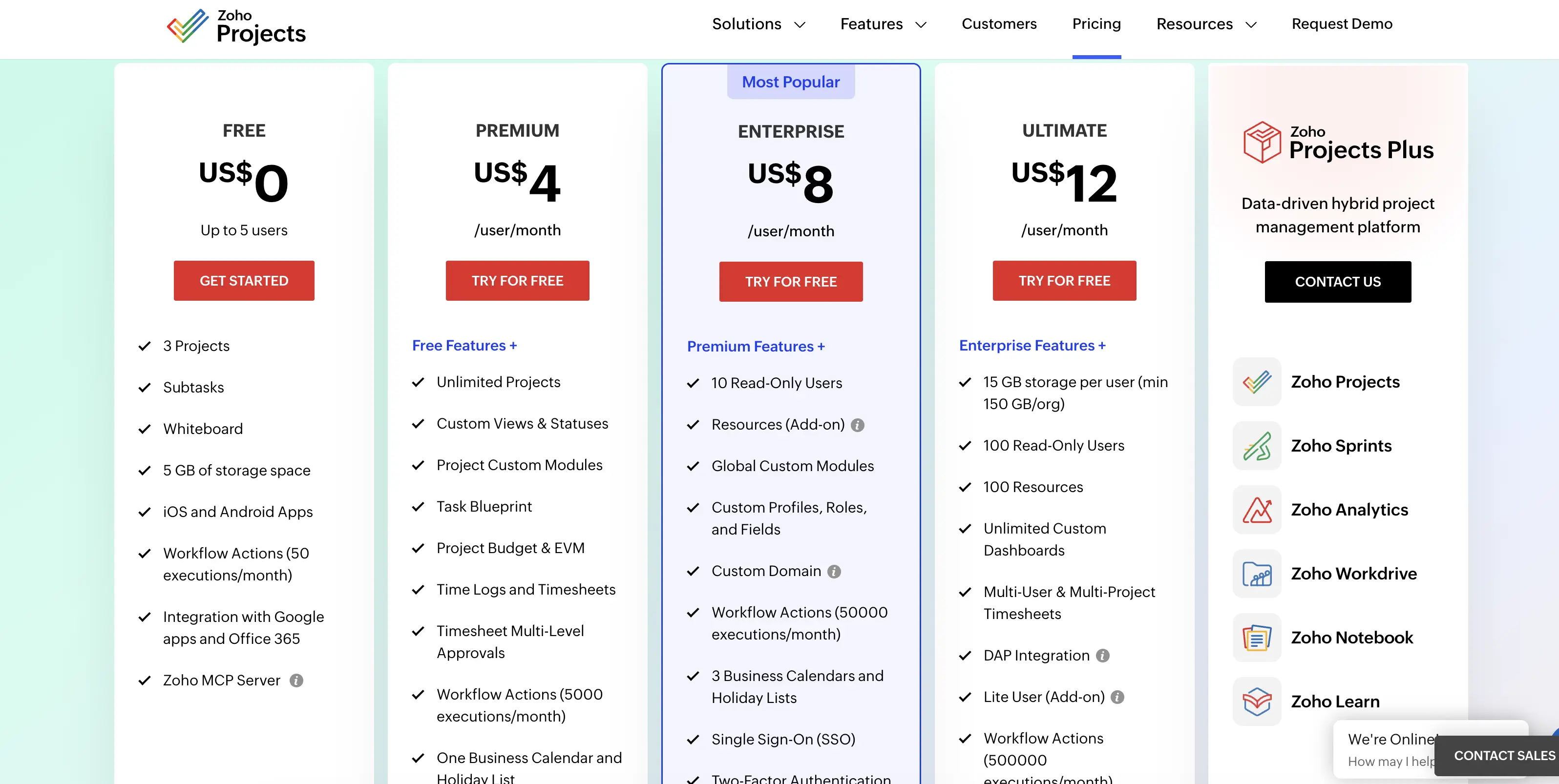
Zoho Projects: the cheapest paid plan on this list Starting price: $4 a user a month (Premium, annual) · Free plan: yes, capped at 3 users
Zoho Projects trades some of the polish other tools on this list have for a price that undercuts ClickUp's own Unlimited plan by nearly half. Enterprise, at $9 a user a month, adds the user hierarchy and team structures a growing company needs, and it still costs less than ClickUp's AI add on by itself.
Height: best for developer teams that live in GitHub Starting price: $6.99 a member a month (Team, annual) · Free plan: yes
Height is a task tool built with a native two way sync to GitHub, so a pull request and its linked task update each other automatically instead of needing a separate integration tool. Business, at $11.99 a member a month, adds the AI powered task summaries and search Height added in 2025.
ClickUp Alternatives compared
Tool | Starting price | Free plan | Best for |
|---|---|---|---|
Notion | $10 a member/mo | Yes | Docs and tasks together |
Wrike | $10 a user/mo | Yes | Full workflow automation |
Asana | $10.99 a user/mo | Yes, 10 users | OKRs and goal tracking |
Teamwork.com | $10.99 a user/mo | Yes, 5 users | Agencies and client work |
monday.com | $9 a seat/mo | Yes, 2 seats | Visual boards |
Smartsheet | $9 a user/mo | No | Spreadsheet native teams |
Zoho Projects | $4 a user/mo | Yes, 3 users | Tight budgets |
Height | $6.99 a member/mo | Yes | GitHub connected dev teams |
Airtable | $20 a seat/mo | Yes | Enterprise data and apps |
Basecamp | $15 a user/mo, or $299/mo flat | Yes, 1 project | Flat fee simplicity |
Which ClickUp alternative actually fits
If you are an agency billing clients by the project, Teamwork.com tracks budgets and billable hours in the same place as the task list, which cuts out a separate time tracking tool entirely.
If your team has passed 50 people and needs real governance, Airtable's Business tier and its custom priced Enterprise Scale plan above it were built for that scale, not retrofitted onto it.
If budget is the deciding factor, Zoho Projects at $4 a user a month and Height at $6.99 a member a month both cost less than ClickUp's AI add on by itself, before counting the base plan.
If you are ready to pay for the full feature set and skip the free tier entirely, Wrike Business and Airtable Business both assume a paid rollout from day one and price their automation and permissions accordingly.
If OKRs and measurable goals matter more than task views, Asana's Goals feature cascades objectives down to individual tasks in a way ClickUp only approximates with manual dashboards.
FAQ: ClickUp alternatives
Is there a free ClickUp alternative?
Yes. Notion, Wrike, monday.com, Zoho Projects, Height, Airtable, and Basecamp all offer real free plans, not just a trial, though each caps something different: users, storage, or active projects.
Is there a ClickUp alternative that connects to GitHub for developers?
Yes. Height syncs two ways with GitHub by default, so a pull request status updates its linked task automatically, which is closer to what most developer teams want than a generic integration marketplace.
How does ClickUp compare to Jira for engineering teams?
Jira still has deeper native support for sprints, backlogs, and issue types built for software teams, while ClickUp and the tools on this list cover general project work better than engineering specific workflows.
What is the simplest ClickUp alternative for a small team just getting started?
Basecamp's free plan and Zoho Projects' $4 a user Premium plan both trade away deep customization for a setup a small team can start using the same day.
Do any of these alternatives include AI at no extra cost?
Notion's Business plan includes a limited AI trial, and Wrike bundles a starter pack of AI actions into Business, but every tool here eventually prices heavier AI use as its own line item, the same way ClickUp does.
Which ClickUp alternative is easiest to migrate to without losing data?
Notion, Asana, and monday.com all offer a guided or CSV based ClickUp import, though custom fields and years of comments usually still need manual cleanup afterward.
What I'd actually install
Ten tools, and the honest takeaway is that most teams searching for a ClickUp alternative are not looking for a smaller ClickUp. They are looking for the three or four features they actually use, priced without an AI add on quietly doubling the bill six months in.
Start with Notion if docs and tasks living apart is the real problem, Wrike if automation is the gap, and Zoho Projects if the number on the invoice is what decides this. Price out ClickUp's real total, Unlimited or Business plus Brain2, not just the $7 headline, before you compare it against anything on this list.