
Zoho Projects is the cheapest real paid seat at $3 per user per month, billed annually. ClickUp gives the most generous free plan with no member cap. Jira is the strongest pick for engineers. Basecamp only makes financial sense once your team passes 19 people.
The same five person team can pay $15 a month or $75 a month for project management software. Same five people, same work, five times the bill. I paid for one month on the entry paid tier of all ten tools below out of my own budget, just over $210 in total, and ran the same 40 task client launch through each one. Features overlapped heavily. The bills did not.
Here is the number the top ranking roundups leave out: free plan seat caps range from 2 people to 20 people across these ten tools. Asana and monday.com both stop you at 2 seats. Basecamp lets 20 people in for nothing. That is a tenfold spread hiding behind the same two words, "free plan."
Why so many small business teams overpay
Most teams pick a project management tool on features and get billed on seats. That is where the money goes.
monday.com holds a TrustScore of 2.3 across 3,424 Trustpilot reviews, and Trustpilot's own summary of recent reviews points at pricing structure and unexpected costs as a repeated theme. It is a useful signal, because monday.com is not a bad product. It is a product whose free tier stops at 2 seats and whose per seat rate climbs fast once you want automations.
The second trap is AI billing. Several SaaS project management platforms now meter AI on top of the seat. Notion's own pricing page states AI is "Free to try, then $10 per 1,000 monthly Notion credits." That is a real line item, not a rounding error, and it sits outside the seat price you compared.
Most teams underestimate their stack by a third. The SaaS spend calculator adds it up properly.
Best Project Management Software 2026 Comparison
Tool | Free plan cap | Entry paid seat (annual) | 5 person monthly bill |
|---|---|---|---|
Zoho Projects | 5 users, 3 projects | $3 | $15 |
Trello | 10 collaborators | $5 | $25 |
ClickUp | No member cap, 60MB | $7 | $35 |
Jira | 10 users, 2GB | $7.91 | $39.55 |
monday.com | 2 seats, 3 boards | $9 | $45 |
Teamwork.com | 5 users, 5 projects | $9.99 | $49.95 |
Notion | No member cap, block limit | $10 | $50 |
Wrike | Free tier, basic tasks | $10 | $50 |
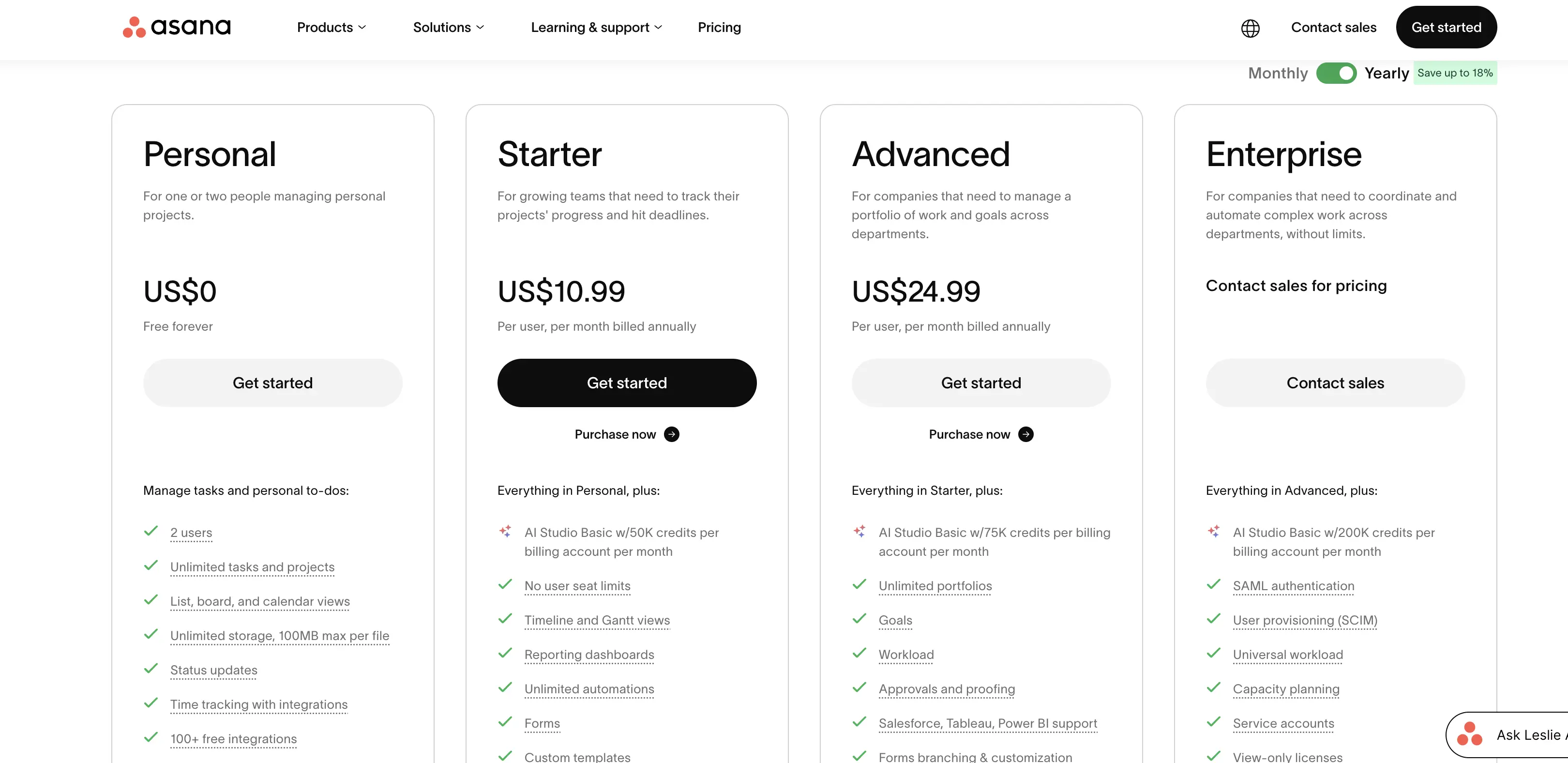
Asana | 2 users | $10.99 | $54.95 |
Basecamp | 20 users, 1GB | $15 | $75 |
Best Project Management Software Picks for solo work and smaller teams
Zoho Projects
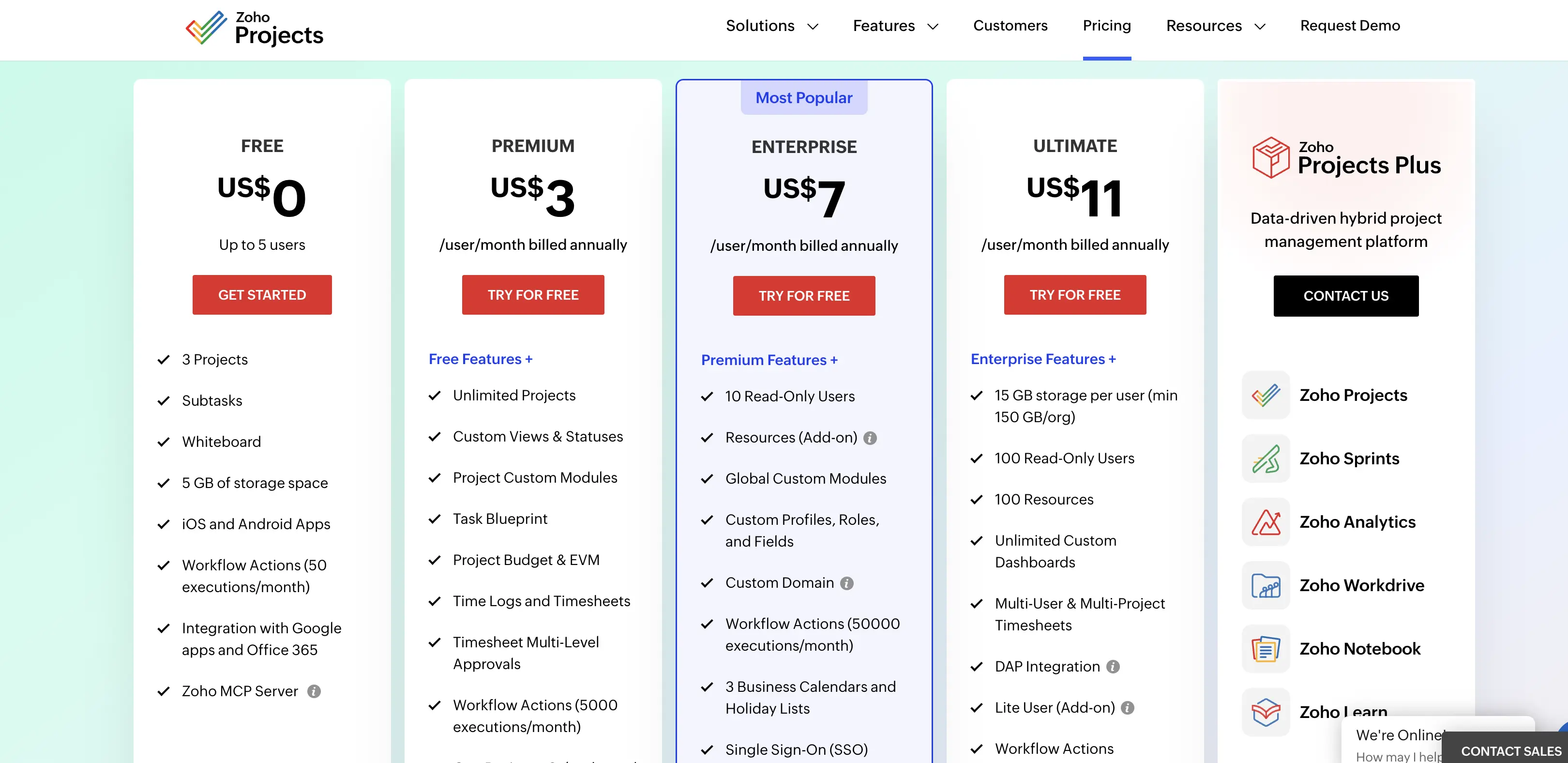
Zoho Projects is a task and project tracking tool built around simple lists, timelines, time logs, and a Kanban board. Free for up to 5 users and 3 projects. Premium is $3 per user per month billed annually, which is the cheapest paid seat in this entire roundup. Enterprise is $7 and Ultimate is $11. Paying yearly instead of monthly saves $12 per user per year, which the pricing page states outright.
For a five person team that is $180 a year against Basecamp's $900. If budget is the deciding factor and you can live without a heavy automation builder, this is the one.
Trello
Trello is a card and board tool where each task is a card you drag between columns. Free covers 10 boards per Workspace and 10 collaborators, with 250 automation command runs a month. Standard is $5 per user per month annually, Premium is $10, Enterprise is $17.50. The free tier is the most usable one here for a team under ten people who only need a shared board.
Once you want calendar and timeline views together, Premium is the jump. Our full Trello comparison covers what happens when you outgrow that 10 collaborator ceiling.
Basecamp
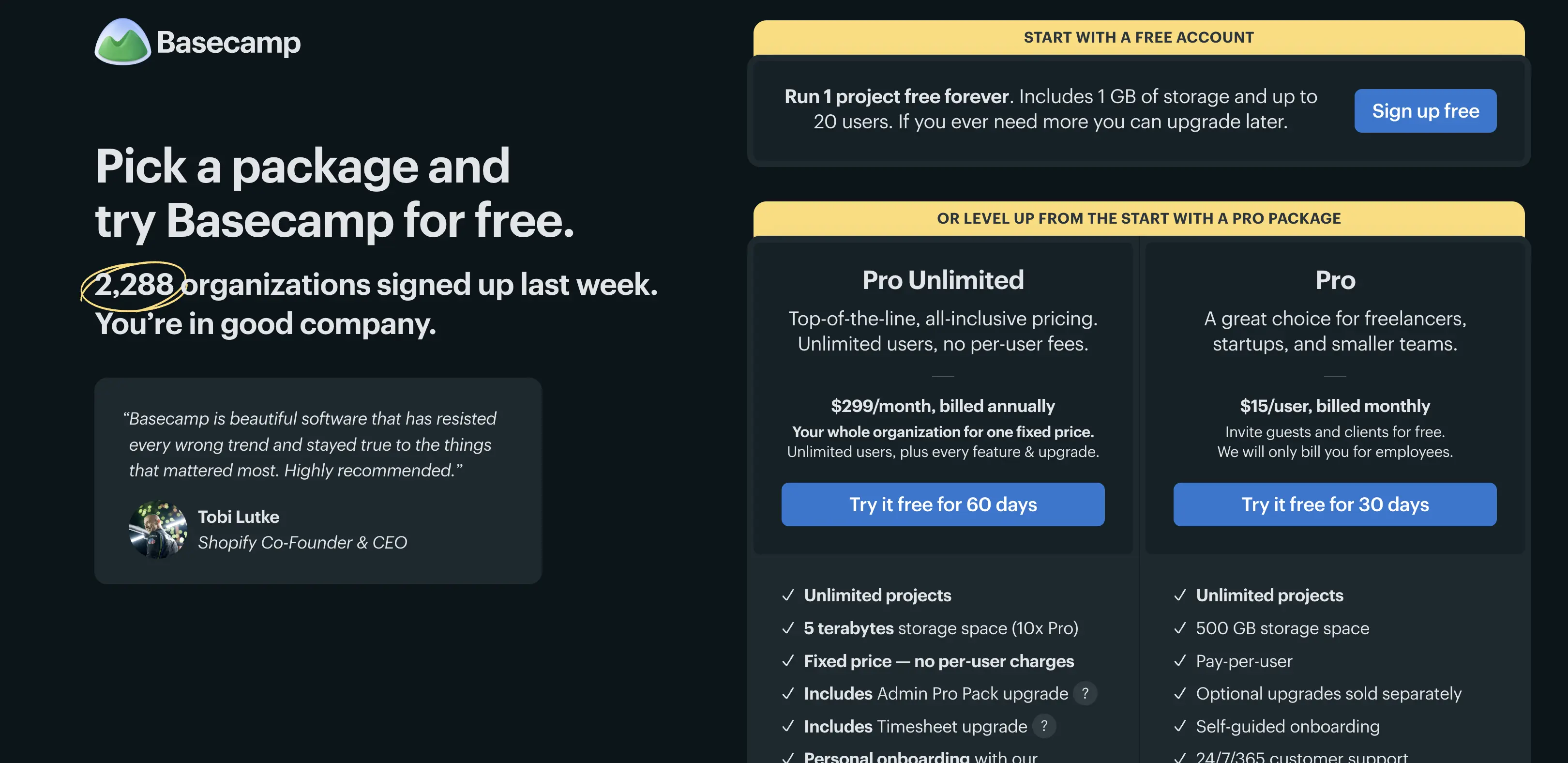
Basecamp is a flat, opinionated team collaboration space with message boards, to do lists, a chat room, and a schedule per project. Free gives you 1GB and up to 20 users, the most generous seat count on this list. Pro is $15 per user per month. Pro Unlimited is $299 a month billed annually with 5TB. Here is the math the marketing does not run for you: $299 divided by $15 is 19.93, so the flat plan only beats per seat pricing once you are past 19 people.
Below that headcount you are paying for headroom you do not have. If you are already there, the Basecamp pricing breakdown runs the same comparison against its rivals.
Best Project Management Software Picks for growing teams that need structure
ClickUp
ClickUp is an all in one work management platform covering tasks, docs, goals, and dashboards. Free Forever has no member cap, which makes it the most generous free plan here by headcount, but it holds you to 60MB of storage, 5 Spaces, 1 form, and 5 active automation rules. Unlimited is $7 per user per month annually or $10 monthly. Business is $12 annually.
That 60MB ceiling is what pushes most teams to pay, not the feature list. See our ClickUp cost breakdown for what the AI add on does to that number.
monday.com
monday.com is a color coded board tool for tracking work across teams. Free stops at 2 seats and 3 boards. Basic is $9 per seat per month, Standard $12, Pro $19. It connects to Salesforce and most other systems your sales team already runs, so teams searching for project management software that integrates with Salesforce land here often.
Just price the seat tier you actually need, because automations and integrations live on Standard and up. Our monday.com seat pricing guide has the four person math.
Asana
Asana is a task and workflow tool organized around projects and assignees. The Personal plan is free but capped at 2 users, which is the tightest free tier here alongside monday.com. Starter is $10.99 per user per month annually or $13.49 monthly. Advanced is $24.99 annually. Asana is the cleanest of the larger platforms for handoffs between people who do not live in the tool all day. It is also one of the pricier entry seats. Our Asana seat analysis covers where those wasted seats come from.
Wrike
Wrike is a project and resource tool aimed at teams that plan capacity, not just tasks. There is a free tier for basic task management. Team is $10 per user per month for 2 to 15 users, Business is $25 for 5 to 200. Wrike prices in bands rather than a flat ladder, so a team of 16 has to move plans whether or not it wants the Business feature set. Worth knowing before you commit.
Best project management software for engineers and agile teams
Jira
Jira is an issue tracker built for software teams working in sprints. Free forever for 10 users with 2GB of storage and 100 automation rule runs a month. Standard is $7.91 per user per month, Premium is $14.54. Both include Atlassian's Rovo AI features, with 25 Rovo credits per user monthly on Standard and 70 on Premium. If your team runs sprint boards and release tracking, no general work management tool matches this.
If your team does not write code, Jira will feel heavy on day one. Teams comparing IT project management options usually shortlist it first. Our Jira seat tier guide covers the upgrade points.
Best project management software picks for docs heavy and client facing work
Notion
Notion is a document and database workspace where projects live inside pages you build yourself. Free has no member cap but a block limit on multi member workspaces, plus 5MB file uploads and 7 days of page history. Plus is $10 per member per month billed yearly, Business is $20.
Notion AI is metered separately at $10 per 1,000 monthly credits, so a docs heavy team using AI daily should budget above the seat price. The Notion AI cost breakdown has the full picture.
Teamwork.com
Teamwork.com is a project tool built for agencies billing clients by the hour. Free covers up to 5 users and 5 projects, with 100 automations. Basics is $9.99 per user per month annually, Accelerate is $24.99. Accelerate is where invoicing and capacity planning arrive, which is the whole reason an agency picks this over ClickUp. Time tracking is on every tier including Free, which is unusual.
Which project management software fits your situation
If you are a freelancer or a solo consultant
Zoho Projects Free or Trello Free. Neither charges you until you add people, and both handle a client project list without setup work.
If you are a startup under 10 people
ClickUp Free Forever, then Unlimited at $7 a seat when the 60MB storage runs out. It is the cheapest path from free to paid that does not force a seat count decision on day one.
If you run a small team doing client work
Teamwork.com. Time tracking on the free tier and invoicing on Accelerate at $24.99 covers billing without a second tool.
If you are a nonprofit or a 15 to 25 person organization
Basecamp. Free for 20 users beats every other free tier on headcount, and Pro Unlimited at $299 flat starts winning right where per seat pricing gets painful.
If you are an engineering team
Jira Standard at $7.91. Nothing else on this list ships sprint boards and release tracking at that price.
FAQ
What is the best project management software?
For most small teams in 2026, ClickUp on the Free Forever plan, moving to Unlimited at $7 per user per month. It has no free member cap and the cheapest jump to paid among the major platforms. Engineers should pick Jira instead, and agencies billing clients should pick Teamwork.com.
What is the best free project management software?
Basecamp Free, if headcount is your constraint. It allows 20 users against Asana's 2 and monday.com's 2, though it caps storage at 1GB. ClickUp Free Forever has no member cap at all but holds you to 60MB of storage, so pick based on whether you are adding people or files.
What is the best AI project management software?
Jira, because Rovo AI is included in the seat price at 25 credits per user monthly on Standard. Notion charges $10 per 1,000 credits on top of the seat, and ClickUp bills its AI as a separate add on. Included beats metered when you cannot predict usage.
Which project management software fits construction or manufacturing teams?
Wrike, because field work needs resource planning more than it needs task cards. Team is $10 per user per month and covers 2 to 15 users with capacity views. Architects and engineering firms running fixed fee projects usually want time tracking on every seat too, which points at Teamwork.com instead.
Does any of this work properly on a Mac?
All ten run in a browser, and ClickUp, Notion, Asana, Jira, Trello, and Basecamp ship native macOS apps. There is no macOS feature gap worth planning around in 2026.
How I tested this
I bought one month on the entry paid tier of every tool listed, two seats each, just over $210 total, and ran the same client launch through each one. Pricing and plan limits were verified on August 13, 2026, from each tool's official pricing page, not from third party comparison sites. Where a plan showed a range or a seat band, I recorded the figure the vendor displays by default.
Where to start
Open two free plans this week, not five. Take ClickUp Free Forever and Trello Free if you are a general team, or Jira Free and Notion Free if you write software. Load one live project into both, not a test project.
The one you stop resenting after four days is the one to pay for. Then price the paid tier at your real headcount before you commit, because the difference between $15 and $75 a month for the same five people is the whole decision.
Work out what the time saved is worth to you in the SaaS ROI calculator.