
An enterprise app quote tells you what it costs to build version one. It rarely tells you what the app costs to own. We learned this the expensive way on a permit-management build.
The client ran the first version on a low-code CRM platform because the sales demo looked like a near-perfect fit.
Every operational exception forced custom code inside the platform anyway, and support tickets kept ending with "that is a platform limitation."
After the first version, we rebuilt the contractor portal as a custom app. The math was blunt.
Two to three years of license fees alone would have paid for a fully custom first version.
Why do enterprise app quotes miss the real cost?
Most quotes miss the real cost because they price the build, and the build is the smallest part of an enterprise app's life.
A quote covers discovery, design, development, testing, and launch. That's usually three to six months of work. The app then runs for years.
The gap isn't always a vendor hiding things. Buyers ask "what will it cost to build?" and vendors answer that question. Nobody asks "what will it cost in year three?" So nobody answers it.
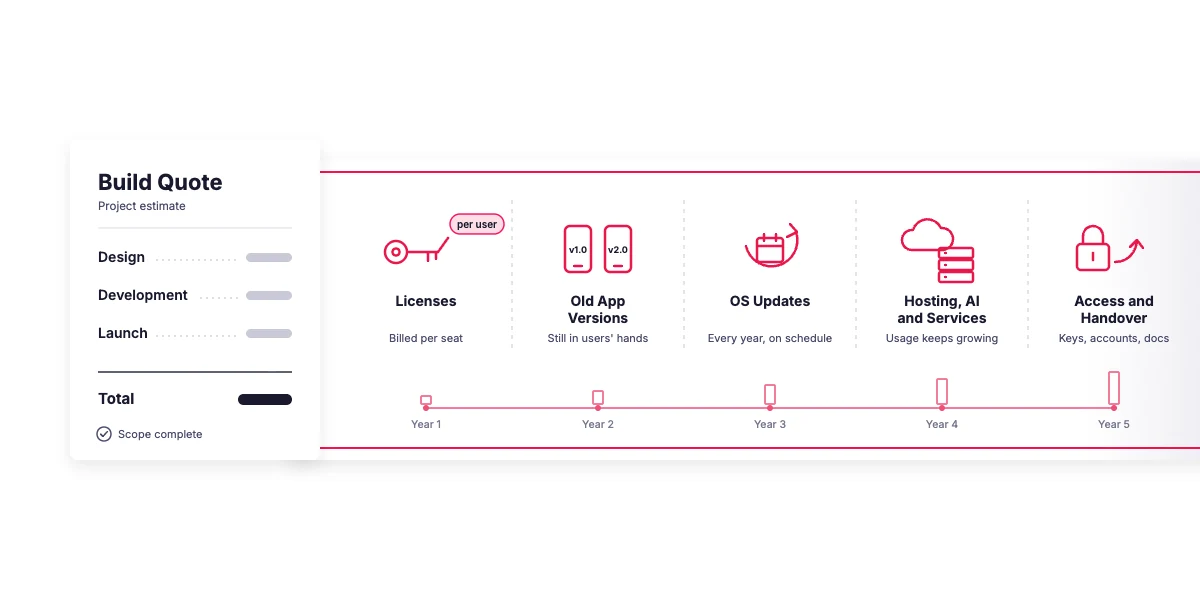
Here is what a typical quote covers next to what it usually leaves out.
What the quote covers | What it usually leaves out |
|---|---|
Screens and features in the scope | Platform and third-party license fees that grow with headcount |
Testing on current devices | Supporting workers who never update the app |
App Store and Google Play launch | Yearly OS changes and new store rules |
A hosting estimate for launch traffic | Running costs for realtime features, AI calls, and device management |
A handover meeting | Access, credentials, and knowledge that walk out when people leave |
None of these items is exotic. Every one of them showed up as a real bill on a project we've worked on. The next five sections walk through each one, with the decision we made and what we'd tell any buyer to ask for before signing.
Cost 1: Platform licenses that outgrow the build
Platform licenses become a hidden cost when an app is built on a paid platform that charges per user, per seat, or per record, every month, for as long as the app exists. Low-code tools, CRM platforms, and app builders all work this way. The build looks cheap because part of the cost moved into a subscription.
That subscription doesn't stay flat. In its April 2026 forecast, Gartner put global software spending at $1.44 trillion for 2026, up 15.1% in a year, and SaaStr's breakdown of that forecast notes that roughly 9% of IT budgets now go to price increases on software companies already own. Your platform bill can rise even when your app doesn't change.
On the permit build from the intro, licenses were only half the problem. The other half was fit. Real operations are full of exceptions. Inspections get rerouted. Some contractors need different approval paths.
Some permits need a manual override. Each exception meant more custom logic inside a platform that wasn't designed for it. Staging and production were hard to separate, and debugging was close to blind.
We didn't throw the platform out. Staff kept using the CRM for internal work it handled well. We rebuilt only the contractor-facing portal as a custom app, with its own backend and a controlled integration back into the platform.
That split kept the parts that worked and replaced the part that kept breaking.
Before you sign, ask for the license line written out per user, per year, for five years, at your expected headcount.
If the platform route costs more than a custom build by year three, you now know which quote is really cheaper. Licenses are the cost you can see coming, though. The next one hides inside your own workforce.
Cost 2: The workers who never update the app
Enterprise apps have to support old versions because the people using them don't update on your schedule. Consumer app teams can nag users or force an update. Enterprise teams often can't.
A technician mid-job won't wait for a 200 MB download. A shared warehouse tablet may sit on an old build for months.
Even on Apple's well-managed platform, the latest system doesn't reach everyone. On June 7, 2026, nine months after iOS 26 launched, Apple's own figures showed it running on 79% of all iPhones.
That leaves about one phone in five on something older. App versions lag in the same way, and on company devices the lag can be worse.
We hit this hard on a job-and-payroll app for a field-services contractor. We refactored jobs so one job could carry multiple purchase orders and reimbursements.
The new app version handled it well. About half the trucks were still running the previous version, which expected exactly one purchase order per job.
Forcing everyone to update would have stopped work in the field. Instead, we built an API shim. The server reads the app version sent with each request.
New versions get the full multi-order data. Older versions get the same data flattened back into the single-order shape they understand. Both versions keep working against one backend.
The same project taught us a second lesson about field apps. We stopped storing payroll totals as saved numbers.
The system now recalculates each week's payroll from the underlying jobs, materials, and rates whenever something changes, and completed invoices lock so finished weeks can't shift.
Stored totals drift once edits start arriving from devices on different versions. Recalculated totals stay verifiable.
Ask any vendor one question here: "When you change the API, what does last year's app see?" A good answer names a strategy.
A blank look means the cost lands on you later, usually the week after a big release. Old app versions are one moving target. Apple and Google add another every year..
Cost 3: The yearly rules from Apple and Google
Apple and Google change their requirements every year, and an enterprise app has to keep up or lose the ability to ship updates. This isn't optional maintenance. It's a deadline someone else sets.
Two recent examples show the pattern:
Apple: since April 28, 2026, every app uploaded to App Store Connect must be built with Xcode 26 or newer, against the iOS 26 SDK. An app that hasn't been touched in a year can't ship even a one-line fix until the project is upgraded.
Google: apps targeting Android 15 or higher must support 16 KB memory pages, and Google Play will block updates that don't comply after February 1, 2027. Apps written only in Java or Kotlin are mostly fine. Apps with older native libraries often need rebuilding.
The 16 KB change is a good example of how this bites. We've watched it surface late in an Android release cycle on an app with older native dependencies.
A fix that should have taken days turned into a migration because we had to upgrade several libraries at once to get a compliant build.
The lesson we now build into every engagement: keep dependencies current in small steps, every quarter. Small upgrades cost a few hours each.
Skipping two years of them turns the next store deadline into a project of its own.
When you compare quotes, look for a maintenance line that explicitly names OS-version updates.
"Bug fixes" alone don't cover it. Store rules are at least announced in advance. Running costs tend to show up with no warning at all.
Cost 4: Running costs nobody priced
Running costs are the monthly bills for services the app needs to work in production: hosting, real-time messaging, AI calls, maps, SMS, push notifications, single sign-on, and device management.
They scale with usage, so they're small at launch and large a year later.
We learned to put these in writing on a multiplayer platform build. The client didn't expect to pay ongoing fees for the real-time infrastructure that kept every player's screen in sync.
The engineering was right. The surprise was the bill. After that project, we changed our discovery process. We now list operational and service costs next to the build estimate, line by line, before anyone signs.
Enterprise apps carry their own set of these:
Running cost | Why enterprise apps need it | What scales it |
|---|---|---|
Cloud hosting and databases | Every request and record lives somewhere | Users, data volume, uptime targets |
Realtime messaging | Live dashboards, dispatch, chat | Concurrent connections, messages |
AI model calls | Document parsing, summaries, assistants | Requests per user, input size |
Single sign-on (SSO) | Staff log in with company accounts | Seats or monthly active users |
Mobile device management (MDM) | IT controls company phones and private app installs | Number of managed devices |
Maps, SMS, and email services | Routing, alerts, verification codes | Volume of lookups and messages |
AI calls deserve a special note. On one product that parses uploaded resumes, each parse is a paid call on a large input.
We picked a small, fast model because the task is narrow, capped files at 5 MB, checked that size twice, and limited each user to one parse per day.
Without those limits, a single bad upload loop could have burned through the monthly AI budget.
Ask vendors for a running-cost table like the one above, filled in at launch volume and at three times launch volume. The last hidden cost isn't a bill at all. It's what you lose when people leave.
Cost 5: Lost access and lost knowledge
Knowledge loss becomes a cost when the people who know how the app works, and who hold the logins, leave the project. Enterprise apps outlive teams.
Vendors rotate staff, internal champions change jobs, and contractors move on.
We saw the price of this on a telecom platform we took over. Several project managers had rotated through before us, and the previous developer was leaving.
There was no usable API documentation, so our engineers spent weeks working out expected API behavior from scattered backend code.
Several months in, we learned the client had already given the previous team access to a staging environment and logging tools that showed real API requests and responses.
That access had been lost somewhere in the handoffs.
The lesson surprised us. Missing documentation wasn't the real problem. Missing access was.
A staging environment and live logs would have answered most of the questions the missing docs left open.
This cost is the easiest to prevent. Keep every account in your company's name: the Apple and Google developer accounts, the code repository, cloud hosting, and every third-party service.
Keep credentials in a shared password vault you own. Require a written handover list of environments, logins, and integrations at every milestone, not just at the end.
How to get an honest lifetime quote
The surest way to get an honest lifetime quote is to ask for one in writing, before you compare prices.
Vendors who have run enterprise apps for years can answer these questions quickly. Vendors who only build and hand off will struggle.
Use these questions in every vendor call:
What does this cost to own for five years, not just to build? Ask for the build, licenses, running costs, and maintenance as separate lines.
When you change the API, how do older app versions keep working? Listen for version headers, compatibility layers, or a minimum-version policy.
How do you handle Apple and Google's yearly requirements? A good answer includes a regular dependency update schedule.
Which third-party services does the app depend on, and who pays for them? Get the list now, not after launch.
Whose name will the accounts be in? The answer should be yours, for every account.
What happens if your lead engineer leaves mid-project? Ask how access, environments, and decisions are documented.
Where would a platform or low-code tool be cheaper than custom, and where not? An honest vendor will tell you when custom is the wrong call.
The last question matters most. A vendor who recommends custom work for everything is selling hours.
Look for developers who quote the life of the app, not just the launch, and who can point to specific trade-offs they made on past projects, such as keeping a CRM for internal staff while rebuilding only the portal that kept breaking.
A simple five-year cost sheet
A five-year cost sheet is a one-page table that lists every cost of owning the app, year by year. Ask each shortlisted vendor to fill in the same template.
Then you compare like with like.
Cost line | Year 1 | Year 2 | Year 3 | Year 4 | Year 5 |
|---|---|---|---|---|---|
Build and launch | |||||
Platform and software licenses | |||||
Hosting and databases | |||||
Third-party services (AI, maps, SMS, real-time) | |||||
SSO and device management | |||||
OS updates and dependency upgrades | |||||
Feature work and support | |||||
Total |
Two patterns usually jump out. Platform-based builds look cheaper in year one and climb every year after.
Custom builds cost more up front and then flatten out, as long as maintenance happens on schedule.
Neither pattern is always the right one. The point of the sheet is that you can see which one you're buying.
Before you sign
Put the five-year cost sheet in front of every vendor on your shortlist and ask them to fill it in. The answers will tell you more than the build quote does.
On the permit project that started this article, the license line alone crossed the cost of a full custom build within two to three years.
Nobody had written that line down when the platform was chosen.
About the Author
Daniel Haiem
Daniel Haiem is the CEO of AppMakers USA, a mobile app development agency that works with founders on mobile and web builds.
He is known for pairing product clarity with delivery discipline, helping teams make smart scope calls and ship what matters.
Earlier in his career he taught physics, and he still spends time supporting education and youth mentorship initiatives.