Kissflow's own pages show two starting prices, $1,500 and $2,500 a month, and its pricing page prints none. These Kissflow alternatives show theirs.
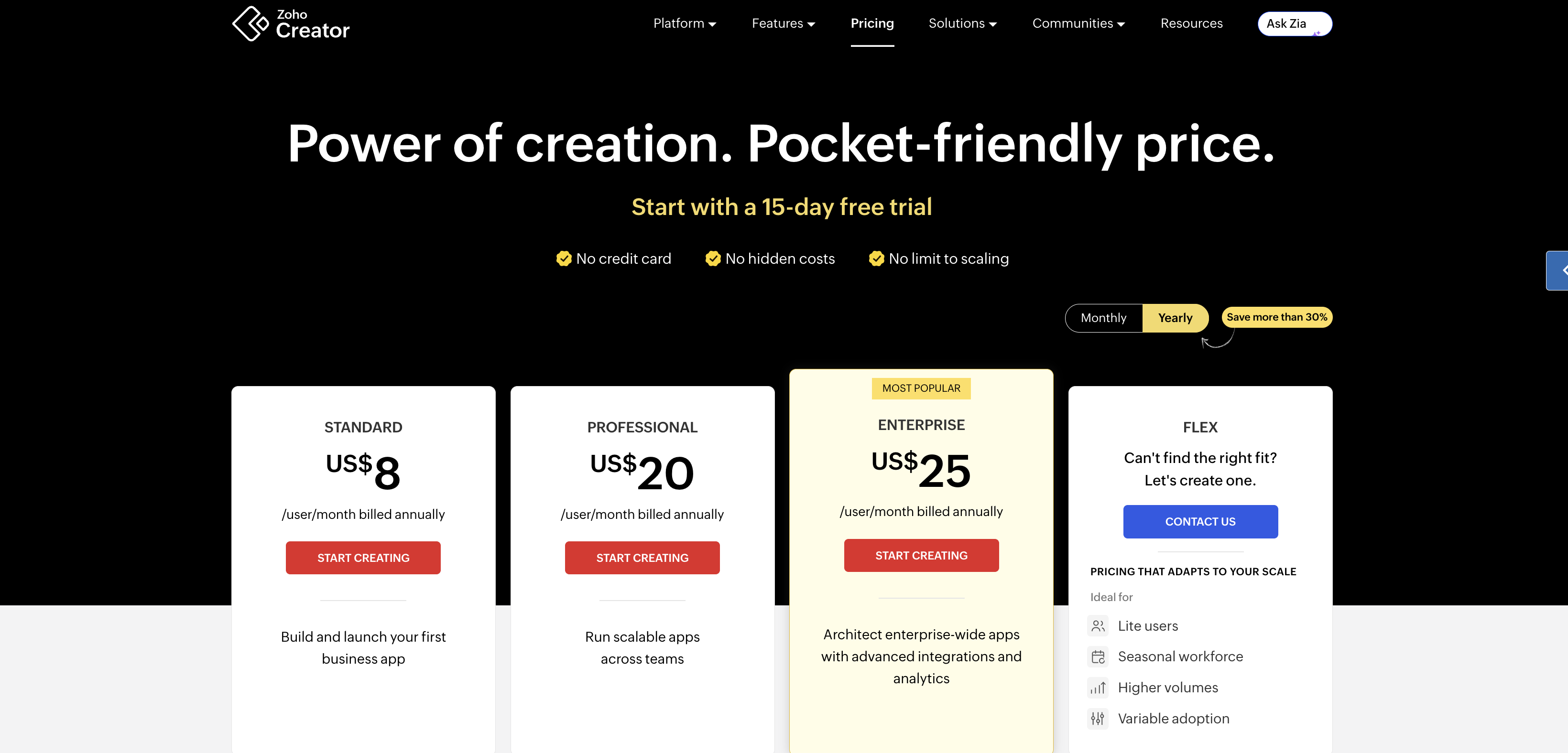
Zoho Creator starts at $8 for each user, each month, and Jestor at $200 a month for unlimited users.
Kissflow's terms say a year is invoiced up front with no refund. That makes the year $18,000 at $1,500 a month and $30,000 at $2,500 a month, a gap of $12,000.
Kissflow is a no-code platform for workflow automation, approvals, and forms, and the 12 tools below cover the same jobs.
Short answer
Zoho Creator: $8 for each user, each month on yearly billing, with built-in approvals on every plan. The $8 plan allows one app.
Jestor: $200 a month for unlimited users on Growth, with 1,500 automation runs a month.
Power Apps: $20 for each user, each month, paid yearly, for teams that already run on Microsoft.
Why teams leave Kissflow
A Quora thread asking for the best Kissflow alternative still opens with a seven-year-old answer from a WEBCON employee. A reply about eleven years old on a related question calls Kissflow simple and cheap.
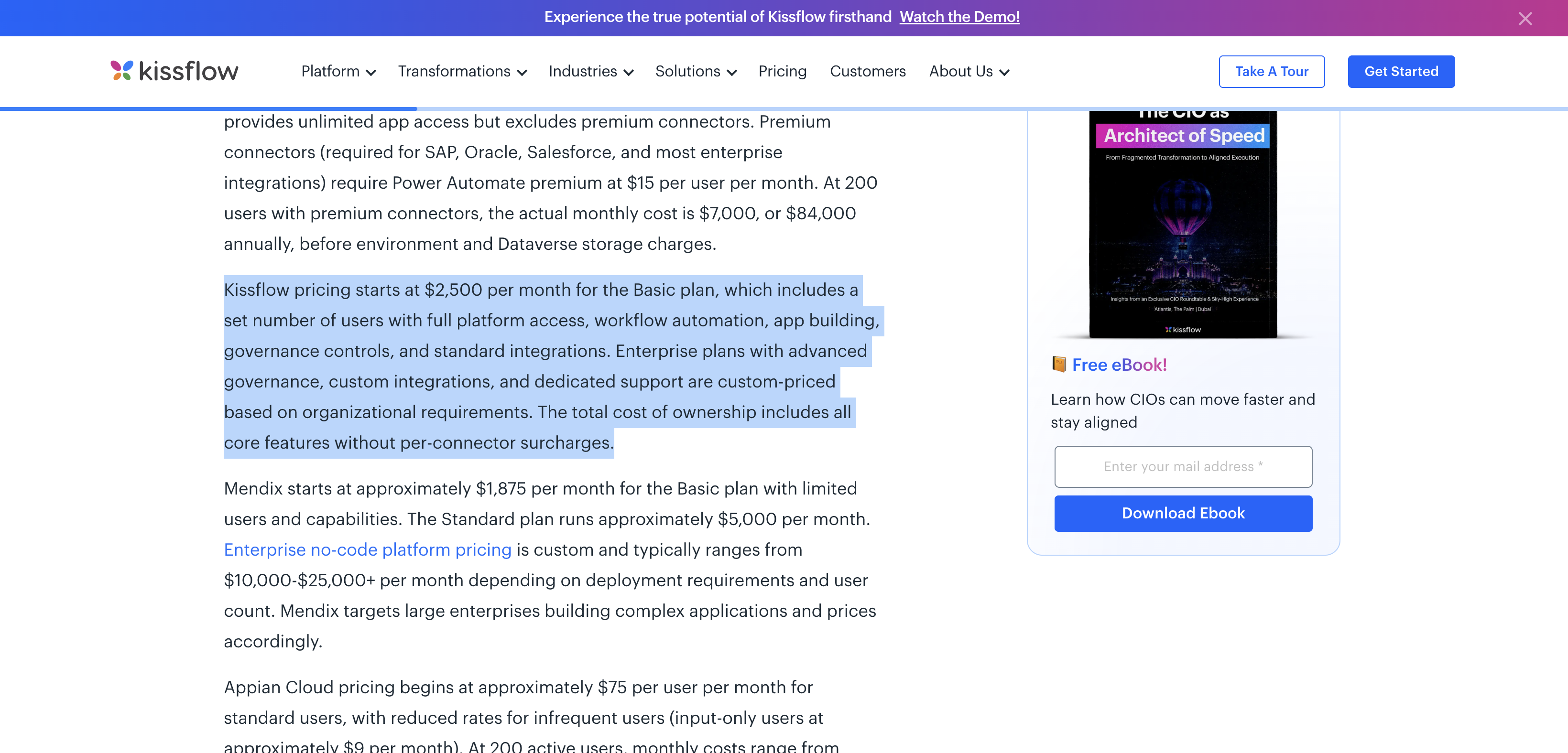
Kissflow now starts at $1,500 to $2,500 a month.
Four things push teams out. They are an unprinted price, a contract paid a year ahead, plan walls between Basic and Enterprise, and an export that drops fields. Each has its own section below.
How much does Kissflow cost?
Kissflow pricing sits on three pages, and they disagree. Kissflow's pricing page prints no price and lists fixed annual agreements. Kissflow's pricing comparison, updated 24 August 2026, says Basic starts at $2,500 a month for a set number of users.
Kissflow's enterprise BPM pricing page, updated the same day, gives both prices. Its body says $1,500 a month for up to 50 users. Its FAQ says $2,500 a month for 50 users.
The Digital Project Manager, an independent review site, prints $1,500 in a page updated 26 October 2026.
Take 12 months at the starting price.
At $1,500 a month, the year costs $18,000.
At $2,500 a month, the year costs $30,000.
The gap is $12,000 a year.
Take 50 users, the count on Kissflow's BPM page.
$1,500 a month is $30 for each user, each month.
$2,500 a month is $50 for each user, each month.
The comparison page also prices three years for 200 users with 5 integrations at $120,000 to $250,000. Divided by 200 users and 36 months, that is $16.67 to $34.72 for each user, each month.
Kissflow dates those figures as of January 2026.
Before you ask for a quote, run your own seat count through the Switch and Save Calculator.
Kissflow's contract: a year paid up front, no refund
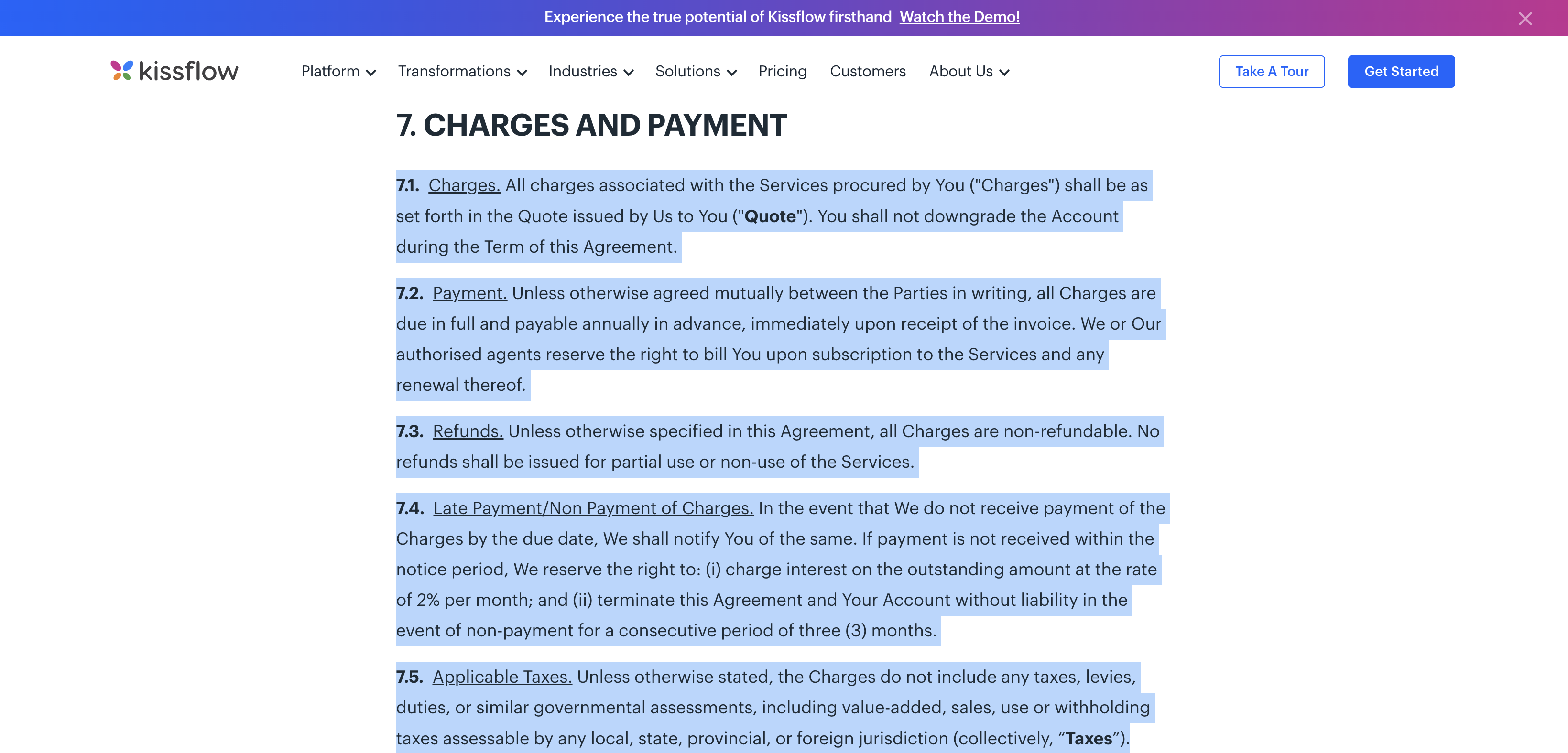
Kissflow's terms of service, effective 1 September 2026, say all charges are due in full, a year in advance, when the invoice arrives. Both sides can agree otherwise in writing.
Every charge is non-refundable, including months you do not use, and the account cannot be downgraded during the term. The first term lasts one year.
The contract then renews for another year unless either side gives written notice at least 30 days ahead.
Kissflow's monthly rate on its comparison page does not mean month-to-month billing. Unless your quote says otherwise, the terms point to one yearly invoice for the full $18,000 or $30,000.
One more clause matters when prices change. A notice posted on Kissflow's community site counts as notice to you, and the terms require you to stay subscribed to that site.
Ask for the term, the user count, and the renewal date in writing before you sign.
Kissflow Basic vs Enterprise: where the plan walls sit
Kissflow's pricing FAQ lists the gaps between the plans. Basic support runs 5 days a week, 9 hours a day. Enterprise starts at 5 days a week, 12 hours a day, and 24 hour weekday support costs extra.
Private hosting on Google Cloud, AWS, or Azure carries an extra managed service fee. Kissflow's professional services team builds custom connectors and prices them by scope. A single Enterprise feature cannot be added to Basic.
Kissflow Enterprise pricing is quoted on request. The FAQ says price follows the usage tier, user roles do not change it, and apps, processes and boards have no cap.
It does not say which plan includes SSO or external users, so get both answers in writing.
Alternatives to Kissflow, grouped by who they fit
These Kissflow alternatives all print a price on their own pricing pages. Pricing and features verified 29 October 2026 from each vendor's own pages, in US dollars.
The table shows what 50 users pay over 12 months. For each tool, pick the cheapest paid plan that builds forms or workflows, and use the yearly price printed on its page.
Jestor prints only a monthly price, so its total is 12 months at that price. Retool's total assumes 5 builders and 45 internal users. Jotform prints no price for teams.
Tool and plan | Printed price | Billing wording | 50 users, 12 months | Limit to know |
|---|---|---|---|---|
Jestor Growth | $200 a month, unlimited users | No long-term contract | $2,400 | 1,500 automation runs a month |
Retool Team | $10 for each builder, $5 for each internal user, each month | billed annually | $3,300 | 5,000 workflow runs a month |
Zoho Creator Standard | US$8 for each user, each month | billed annually | $4,800 | 1 application |
ClickUp Core | $9 for each user, each month | billed yearly | $5,400 | 1,000 automation actions a month |
Asana Starter | US$10.99 for each user, each month | billed annually | $6,594 | Approvals start on Advanced |
Cflow Joy | $11 for each user, each month | billed annually | $6,600 | minimum 10 users, 20 workflows |
monday.com Standard | $12 for each seat, each month | billed yearly | $7,200 | plans start from 3 users |
Flokzu Standard | $17 for each user, each month | billed annually | $10,200 | minimum 10 users |
Airtable Team | $20 for each seat, each month | billed annually | $12,000 | 50,000 records for each base |
Power Apps Premium | $20 for each user, each month | paid yearly | $12,000 | $22 from 1 January 2027 |
Tallyfy Full seat | $300 for each seat, each year | billed yearly | $15,000 | 12-month commitment |
Jotform Bronze | $34 a month | billed annually | No printed team price | one user only |
Low printed price for small teams
Jotform is a form builder. Starter is free and allows 5 forms, 100 submissions a month, and one user.
Jotform's pricing page says approvals are free on every plan.
Bronze costs $34/month on yearly billing, Silver $39, and Gold $99; all three serve one user.
Only Enterprise, at a custom price, serves a team.
Zoho Creator is a low-code app builder with built-in approvals.
Standard costs US$8 per user per month on yearly billing, or US$12 on monthly billing, and allows one application.
Professional costs US$20 on yearly billing and allows unlimited applications.
SAML sign-in starts on Enterprise at US$25. A customer portal for outside users is an add-on from US$100 a month for 250 portal users.
Jestor is a no-code app builder. Growth costs $15 for each user, each month, or $200 a month for unlimited users.
Pro costs $30 for each user or $500 a month for unlimited users.
Growth allows 1,500 automation runs a month and 3,000 records for each table. SSO sits on Endure Operations, which has no printed price.
Process and approval tools with a user minimum
Cflow is a workflow tool for approvals. Joy costs $11 for each user, each month on yearly billing, or $22 on monthly billing.
Joy needs 10 users and allows 20 workflows. Bliss costs $16 on yearly billing, needs 20 users, and allows 50 workflows.
Google and Office 365 sign-in are on every plan, and SAML is quote-only.
Flokzu is a business process tool. Standard costs $17 for each user, each month on yearly billing, or $18 on monthly billing. Standard and Premium both need 10 users.
Standard allows 1,000 process instances a month and 10 GB. Premium costs $22 on yearly billing and lifts the process cap.
Flokzu does not offer refunds.
Tallyfy is a process and task tool. A Full seat, which builds templates, costs $300 per seat per year, or $30 a month.
A Light seat, which completes assigned tasks, costs $100 a year or $10 a month. SSO, SCIM, and guest access come with both.
The yearly plan is a 12-month commitment billed up front, with no partial refunds.
Work boards your team may already use
If a board tool is on your shortlist, the guides to monday.com alternatives and Airtable alternatives show what each plan costs for a small team.
The project management software roundup covers the wider field.
monday.com is a work management platform. Standard costs $12 for each seat, each month on yearly billing, or $14 on monthly billing. Plans start from 3 users.
Standard allows 250 automation actions a month and 3 workflows, and counts 4 guests as 1 seat. SSO and audit logs are Enterprise only.
ClickUp is a work management app. Core costs $9 for each user, each month on yearly billing, or $12 on monthly billing. It allows unlimited forms and 1,000 automation actions a month.
Google SSO starts on Business at $17, and SAML sits on Enterprise. ClickUp gives a full refund if you ask within 30 days.
Asana is a work management tool. Starter costs US$10.99 for each user, each month on yearly billing, and includes basic forms.
Approvals start on Advanced at US$24.99, and SAML sign-in is an Enterprise feature. The free Personal plan covers two users.
Airtable is a database and app builder with forms. Team costs $20 for each seat, each month on yearly billing, or $24 on monthly billing.
It allows 50,000 records for each base and 25,000 automation runs a month.
SAML sign-in starts on Business at $45. Outside guests need the Portals add on, from $120 a month for 15 guests on Team.
App builders for IT and Microsoft Teams
Power Apps is Microsoft's app builder. Premium costs $20 for each user, each month, paid yearly, or $12 with a 2,000-user minimum.
Extra database space costs $40 for each GB, each month.
Microsoft's licensing notice raises Premium to $22 and the 2,000-user tier to $14 on 1 January 2027. The Developer plan is free for building apps, and using them needs paid licenses.
Retool is an internal tool builder. Team costs $10 for each builder and $5 for each internal user, each month on yearly billing. Free covers up to 5 users.
Team allows 5,000 workflow runs a month.
External users and embedded apps start on Business, at $50 for each builder and $15 for each internal user. SSO is Enterprise only.
How do you export your data and leave Kissflow?
Kissflow's board export guide says a board export arrives as a CSV file by email. It holds only the fields visible in your layout.
It leaves out lookups, images, signatures, attachments, checklists, notes, activity, item transitions, and the fields inside tables.
Dataform exports have a row limit. A Kissflow team announcement says, "CSV exports are now capped at 100,000 rows per file." A dataform with 110,000 rows downloads as one ZIP holding two files, one with 100,000 rows and one with 10,000.
Kissflow's migration guide, updated 15 October 2026, covers moves in general. It says to run both tools for 30 to 60 days and keep the old subscription at least 90 days after the switch.
A simple app takes 2 to 4 weeks, and 20 to 50 apps take 8 to 16 weeks.
Kissflow's contract changes what leaving costs. Say you stop using Kissflow 4 months into a paid year. The invoice covered 12 months, so 8 months stay unused, and the terms refund nothing.
8 months at $2,500 is $20,000 paid for months you do not use.
8 months at $1,500 is $12,000.
The new tool adds its own cost during the overlap. Zoho Creator Standard costs US$12 for each user, each month on monthly billing.
For 50 users, that is $600 a month, so $1,200 over a 2-month overlap.
What happens to your data after you cancel Kissflow?
Your access ends on the termination date, and the terms tell you to export before then using the standard export. If you miss it, tell Kissflow in writing right away.
Kissflow then hands the data over manually for 30 days from the termination date, and after that it may delete everything permanently.
Kissflow's data processing agreement says all customer data is deleted from its servers within 30 days of termination.
Before you cancel Kissflow
Find the renewal date on your quote. Written notice must reach Kissflow at least 30 days before it.
Send the notice by email to legal@kissflow.com, the only address the terms list for notices.
Export every board and dataform, then check each CSV for the missing fields listed above.
Plan a separate copy of attachments, signatures, and images, because the board CSV leaves them out.
Keep the old subscription for 90 days after the switch if your term allows it, and count unused months as money already spent.
Which Kissflow alternative fits your team?
If you are a small team that wants a printed price for each user, start with Zoho Creator or ClickUp. Zoho Creator costs US$8 and allows one application. ClickUp costs $9 and allows unlimited forms.
If you only need intake forms and one approval step, Jotform Starter is free for one user. A team needs Enterprise.
If nobody on your team writes code, monday.com at $12 per seat or Asana at US$10.99 keeps the setup visual. Asana approvals start at US$24.99.
If your company runs on Microsoft 365, Power Apps at $20 for each user fits best. The $22 price starts on 1 January 2027.
If you need SSO and outside guests, Tallyfy includes SSO, SCIM, and guest access on both seat types. Cflow includes Google and Office 365 sign-in on every plan.
If you build internal tools with code, Retool at $10 for each builder and $5 for each internal user is the closest match.
Kissflow alternatives FAQ
Does Kissflow have a free plan or a free trial?
Kissflow's pricing page lists no free plan. Its pricing FAQ says a limited trial starts only after a meeting with a Solution Consultant.
What is the best free Kissflow alternative?
Jotform Starter is free with approvals, 5 forms, and one user. For a team, Jestor Free covers 10 users and Retool Free covers up to 5. Airtable Free allows 5 editors.
Is Kissflow worth it in 2026?
Only if you need Enterprise features or private hosting and can pay $18,000 to $30,000 up front for a year.
For plain approvals and forms, the tools above cost $2,400 to $15,000 for 50 users over 12 months.
Is Kissflow an Indian company?
Kissflow's terms name Kissflow Inc. as the provider. They apply Delaware law to customers outside India and send Indian companies to arbitration in Chennai.
The terms do not say where the company is based.
Does Kissflow limit apps or users on Basic?
Kissflow's pricing FAQ says apps, processes, and boards have no cap. Its BPM page ties the starting price to 50 users, and its comparison page says Basic includes a set number of users.
Which Kissflow alternatives need a minimum number of users?
Cflow needs 10 users on Joy and 20 on Bliss. Flokzu needs 10 on both plans. monday.com plans start from 3 users, and Tallyfy starts at 1 seat.
Which one to pick
Start with the number on your own quote. A year at $2,500 a month is $30,000, and every tool above with a printed team price costs less than $18,000 in seat fees for 50 users.
The right alternative to Kissflow is the one whose limits fit your team, so read the limit column before you compare totals.
Ask Kissflow for your renewal date first, then shortlist one tool from the group that matches your team.
Prices can change, and Microsoft has already announced a rise for 1 January 2027.