Zapier costs $0 on Free, Professional from $19.99 a month, and Team from $ 69 a month when billed yearly. If billed monthly, the same plans start at $29.99 and $103.50.
Any AI step you create on a paid plan from 15 June 2026 starts at the Premium tier. Each run uses 5 tasks for the AI step and 1 task for one action, so 6 tasks in all.
Professional gives you 750 tasks, which covers 125 runs. On the Standard tier, the same 750 tasks would cover 375 runs.
Every price below comes from Zapier's own pricing page and help center as of 1 October 2026.
Short answer
Free: $0. You get 100 tasks a month and Zaps (automations) with two steps. Pick it to learn the tool or to run one small automation.
Professional: from $19.99 a month billed yearly ($29.99 billed monthly) for 750 tasks. Pick it when one person builds multi step Zaps.
Team: from $69 a month billed yearly ($103.50 billed monthly) for 2,000 tasks and 25 users. Pick it when a group shares Zaps and folders.
Tasks: a task is one action step that works. Triggers (the events that start a Zap) are free. An AI step uses 1, 3 or 5 tasks, based on the model tier. New AI steps on paid plans start at 5.
Zapier pricing plans: How much does Zapier cost per month?
Zapier lists four plans on its pricing page: Free, Professional, Team and Enterprise.
The price of Professional and Team depends on the task tier (how many tasks you want), which you pick with a slider.
For every tier, paying for the year costs one third less than paying each month. These are the starting prices shown on the pricing page as of 1 October 2026.
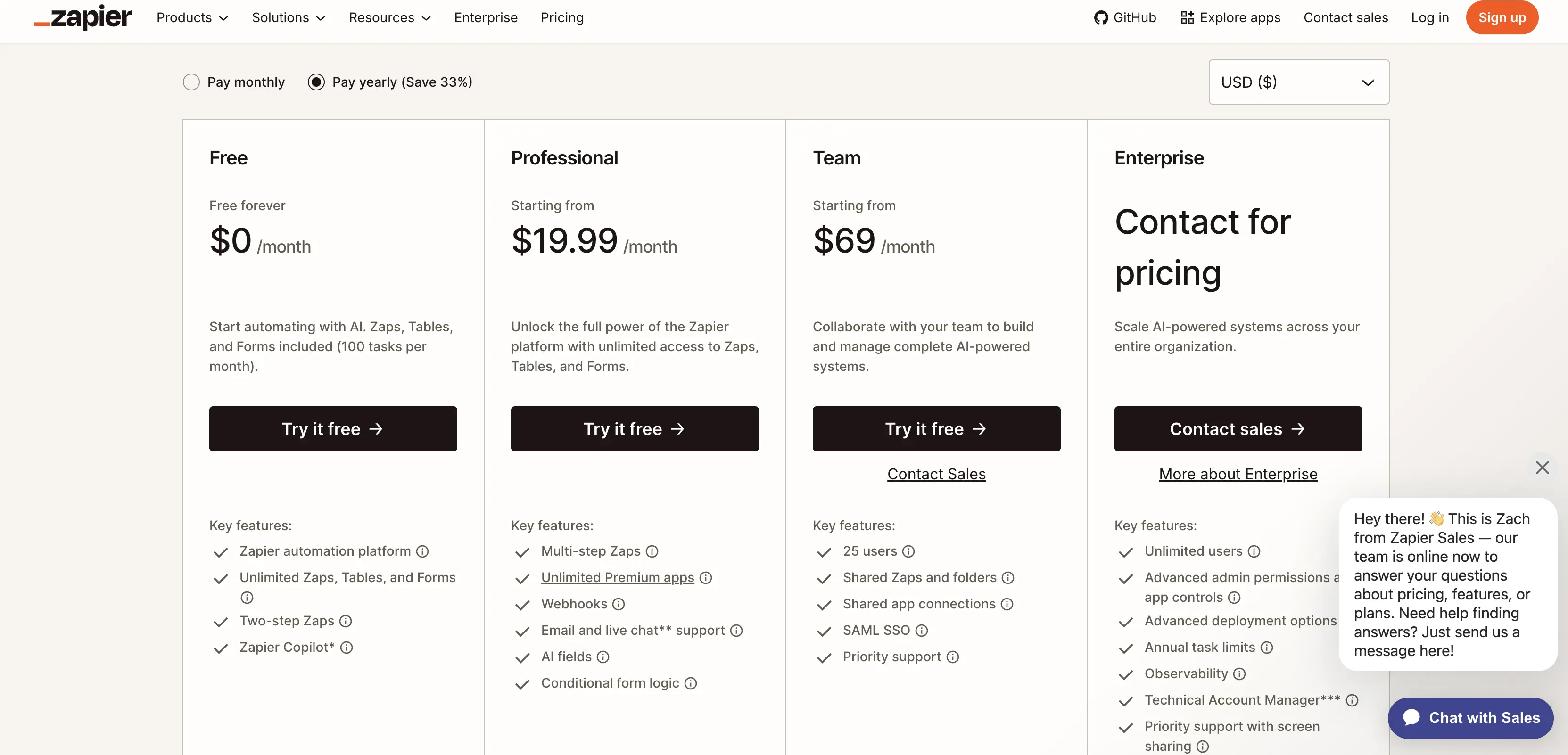
Plan | Billed yearly (per month) | Billed monthly | What the starting price includes |
|---|---|---|---|
Free | $0 | $0 | 100 tasks a month, two step Zaps, unlimited Zaps, Tables and Forms |
Professional | From $19.99 | From $29.99 | From 750 tasks, multi step Zaps, webhooks, AI fields, email and live chat support |
Team | From $69 | From $103.50 | From 2,000 tasks, 25 users, shared Zaps and folders, SAML SSO, priority support |
Enterprise | Contact for pricing | Contact for pricing | Unlimited users, annual task limits, advanced admin permissions |
Zapier pricing in other currencies
The pricing page has a currency selector with 19 options. With Pay yearly selected, the starting prices read as follows.
Currency | Professional from (750 tasks) | Team from (2,000 tasks) |
|---|---|---|
British pounds | £15.30 | £52.81 |
Euros | €17.85 | €61.60 |
Indian rupees | ₹1,966.26 | ₹6,787.00 |
Australian dollars | $29.15 | $100.62 |
Canadian dollars | $29.02 | $100.16 |
New Zealand dollars | $36.12 | $124.67 |
What counts as a Zapier task, and which steps cost more than one
A Zapier task is one action step in a Zap that works. These cost nothing: triggers, filters, paths, formatter steps, delays, and any step that fails with an error.
Zapier's help center states the rule in one sentence: "Only successful actions count toward your task usage."
A Zapier Zap with 1 trigger and 4 actions uses 4 tasks each time it runs. Steps in Zapier Tables and Forms do not count as tasks.
Zapier Agents use a separate activity limit instead of tasks.
The same help article says a few steps cost more than 1 task:
Lead Router: 5 tasks per successful lead routed. At 150 leads a month, that alone uses all 750 tasks of a Professional plan.
Zapier MCP: 2 tasks per successful tool call, so 375 calls use the same 750.
Code by Zapier: 1 task at the standard runtime, and more when you extend the runtime.
Replays: replaying a whole Zap run counts every previously successful step again.
Error handler paths: every successful step inside one counts.
Sub Zaps: each action step inside the sub Zap counts, and so do the Call a Sub Zap and Return From a Sub Zap steps.
Lead Router usage has shown on the Task Usage and Zap History pages only since 21 July 2026.
Before that date, it counted toward your limit without appearing on either page.
How many tasks an AI step uses
An AI by Zapier step uses 1, 3, or 5 tasks per run, depending on the model tier. Standard is 1x, Advanced is 3x, and Premium is 5x.
New steps on a paid plan start at Premium, which makes the default five times as expensive as Standard. Zapier's model tier help article lists the tiers like this as of 1 October 2026.
Model tier | Multiplier | Tasks per run | Runs on 750 tasks | 500 runs a month needed | Professional billed yearly | Professional billed monthly |
|---|---|---|---|---|---|---|
Standard | 1x | 2 | 375 | 1,000 tasks (1,500 tier) | $39 | $58.50 |
Advanced | 3x | 4 | 187 | 2,000 tasks (2,000 tier) | $49 | $73.50 |
Premium | 5x | 6 | 125 | 3,000 tasks (5,000 tier) | $89 | $133.50 |
Say you run a Zapier AI step plus one action 500 times a month.
On Premium, that is 3,000 tasks. You need the 5,000 task tier. It costs $89 a month on yearly billing, or $133.50 a month on monthly billing.
On Standard, that is 1,000 tasks. You need the 1,500 task tier. It costs $39 a month on yearly billing, or $58.50 a month on monthly billing.
If your prompts need no tools, Standard saves you $50 a month on yearly billing. That is $600 a year. On monthly billing, it saves you $75 a month.
In AI by Zapier, the Standard tier cannot use tools. Advanced and Premium can.
If you connect your own AI account, it counts at 1x. Tools work with your own account only on Advanced or Premium models. Zapier's table calls this the best value for workflows that use tools a lot.
On Free, AI steps are previewed at Standard. You cannot publish Advanced or Premium steps on Free.
AI steps built before 15 June 2026 stay as they were. They cannot use tools or knowledge sources.
Each AI step also has a limit on tasks per run. The limit is 75 by default, and you can raise it to 500. When a step reaches the limit, it pauses and asks for your approval.
What happens when you hit your Zapier task limit
When a paid account reaches its task limit, Zapier either bills the extra tasks at a higher rate or pauses your Zaps until the next usage period, depending on whether pay per task billing is on.
Zaps stop running at 3 times the plan's task limit, which is 2,250 tasks on a 750 task Professional plan.
Zapier's pay per task help article sets out the rules as of 1 October 2026.
Pay per task billing is available on Professional, Team, and Enterprise, and not on Free.
It is switched on by default for accounts that joined Zapier after January 2024. Older accounts may need to opt in.
The pricing page FAQ describes the same feature as something you turn on, so the account setting is the one to trust.
On Professional and Team, only the account owner can change the setting. It sits under Billing and usage, then the Billing settings tab.
With it off, Zaps pause once the plan limit is reached and restart at the start of the next usage period.
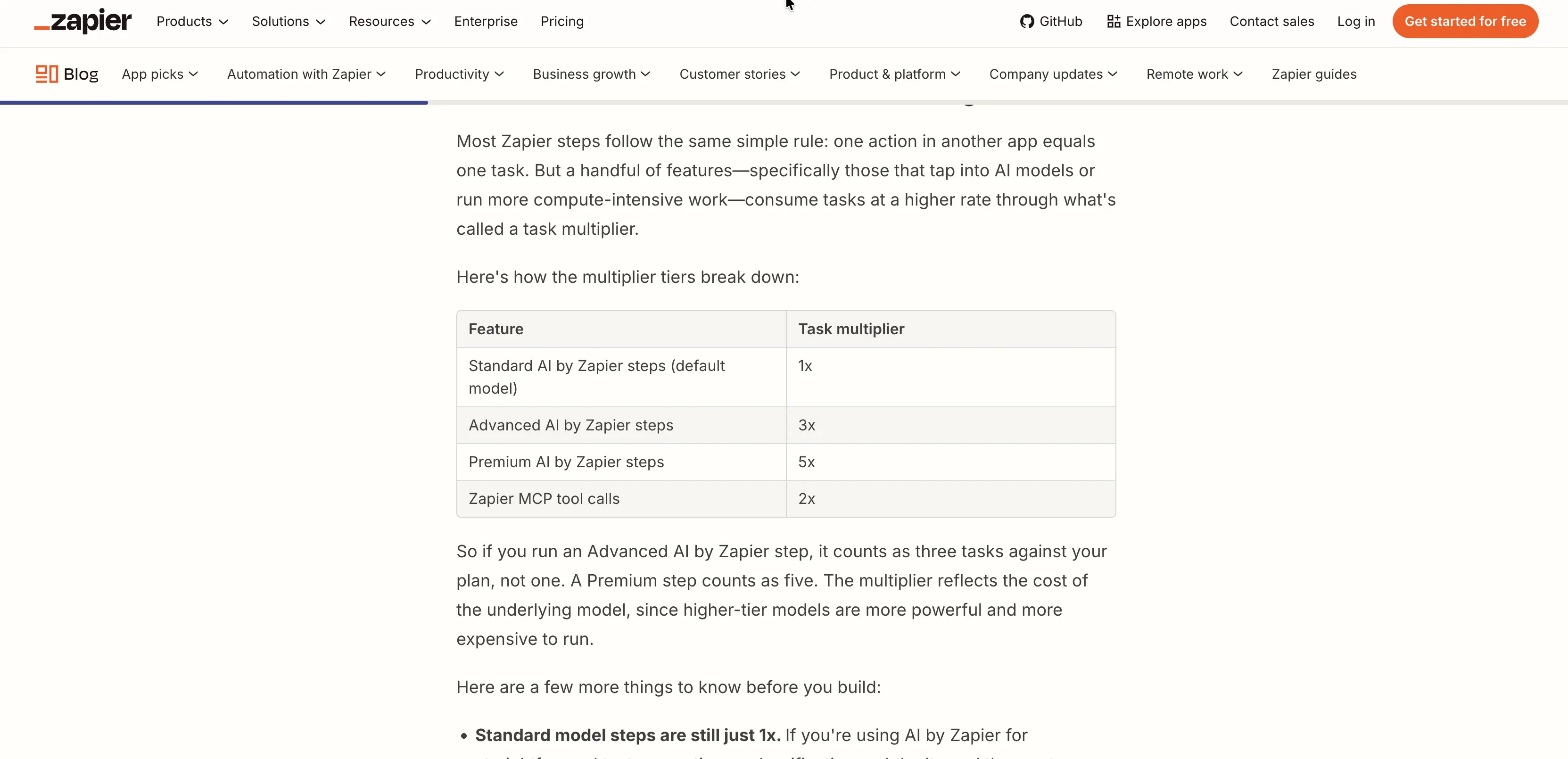
Zapier's own blog gives the overage multiplier: 1.25x your plan's normal task cost on annual plans and 2.5x on monthly plans. It adds that extra tasks are charged monthly even on an annual plan.
The help center says the exact rate for your account shows in Billing settings, so treat the next figures as the formula at work.
On Professional at 750 tasks, the normal task cost is $19.99 ÷ 750 = $0.0267 billed yearly, so an extra task runs about $0.0333.
Billed monthly, it is $29.99 ÷ 750 = $0.0400, so an extra task runs about $0.10.
Using all 1,500 extra tasks up to the 2,250 ceiling adds $49.97 billed yearly and $149.95 billed monthly. That brings the totals to $69.96 and $179.94.
The 5,000 task tier, which also covers 2,250 tasks, costs $89 billed yearly and $133.50 billed monthly.
Overage is $19.04 cheaper than upgrading on annual billing and $46.44 dearer on monthly billing.
Why Zapier gets expensive: price per task from 750 to 20,000 tasks
Zapier does not charge by the Zap. It charges by task volume, and the price per task falls as you climb the slider.
On Professional billed yearly, it drops from $0.0267 at 750 tasks to $0.0095 at 20,000. These prices are from the pricing page's task slider as of 1 October 2026.
Tasks a month | Professional billed yearly | Professional billed monthly | Team billed yearly | Team billed monthly | Price per task (Professional yearly) |
|---|---|---|---|---|---|
750 | $19.99 | $29.99 | Not offered | Not offered | $0.0267 |
1,500 | $39 | $58.50 | Not offered | Not offered | $0.0260 |
2,000 | $49 | $73.50 | $69 | $103.50 | $0.0245 |
5,000 | $89 | $133.50 | $119 | $178.50 | $0.0178 |
10,000 | $129 | $193.50 | $169 | $253.50 | $0.0129 |
20,000 | $189 | $283.50 | $249 | $373.50 | $0.0095 |
Zapier's task ladder has uneven steps. Going from 750 to 1,500 tasks adds $19.01 a month billed yearly for 750 more tasks, about $0.025 each.
Going on to 2,000 adds only $10 for 500 more, which is $0.02 each, so anyone planning for 1,500 tasks should price 2,000 first. Every tier is 33% cheaper when you pay yearly than when you pay monthly.
Multi step Zaps are where Zapier bills climb.
A Zap with a trigger and four actions uses 4 tasks per run. Run it 40 times a day and a month adds up to 4,800 tasks, which lands on the 5,000 tier at $89 a month billed yearly or $133.50 billed monthly.
Reviewers on G2, where Zapier holds 4.5 out of 5 from 2,087 reviews as of 1 October 2026, praise the integrations and return to the same cost complaint.
Several reviewers from small businesses say task use climbs quickly once Zaps gain steps, and that task limits run out fast when they run several automations.
Zapier vs Make and n8n pricing: is there a cheaper alternative?
The three tools count different things, so sticker prices do not line up.
Zapier counts successful action steps and gives triggers away. Make's pricing page counts one credit for each module action, including reading data from an app, and lists its paid plans at 10,000 credits a month.
n8n Cloud counts workflow executions, so a whole run costs one unit, however many steps it has.
n8n's Starter plan is 20 euros a month billed annually for 2,500 workflow executions.
The four action Zap above, run 1,200 times a month, is 1,200 executions on n8n and 4,800 tasks on Zapier.
Those two bills use different currencies and billing terms, so compare them as a volume gap rather than a price quote.
For a ranked comparison of 15 options with their own pricing math, read our Zapier alternatives guide. The n8n alternatives guide covers the other direction, and the best iPaaS platforms roundup puts all of them side by side.
Which Zapier plan fits you
Solo user with one or two small automations: Free. A trigger plus one action uses 1 task per run, so 100 tasks cover 100 runs a month.
Freelancer building multi step Zaps: Professional at 750 tasks. A trigger plus three actions uses 3 tasks per run, so 750 tasks cover 250 runs.
Small team sharing work: Team, which starts at 2,000 tasks and includes 25 users, shared Zaps and folders, and SAML SSO.
AI workflow builder: start AI steps on Standard, and move to Advanced or Premium only when the step needs tools. Connecting your own AI account counts at 1x.
Ops owner with business-critical Zaps: Decide whether to keep pay per task billing on. If it is on, your Zaps keep running until they reach 3 times your plan limit. If it is off, your Zaps pause when they reach your plan limit.
Nonprofit: Zapier offers 15% off any paid plan, excluding pay per task charges. You apply with documents that verify your charitable status, and the discount appears at checkout.
The discounts page does not say how it combines with the annual discount.
Student or educator: Zapier's discounts page lists annual billing and nonprofit discounts, but no student or education discount. Free is the route for learning.
High volume, simple automations: price the same Zap on n8n or Make before you pick a Zapier tier above 5,000 tasks.
Zapier pricing FAQ
Can I turn off pay per task billing?
Yes, on paid plans. The account owner opens Billing and usage, then the Billing settings tab, and switches off the Per task billing toggle.
Zaps then pause when the plan limit is reached. The usage you build up before you switch it off is added to your next invoice.
Has Zapier changed its pricing recently?
Yes. AI by Zapier steps created since 15 June 2026 default to the Premium tier at 5 tasks.
The pricing page now says AI steps, code and the SDK follow the same task based model.
Lead Router usage began appearing on usage pages on 21 July 2026.
Does Zapier still have a Starter plan?
No. Zapier's pricing page lists four plans: Free, Professional, Team and Enterprise. Starter does not appear, so a Starter price quoted on another site does not match the current page.
Is the Zapier Team plan priced per user?
The pricing page shows one monthly figure for Team and lists 25 users as an included feature. It states no per user rate. At 2,000 tasks, Team costs $69 billed yearly against $49 for Professional, a $20 difference.
Is annual billing worth it?
Yes, if you can commit. Annual billing is 33% cheaper at every task tier, and Zapier says the plan is not charged again until 12 months later.
Professional at 750 tasks costs $239.88 a year billed yearly against $359.88 billed monthly, a $120 saving.
Our annual versus monthly calculator runs the same sum for any price.
How much does Zapier Enterprise cost?
Zapier does not publish Enterprise pricing, and its page says to contact sales. The plan lists unlimited users, annual task limits, advanced admin permissions, and a Technical Account Manager. A sales quote is the only route to a number.
Is Zapier free, and can I use it for personal projects?
Yes. Free costs $0 and includes 100 tasks a month, two step Zaps, and unlimited Zaps, Tables, and Forms.
The pricing page lists no personal versus business rule. AI steps on Free preview at Standard and cannot publish Advanced or Premium tiers.
Where to start
Count tasks before you pick a tier. List each Zap's successful action steps, multiply by monthly runs, and add AI steps at their tier rate.
If the total lands just above a rung, price the next rung up, because 2,000 tasks costs $10 more than 1,500 billed yearly.
Before you subscribe, open Billing settings and decide whether pay per task billing should be on.
One limit remains: Zapier's pages give the overage multiplier but not a dollar rate for your account, so confirm yours in Billing settings.