On Higgsfield's Plus plan, a 5-second Kling 3.0 clip at 1080p costs about 43 cents. The same clip costs about 37 cents at 720p and about $1.48 at 4K.
Those numbers come from Higgsfield's own plan table at the regular $59 monthly price. Prices and plan details were checked on 27 November 2026.
Higgsfield charges for Kling 3.0 in credits. The plan card shows a credit total, and the model list shows how many credits 5 seconds of video uses.
You have to divide it yourself, so this guide does it for every plan.
 Kling 3.0 cost per clip on each plan
This table shows what one 5-second Kling 3.0 clip costs on each plan, at the regular monthly price.
Plan | Price each month | Credits each month | 720p clip | 1080p clip | 4K clip |
|---|---|---|---|---|---|
Starter | $19 | 270 | about 53 cents | not offered | not offered |
Plus | $59 | 1,200 | about 37 cents | about 43 cents | about $1.48 |
Ultra | $129 | 3,000 | about 32 cents | about 38 cents | $1.29 |
Here is the math behind the 1080p column.
Plus costs $59 each month and gives 1,200 credits. Higgsfield's table says that buys 137 clips at 1080p. $59 divided by 137 is about 43 cents for each clip.
Ultra with 3,000 credits costs $129 each month. The table says that it buys 342 clips at 1080p. $129 divided by 342 is about 38 cents for each clip.
Starter costs $19 each month and gives 270 credits. It runs Kling 3.0 at 720p only, and the table says that buys 36 clips. $19 divided by 36 is about 53 cents for each clip.
Ultra also comes with 6,000 or 9,000 credits. At $250 for 6,000 and $375 for 9,000, both work out to the same price for each credit.
The bigger pack buys more clips at the same price for each one.
These are regular monthly prices. On 27 November 2026, Higgsfield's yearly prices were Black Friday sale prices, with the sale set to end on 28 November.
Check the current yearly figure before you compare. Our annual vs monthly calculator shows which billing choice saves more once you have it.
The credit label is lower than the clip count
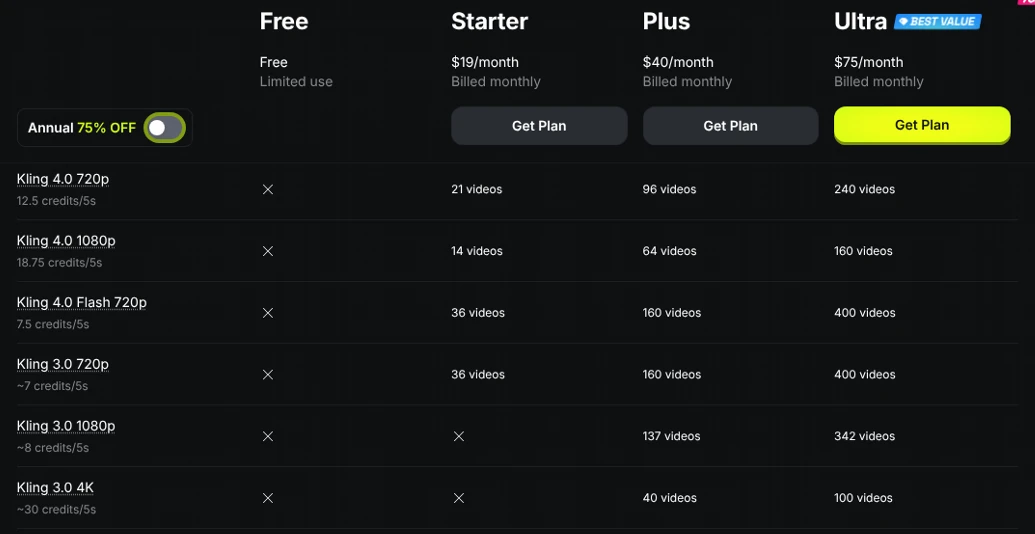
Higgsfield's table labels Kling 3.0 at 720p as about 7 credits for 5 seconds. The same table says Plus buys 160 of those clips with 1,200 credits.
1,200 divided by 160 is 7.5 credits for each clip.
At 1080p, the label says about 8 credits. 1,200 divided by 137 clips is about 8.8 credits.
Budget on the clip counts, since they carry the higher number. A team that plans on 7 credits expects 171 clips at 720p from Plus. It gets 160.
Which plan can make which clip?
Not every plan can run every Kling 3.0 size. Here is what the table shows:
Free: the table shows a cross for Kling 3.0 at every size.
Starter: 720p only. Kling 3.0 at 1080p and 4K are crossed out.
Plus: 720p, 1080p and 4K.
Ultra: 720p, 1080p and 4K.
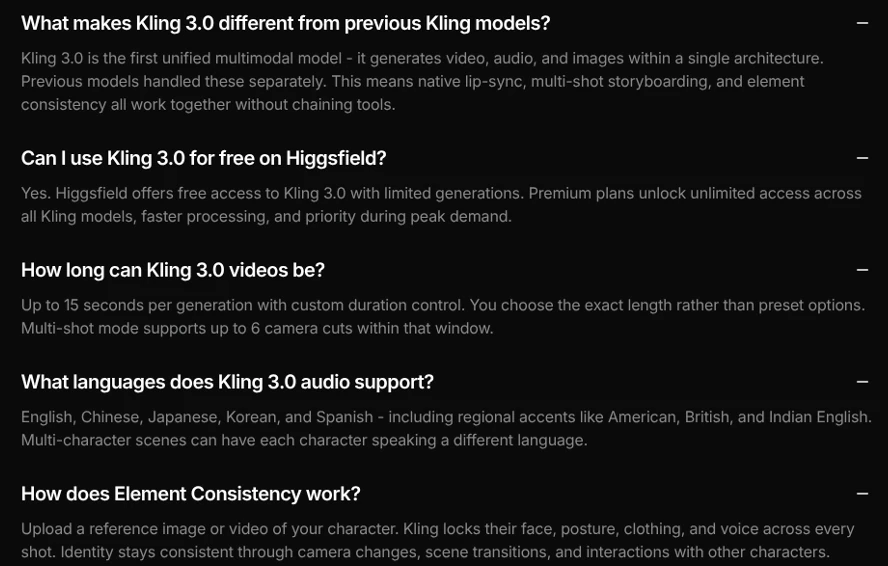
The Free row needs a second look. Higgsfield's Kling 3.0 page FAQ says free access comes with limited generations. Check your own account before you plan on it.
Starter has an odd gap. It can make Kling 4.0 clips at 1080p, 14 of them a month, but not Kling 3.0 clips at 1080p.
Every plan shares the same model limits. One Kling 3.0 generation runs up to 15 seconds, with a length you choose.
It can hold up to 6 camera cuts, and its audio covers English, Chinese, Japanese, Korean, and Spanish.
Kling 3.0 or Kling 4.0 on the same credits
Higgsfield lists Kling 4.0 right next to Kling 3.0, so the same credits can buy either one. The price gap is large at 1080p.
Kling 4.0 at 1080p uses 18.75 credits for 5 seconds. Plus buys 64 of those clips, so each one costs about 92 cents.
Kling 3.0 at 1080p costs about 43 cents on the same plan.
That makes Kling 3.0 about 49 cents cheaper for each 5-second clip at 1080p.
At 720p, the gap closes. Kling 4.0 Flash at 720p buys 160 clips on Plus, the same count as Kling 3.0 at 720p.
Other video models on the same credits
The same credit pool runs every video model on Higgsfield. This table lists the credits for 5 seconds as Higgsfield's plan table prints them.
Model | 720p | 1080p |
|---|---|---|
Kling 3.0 | about 7 | about 8 |
Kling 4.0 | 12.5 | 18.75 |
Kling 4.0 Flash | 7.5 | not listed |
Wan 3.0 | 7.5 | 15 |
Seedance 2.0 | about 22 | about 60 |
Seedance 2.5 | 35 | 80 |
Kling 3.0 sits at the low end of this list. Seedance 2.5 at 1080p uses about 9 times the credits of Kling 3.0 at 1080p.
A lower credit price is no proof of a better clip for your job.
Run one prompt through two or three of these models, then compare the cost of the clip you would publish.
A worked example: one 30-second ad
Say you build a 30 second ad from two 15 second Kling 3.0 clips at 1080p. Each clip takes three tries before one is good enough.
Each try is three blocks of 5 seconds. This example assumes billing follows the per 5 second rate in the table.
On Plus, 5 seconds at 1080p costs about 43 cents. One 15-second try costs about $1.29.
Six tries cost about $7.75 for the whole ad.
Six tries of 15 seconds is 90 seconds, or 18 blocks of 5 seconds. At about 8.8 credits a block, the ad uses about 158 credits. Plus gives 1,200 credits a month, enough for about 7 ads like this.
On Ultra with 3,000 credits, 5 seconds at 1080p costs about 38 cents. The same ad costs about $6.80.
Rules that change what you pay
The table price is only part of the cost. Four rules decide how much of your credit pool turns into finished video.
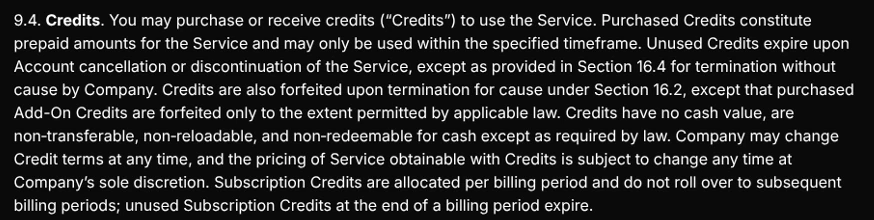
Plan credits do not roll over. Section 9.4 of Higgsfield's Terms of Use says unused subscription credits expire at the end of each billing period.
Extra credit packs last 90 days from purchase, under Section 9.6.
Failed generations come back for most models. Higgsfield's help center, updated 20 November 2026, says credits for failed jobs return automatically, with Grok as the exception.
Upgrades start at once. A downgrade waits until the end of the plan you already paid for.
A clip that finishes but misses your brief is not a failed job, so its credits stay spent.
 Automation follows its own rule. Higgsfield's pricing page says unlimited and free generations work only on higgsfield.ai, not through MCP, the CLI, Canvas, or Supercomputer.
Jobs sent from other apps always spend credits. If those jobs run through an integration platform, our MuleSoft ESB alternatives guide lists real prices for those tools.
Is there unlimited Kling 3.0?
Higgsfield's pricing page lists unlimited Kling 3.0 on one plan only. That plan is Scale, a business plan for 5 to 15 seats, on yearly billing.
The unlimited window lasts 7 days.
It covers 720p clips up to 15 seconds, or 1080p clips up to 10 seconds.
Each active member can run one unlimited job at a time.
The Team business plan on yearly billing lists Kling 3.0 with no unlimited access. The individual plans list unlimited image models, but no unlimited Kling video.
The Kling 3.0 page FAQ reads differently. It says premium plans give unlimited access across all Kling models. Ask Higgsfield which plans include it before you pay for unlimited use.
The Scale prices shown on 27 November 2026 carried a Black Friday discount, so check the current price as well.
Which plan fits your monthly output
Count the clips you plan to publish in a month, then add your usual number of tries. Then match that count to a plan:
Up to about 36 clips at 720p, with no need for 1080p: Starter at $19.
Any 1080p or 4K work: Plus at $59 is the cheapest plan that offers both.
More than about 137 clips at 1080p a month: Ultra, where each clip costs about 5 cents less than on Plus.
A team that wants unlimited Kling 3.0 days: ask about Scale on yearly billing.
Price is one part of the choice. Ownership, training on your uploads, and copyright coverage matter too.
Our guide on how to compare AI video tools before you buy covers those checks.
For what one finished minute costs on other tools, see our best AI video generator guide.
FAQ
How many credits does Kling 3.0 use on Higgsfield?
The table labels 5 seconds at about 7 credits for 720p, about 8 for 1080p and about 30 for 4K. Its clip counts work out to 7.5 credits at 720p and about 8.8 at 1080p.
Can the Starter plan make 1080p Kling 3.0 clips?
No. Higgsfield's plan table shows Kling 3.0 at 720p only on Starter. 1080p and 4K start on Plus.
Is Kling 4.0 more expensive than Kling 3.0 on Higgsfield?
Yes, at 1080p. On Plus, 5 seconds of Kling 4.0 at 1080p costs about 92 cents, while Kling 3.0 costs about 43 cents.
Do unused Higgsfield credits carry over?
Plan credits do not. They expire at the end of each billing period under Section 9.4 of the Terms of Use. Extra credit packs last 90 days.
Is Kling 3.0 free on Higgsfield?
The Kling 3.0 page FAQ says free access comes with limited generations. The plan table shows a cross for Kling 3.0 on the Free plan, so check your account.
How long can one Kling 3.0 clip be?
Up to 15 seconds for each generation, with a length you choose. One generation can hold up to 6 camera cuts.
Price your next month before you pick a plan
Write down how many clips you will publish next month, at which size, and how many tries each one usually takes.
Then read the answer off the cost table above. The plan that fits that count is the one to buy.