

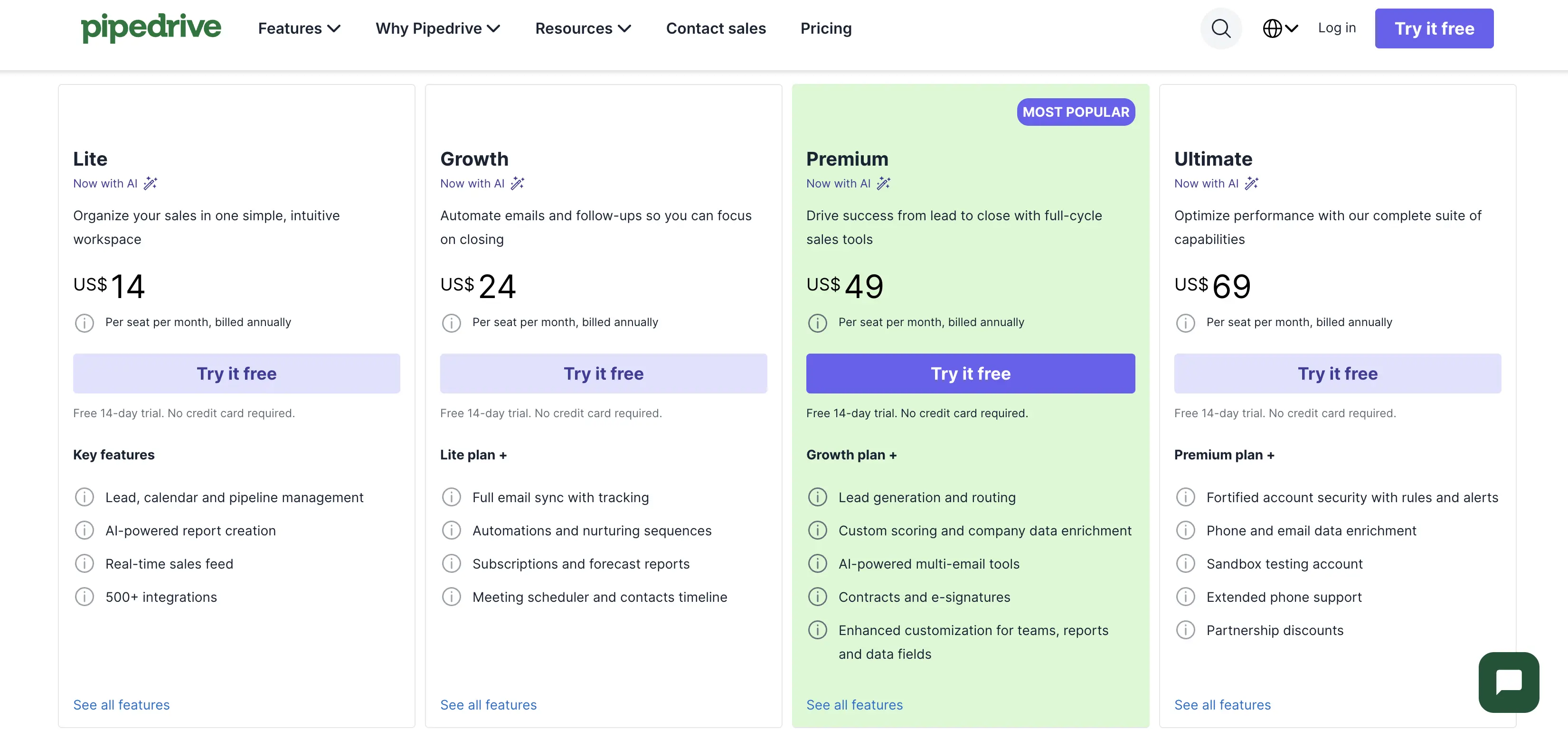
Pipedrive's own pricing page says Premium costs $59 a seat a month, billed annually. Six other references say $49. Both can't be right. I put both numbers side by side this week, along with the $16 Projects add on charge and the free implementation rules, and worked out which figures are actually current.
Pipedrive runs four plans, Lite at $14, Growth at $39, Premium at $59, and Ultimate at $79 a seat a month, all billed annually and confirmed on Pipedrive's own pricing page this week.
Premium is the plan most guides recommend. Not always correctly. It only pays off if you also need the Projects add on or Pipedrive's AI email tools, both of which come free on that tier. Pricing and features verified September 14, 2026 from pipedrive.com's own pricing page and support articles.
Why two different Premium prices are floating around
Open Pipedrive's own pricing page today and Premium reads $59 a seat a month, billed annually, which works out to $708 a seat a year. I confirmed that number directly on the live page twice this week. It is also what larksuite, lindy, emailtooltester, and axisconsulting currently print.
Six other independent guides, including some updated within the last month, still show $49. None of them explain the gap. One even flags that other sites disagree without saying which figure is right.
The most likely explanation is a price increase that some guides caught and others missed during a routine content refresh. Ultimate shows the same pattern on a smaller scale: two guides still print $69 while Pipedrive's own page reads $79.
If a page you are reading quotes $49 for Premium or $69 for Ultimate, treat it as stale rather than as a discount you can actually get. Go straight to pipedrive.com/en/pricing and check the number yourself before you commit a seat count to a budget.
The free implementation rule almost nobody covered
Pipedrive's pricing page states implementation is free "when you sign up for a pricing plan that's over $400 a year." It changes the Lite versus Growth decision for a lot of small teams, and it appears on zero of the fifteen top ranking guides I checked. Several of them instead quote implementation costs of a few thousand dollars up to $20,000, without saying that figure applies to a different, paid onboarding tier, not the free setup most single seat and small team buyers get.
Do the math and the threshold matters more than it looks. Lite costs $168 a seat a year, so one seat alone never clears $400.
Two Lite seats hit $336. Still short. Growth costs $468 a seat a year, so a single Growth seat clears the threshold by itself.
If your team is deciding between three Lite seats at $504 total and one Growth seat, the Growth seat is the one that gets free implementation, not the cheaper looking Lite bundle.
What the Projects add on actually costs you
Pipedrive's pricing page lists the Projects add on at "starting from $16," with no unit stated next to the number.
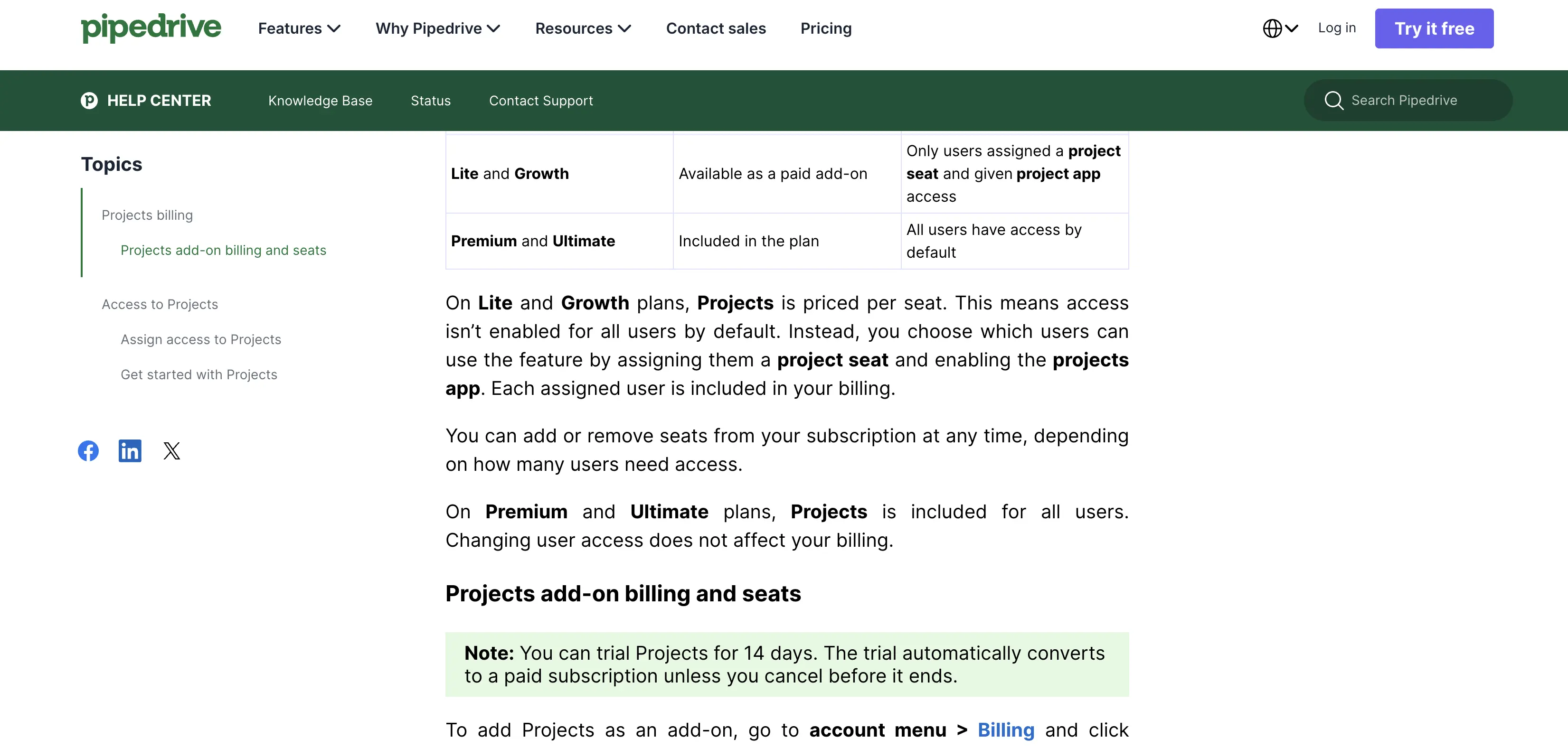
Pipedrive's own support article on Projects billing settles it: Projects is priced per seat on the Lite and Growth plans, and included free with universal access on Premium and Ultimate. The $6.67 figure that keeps showing up looks like an older rate that never got updated across most of the sites still citing it. If you are on Growth and pricing out five seats with Projects added, budget $16 a seat, not $6.67, until Pipedrive's page says otherwise.
There's a second catch buried in that same support article: the Projects trial runs for 14 days, and it converts to a paid subscription automatically unless you cancel first. "The trial automatically converts to a paid subscription unless you cancel before it ends," per Pipedrive's own knowledge base. No warning email is mentioned. Set a calendar reminder before you start that trial, not after.
Which AI features actually need a Premium seat
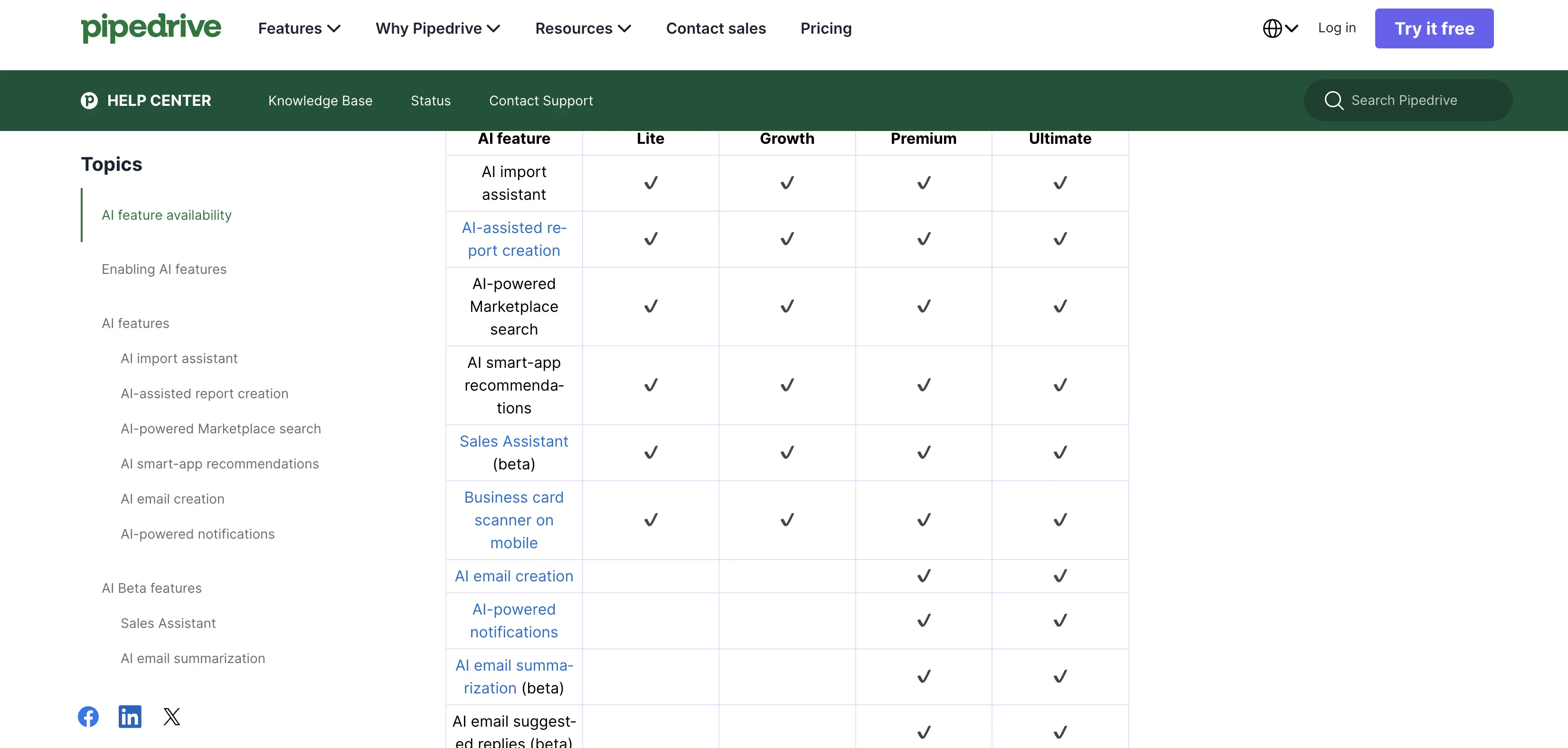
Pipedrive's marketing copy calls AI a feature across the board, but its own AI feature documentation splits the tools by plan. The AI import assistant, AI assisted report creation, AI powered marketplace search, and the Sales Assistant beta are all included on every plan, Lite through Ultimate.
AI email creation, AI powered notifications, AI email summarization, and AI suggested replies are a different story. Those four are gated to Premium and Ultimate only, confirmed directly on Pipedrive's own AI feature table.
If the reason you're upgrading past Growth is AI help writing or summarizing emails, that's a real reason. If it's the report builder or the Sales Assistant, though, Lite already has it. Premium buys nothing extra there. Not one thing.
Pipedrive pricing plans: what each one gets you
Plan | Billed annually | Billed monthly (list) | What you actually get |
|---|---|---|---|
Lite | $14/seat/mo ($168/yr) | Higher, pay as you go | Pipeline, activities, AI report builder, Sales Assistant beta |
Growth | $39/seat/mo ($468/yr) | Higher, pay as you go | Everything in Lite, plus full email sync and automations |
Premium | $59/seat/mo ($708/yr) | Higher, pay as you go | Everything in Growth, plus AI email tools, free Projects seats |
Ultimate | $79/seat/mo ($948/yr) | Higher, pay as you go | Everything in Premium, plus extended support |
Pipedrive only surfaces the annual billed figure prominently on its own page right now, so the exact monthly, pay as you go rate for each tier is not published in the same place. Expect it to sit above the annual figure, the way every plan on this page already works.
A worked example makes the plans easier to compare. A five person team on Growth plus the Projects add on pays $39 plus $16 a seat, or $275 a month total.
The same five seats on Premium, where Projects is already included, run $295 a month. Just $20 apart. That's a small enough gap that most teams already using Projects are better off on Premium than stacking the add on separately.
That stacking is exactly what one small business founder flagged in a G2 review posted August 30, 2026: the base plan is affordable, but the list of optional add ons piles up fast enough that the real total feels a lot higher than the plan you signed up for.
Which plan actually fits your team
Solo founders and small teams who just need a pipeline and activity reminders are the clearest fit for Lite. You get the AI report builder and Sales Assistant beta at the lowest price. Nothing more to buy yet. One seat won't clear the $400 free implementation threshold on any plan, so there's nothing to lose by starting cheap.
Teams that live in their inbox should look at Growth first, since two way email sync with tracking and automations sit behind that tier rather than Lite, and a single Growth seat already clears the free implementation line by itself without any budgeting math required.
Teams already leaning on AI to draft and summarize email are the group Premium is actually built for. AI email creation, notifications, and suggested replies are locked to Premium and Ultimate. Growth won't get you there, no matter how many automations you stack on it.
Teams running project delivery alongside sales get more value from Premium than from Growth plus the Projects add on, once you're past roughly three or four seats. Projects is free there. Unlimited too.
Teams that need every seat's activity visible for reporting, agencies and larger sales floors especially, are the ones Ultimate's extended support and full access tier actually serves.
How Pipedrive compares on price to HubSpot and Zoho CRM
Pipedrive's Premium tier, the plan most guides recommend, lands in the middle of the CRM pricing field rather than at either end. HubSpot's comparable Sales Hub Pro tier runs $90 a seat a month billed annually, well above Pipedrive Premium's $59. Zoho undercuts both. Its CRM Professional plan runs $40 a seat a month annual, cheaper than Pipedrive but without Pipedrive's free Projects inclusion at that tier.
That inclusion matters. If seat cost is the deciding factor and you're weighing switching tools entirely rather than just plans, our switch and save calculator runs the real math on seat count, add ons, and switching costs side by side rather than comparing sticker prices alone.
Pipedrive pricing FAQ
Does the Projects add on trial auto convert to a paid subscription?
Yes. Pipedrive's own support article states the 14 day Projects trial converts to a paid subscription automatically unless you cancel before it ends. No reminder comes first. There's no separate warning built into the trial itself.
Do EU buyers pay VAT on top of the listed Pipedrive price?
Yes, unless you supply a valid VAT number. Pipedrive's pricing page states prices are VAT exclusive and VAT is billed to EU customers at the applicable local rate.
How much does Pipedrive cost, and is there a free plan?
No free tier exists. Pipedrive offers a 14 day free trial with no card required, but there is no permanent free plan you can stay on. After the trial you need to pick one of the four paid plans to keep using it.
Can I pay monthly instead of committing to a year?
Yes. Pipedrive offers monthly billing on every plan, though the per seat rate is higher than the annual figures listed above, since every plan on this page trades a longer commitment for a lower price. Pipedrive's own help center describes it simply as paying "on the same day each month," against the discount you get for paying the full year upfront.
Which Pipedrive plan includes two way email sync?
Growth and above. Lite stops short. It covers pipeline and activity tracking only, with full email sync and tracking automation starting one tier up, at Growth.
What decides your real price
The sticker price on Pipedrive's pricing page tells you less than it looks like it does. Which Premium figure is current, whether your seat count clears the $400 implementation line, and whether Projects is a $16 add on or a free inclusion all depend on the exact plan you pick, not just the plan name.
The plan name alone won't tell you. Check pipedrive.com's own page directly before budgeting. A fair number of the guides ranking around it are quoting a price Pipedrive itself has already moved past.
If you've already decided Pipedrive isn't the fit, our Pipedrive alternatives roundup runs the same add on math against thirteen other CRMs. And if HubSpot or Salesforce are also on your shortlist, we've run the same live pricing check on HubSpot's pricing and Salesforce's pricing, both of which turned up their own gaps between the advertised number and the one you'd actually pay.