
SaaSSwitcher offers four free SaaS calculators, each answering a single money question before a software bill renews. They need no account. All four sit on the free SaaS calculators page.
The SaaS Spend Calculator adds up what you pay today, and the Annual vs Monthly Calculator shows the real savings from paying for the whole year.
The Switch & Save Calculator tells you if a cheaper tool covers the cost of moving. The SaaS ROI Calculator checks whether a tool pays for itself through saved hours.
Every example below uses prices from each vendor's own pricing page, checked on 18 November 2026, so you can type the same numbers into each calculator and get the same result.
These calculators are for buyers. They do not track churn or monthly revenue for a company that sells software.
Which calculator answers which question
Each row matches one buying question to the calculator that answers it.
Your question | Calculator | What you type | What you get |
|---|---|---|---|
What does all our software cost? | SaaS Spend | Each tool, its users, and the price for each user | Monthly and yearly total, average cost for each user, split by category |
Should we pay for the whole year? | Annual vs Monthly | Users, the monthly price, and the yearly plan's price for each month | Yearly savings, real discount, the month the yearly plan starts to win |
Is the cheaper tool worth the move? | Switch & Save | Users and prices for both tools, a one-time switching cost, 1 to 3 years | Money saved or lost, payback in months, a verdict |
Does this tool pay for itself? | SaaS ROI | Users, price, hours saved each week, hourly cost of that time | ROI, net value each year, hours saved each year |
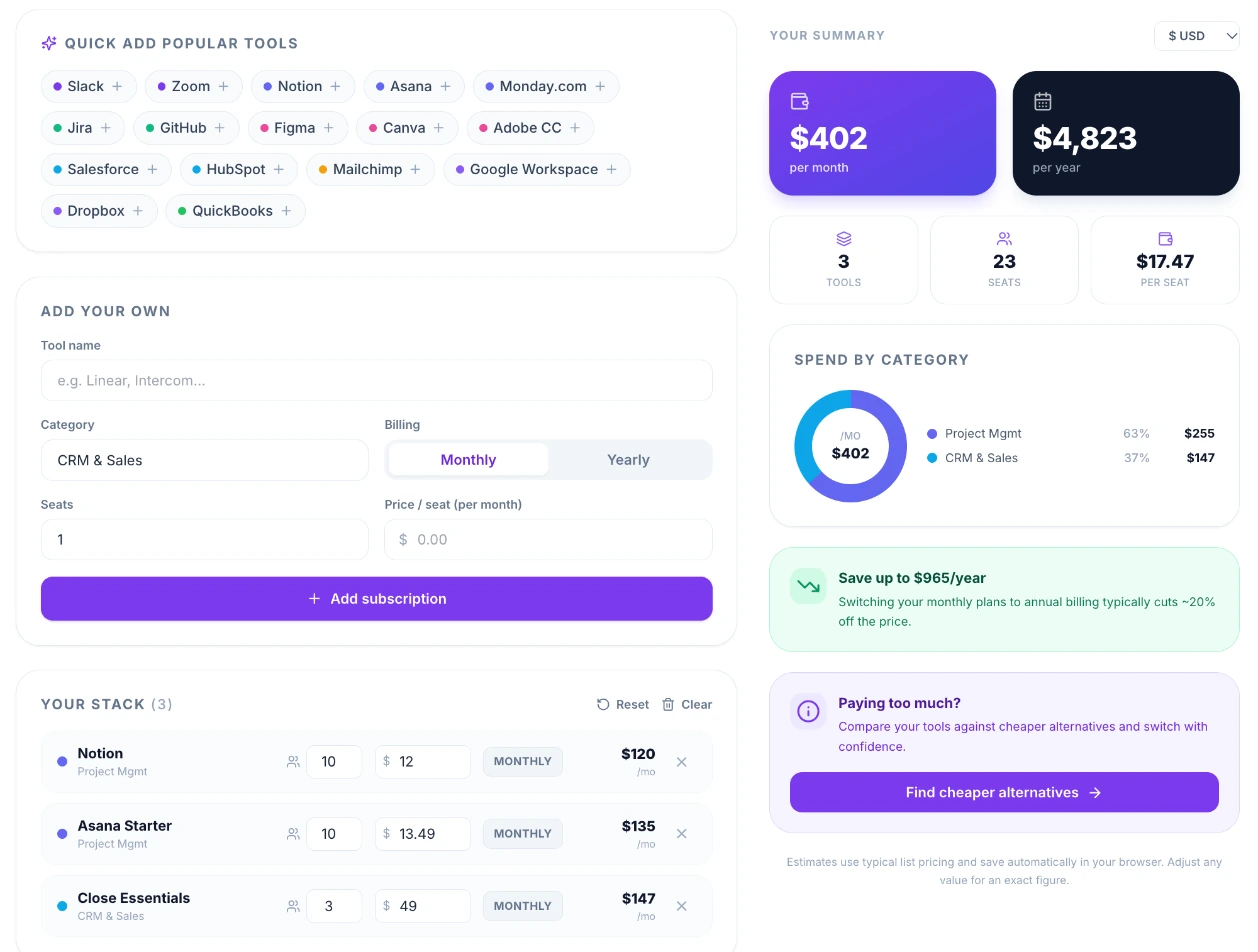
SaaS Spend Calculator: what all your software costs
The SaaS Spend Calculator puts every paid tool in one list. For each tool, you enter a name, a category, Monthly or Yearly billing, the number of users you pay for, and the price for each user on your plan.
Quick add buttons cover 16 popular tools, such as Slack, Notion, HubSpot, and QuickBooks. Each button fills in a starting price. Use your invoice price instead.
The summary shows your total for each month and each year. It also shows how many tools and users you pay for, the average cost for each user, and how the bill splits across categories like Project Mgmt and CRM & Sales.
Example: three tools for one team
Take a team that pays for three tools month to month.
Notion Plus costs $12 for each user, each month. For 10 users, that is $120 a month.
Asana Starter costs $13.49 for each user, each month. For 10 users, that is $134.90 a month.
Close Essentials costs $49 for each user, each month. For 3 users, that is $147 a month.
That totals $401.90 a month. The calculator rounds that to $402 a month and $4,823 a year, and it spreads the bill across 23 users at an average of $17.47 for each user.
Project tools take 63% of this bill, and the sales tool takes the other 37%.
The yearly savings estimate is only a starting point
Under the totals, the calculator estimates what paying for the whole year could save. It takes 20% off the yearly cost of your monthly plans, so this team sees "Save up to $965/year".
The real savings are higher.
Notion Plus saves $2 for each user, each month. For 10 users over 12 months, that is $240.
Asana Starter saves $2.50 for each user, each month. For 10 users over 12 months, that is $300.
Close Essentials saves $14 for each user, each month. For 3 users over 12 months, that is $504.
Together, that is $1,044, which is $79 more than the estimate. With other tools, the real savings can land well below 20%, so check each tool in the Annual vs Monthly Calculator before you pay for a full year upfront.
One setting needs care. Switch a row to Yearly, and the price box asks for the price for each user for the whole year. For Notion Plus on a yearly plan, type $120, which is $10 a month for 12 months.
Annual vs Monthly Calculator: Is paying for the year worth it
The Annual vs Monthly Calculator compares the two prices most pricing pages show side by side.
You enter the number of users, the monthly plan's price, and the yearly plan's price for each month.
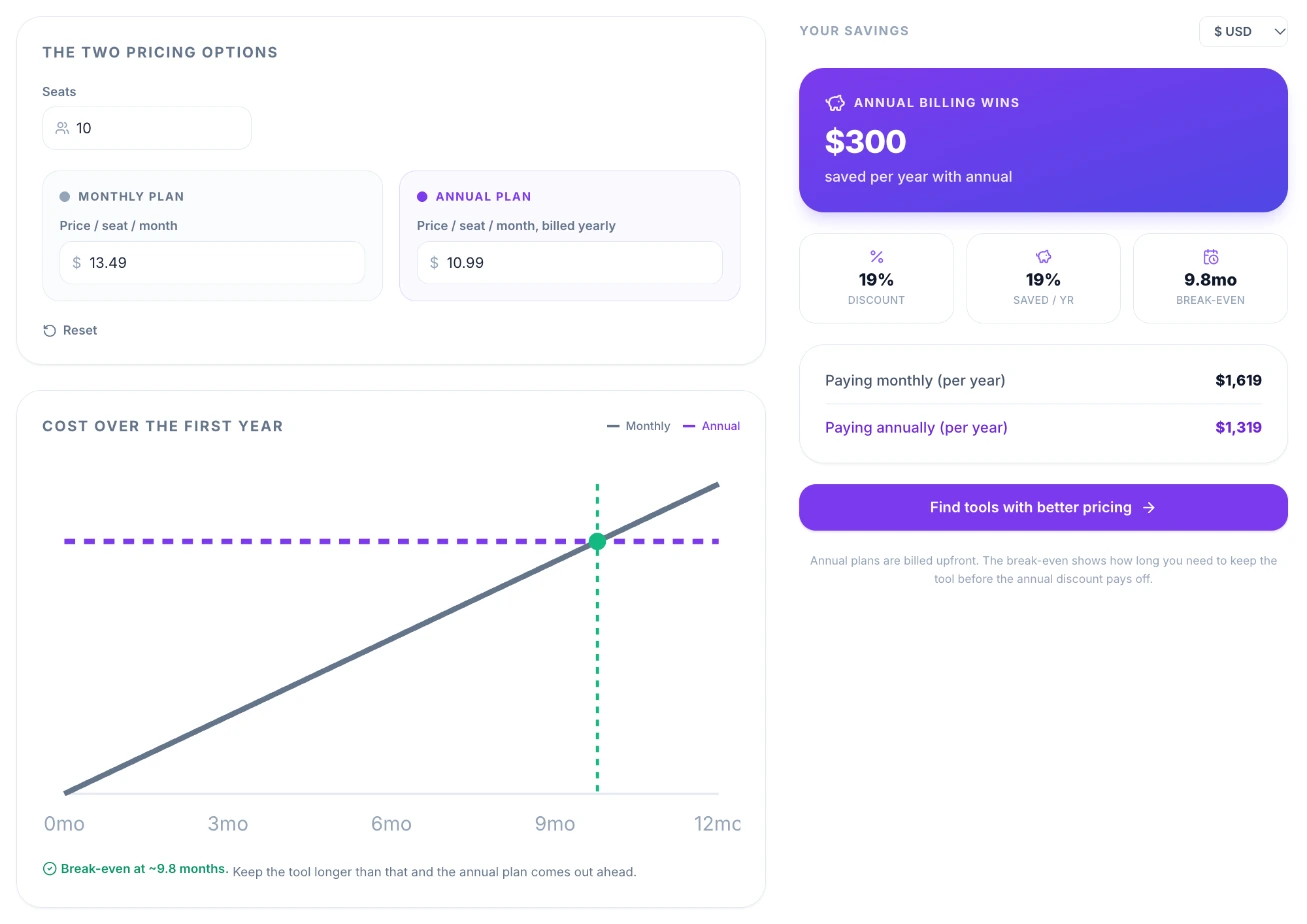
It returns the savings for each year, the real discount, both yearly totals, and the exact month where the yearly plan starts to come out ahead.
Example: Asana Starter for 10 users
Asana Starter costs $13.49 for each user, each month, on the monthly plan. For 10 users over 12 months, that is $1,618.80.
On the yearly plan, it costs $10.99 for each user, each month, paid upfront. For 10 users, that is $1,318.80.
The yearly plan saves $300. The calculator shows a 19% discount and a break-even point at about 9.8 months.
A team that might leave Asana before month 10 pays less on the monthly plan, since the yearly plan takes the full $1,318.80 on day one.
Many buyers never get there. In a 2019 Indie Hackers thread on monthly or annual plans, one commenter said he pays monthly while he tries a product, then forgets the yearly option exists and keeps paying monthly. A quick run of this calculator once the trial months are over shows what that habit costs.
Real yearly discounts are rarely 20%
The table shows six plans with the monthly price and the yearly plan's price, both for each user, each month. The last two columns come straight from the Annual vs Monthly Calculator.
Tool and plan | Monthly plan | Yearly plan, each month | Real discount | Yearly plan wins after |
|---|---|---|---|---|
Notion Plus | $12 | $10 | 16.7% | 10.0 months |
Asana Starter | $13.49 | $10.99 | 18.5% | 9.8 months |
ClickUp Core | $12 | $9 | 25% | 9.0 months |
Close Solo (1 user only) | $19 | $9 | 52.6% | 5.7 months |
Close Essentials | $49 | $35 | 28.6% | 8.6 months |
Close Growth | $109 | $99 | 9.2% | 10.9 months |
Prices come from the Notion, Asana, ClickUp and Close pricing pages on 18 November 2026. The calculator rounds each discount to a whole number, so Asana Starter shows as 19%.
One company can sit at both ends of the range. Close takes 52.6% off Solo and only 9.2% off Growth, so the plan you pick matters more than the brand.
Banners show the best case. ClickUp's page says "Save up to 33% with yearly", while Core, its cheapest paid plan, saves 25%. Notion's banner offers up to 20%, and both Plus and Business save 16.7%. Neither reaches 20%.
The flat 20% in the spend estimate sits near the middle of this range, which makes it fine for a first look and too rough for a contract decision. Check your own plan. Close's four plans and their AI credit limits are broken down in Close CRM pricing.
Switch & Save Calculator: does a cheaper tool cover the cost of moving
The Switch & Save Calculator puts your current tool next to the one you might move to. For each tool you enter users, the price for each user, and Monthly or Yearly billing.
Then you add one time switching costs, such as migration, onboarding and training. Pick 1, 2 or 3 years. It returns a verdict of Worth switching or Stay put, the money saved or lost, the monthly and yearly difference, and the payback time in months.
Example: Asana Starter to ClickUp Core
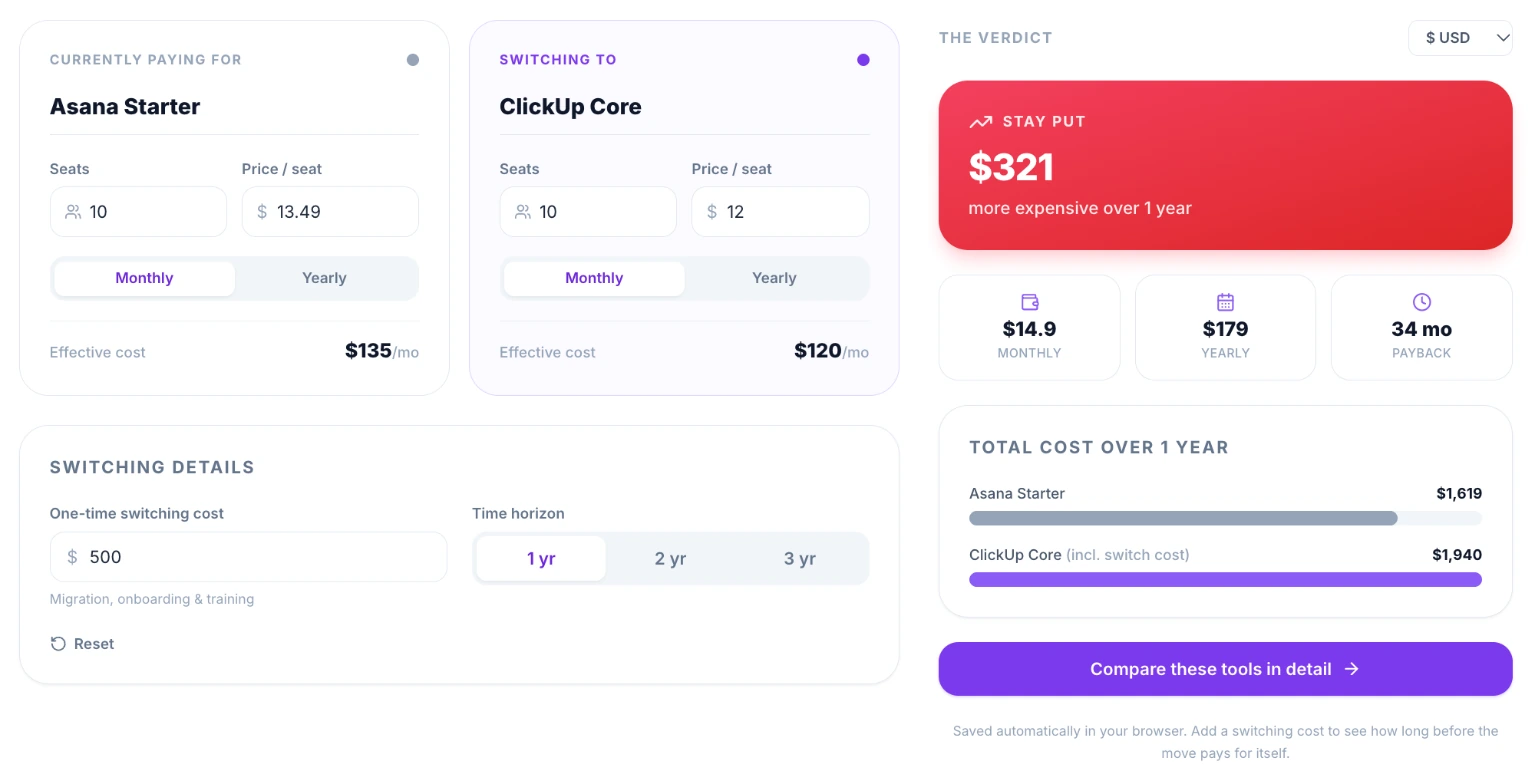
Take 10 users on monthly plans and a $500 switching cost.
Asana Starter costs $13.49 for each user, each month. For 10 users, that is $134.90 a month.
ClickUp Core costs $12 for each user, each month. For 10 users, that is $120 a month.
The move saves $14.90 a month. Over 12 months, that is $178.80.
The $500 switching cost takes 34 months to pay back. That is nearly three years. $500 divided by $14.90 is 33.6, and the calculator rounds up to the next whole month.
Here is the verdict for each span:
1 year: Stay put. ClickUp Core plus the switching cost comes to $1,940, which is $321.20 more than Asana's $1,618.80.
2 years: Stay put. ClickUp Core comes to $3,380, which is $142.40 more than Asana's $3,237.60.
3 years: Worth switching. ClickUp Core comes to $4,820, which is $36.40 less than Asana's $4,856.40.
A gap of $1.49 for each user looks like an easy win on a pricing page, yet with a $500 move the cheaper tool only pulls ahead in year three.
Yearly plans change the answer
On yearly plans, this calculator wants the price for each user for the whole year.
Asana Starter is $10.99 a month on the yearly plan. For 12 months, that is $131.88.
ClickUp Core is $9 a month on the yearly plan. For 12 months, that is $108.
The gap grows to $19.90 a month, and payback drops to 26 months. Over 3 years the move saves $216.40.
The calculator compares cost only. For what each tool includes, see Asana alternatives and ClickUp alternatives.
SaaS ROI Calculator: does the tool earn back its price
The SaaS ROI Calculator turns hours saved into a return on the price. You enter users, the cost for each user, the hours each user saves each week, the hourly cost of their time, and any extra revenue each month.
The hours slider runs from 0 to 20 in half-hour steps. Hours matter most here.
Example: ClickUp Core for 10 users
Say each of 10 users saves half an hour a week, and an hour of their time costs $35.
ClickUp Core costs $12 for each user, each month. For 10 users, that is $120 a month.
The calculator counts 4.33 weeks in a month, so half an hour for each of 10 users over those 4.33 weeks comes to 21.65 hours a month.
At $35 an hour, 21.65 hours is worth $757.75 a month.
Take away the $120 cost and $637.75 is left each month.
$637.75 divided by $120 is 5.31. The calculator shows an ROI of 531%, with $7,653 of net value a year and 260 hours saved.
Each user only needs to save about 5 minutes a week to cover the price. $12 divided by $35 is about 0.34 hours, or 20.6 minutes a month. Spread over 4.33 weeks, that is about 4.75 minutes a week. The bar is low.
Set the slider to 0 hours and the same tool shows an ROI of minus 100%, since nothing comes back for the $120 the team pays each month.
The full SaaSSwitcher SaaS ROI Calculator: Explained guide works through four more real tools, each with its own price and hours, and adds a break-even table for quick checks.
Three settings that change the result
Yearly asks for two different numbers. In the Spend, Switch & Save and ROI calculators, Yearly wants the price for each user for the whole year. In Annual vs Monthly, the yearly box takes the yearly plan's price for each month. For Notion Plus, that is $120 in the first three calculators and $10 in the fourth.
The currency menu changes the sign only. Switch the spend example to EUR and it shows €402, the same number with a new symbol, so type every price in the currency printed on your invoice.
Every paid user counts. People who rarely log in still show up on the bill, so enter the users you pay for, not only the active ones.
What the four calculators leave out
All four work from the prices and hours you type. That leaves gaps. None of them adds these costs for you:
Sales tax or VAT.
Usage charges, such as AI credits or call minutes.
Setup fees, apart from the one-time cost box in Switch & Save.
Price rises at renewal.
When one of these applies to your plan, spread the cost across the full year and add it to the price for each user before you run the numbers.
Each calculator saves your entries in your own browser, so you can come back after a price change, adjust one number and see the new result straight away.
Run all four in this order before a renewal
SaaS Spend: list every paid tool and mark the three highest costs.
Annual vs Monthly: for each of those three, find the real discount and the month the yearly plan starts to win.
SaaS ROI: check that each one saves enough hours to cover its price.
Switch & Save: for any tool that fails the ROI check, price the move to a cheaper option with a real switching cost and a span of 2 or 3 years.
Before you move, SaaSSwitcher's comparisons put the two tools side by side on features and price.
SaaSSwitcher calculators FAQ
Are SaaSSwitcher's calculators free?
Yes. All four are free to use, with no sign-up and no account.
Do the calculators keep my numbers?
Yes, in your own browser. Each calculator saves your entries there automatically, so the numbers are waiting when you return on the same browser.
Does the currency menu convert my prices?
No. It swaps the currency symbol and applies no exchange rate, so type every price in the currency you select.
How accurate is the "Save up to" figure in the spend calculator?
It is a rough guide built on a flat 20% cut. Real yearly discounts in this guide run from 9.2% to 52.6%, so use the Annual vs Monthly Calculator for the exact figure on each plan you pay for.
Can Switch & Save compare more than two tools?
No. It compares one current tool with one new tool. Run it once for each option you are weighing, with the same switching cost and span.
Which calculator should I open first?
Start with the SaaS Spend Calculator. It shows which tools cost the most, and those are the ones worth putting through the other three.
Start with your biggest bill
Open the SaaS Spend Calculator and add every tool your team pays for.
Take the three largest lines and run each one through the other three calculators before its renewal date, using the prices on today's pricing page rather than last year's invoice.